
Your needs, this model
Does it fit your priorities?
Can this card transfer my analog component source?
The manufacturer lists a DB9-to-component breakout in the package. Component video can be a high-definition source, but the breakout input is not the same as HDMI passthrough; use the exact source timing table and do not infer HD from composite or S-video.
Explore this need in the finder →Will it capture 1080p60 in OBS from an HDMI source?
The technical page lists capture up to 2048x2160 and up to 144 fps in selected modes, but also gives about 80 fps as the 1920x1080 example ceiling. A 1080p60 Windows/OBS arrangement is conservative; 1080p120 and 4K capture are not documented for this model.
Explore this need in the finder →Can I send the same source onward to my monitor?
No HDMI output is listed. If a display also needs the source, provide a separate output or splitter path and verify HDCP/source rules; this card is a capture input, not a loop-through device.
Explore this need in the finder →The Pro Capture HDMI is a one-channel PCIe capture card for a source that can provide an unencrypted HDMI signal or a supported analog signal through its DB9 breakout. It is not a 4K gaming recorder, a USB dongle or an HDMI pass-through switch. Its strongest case is a fixed desktop workflow where the input format and host slot are already known and the target is a conservative HD capture mode.
One input channel, with two alternative source paths
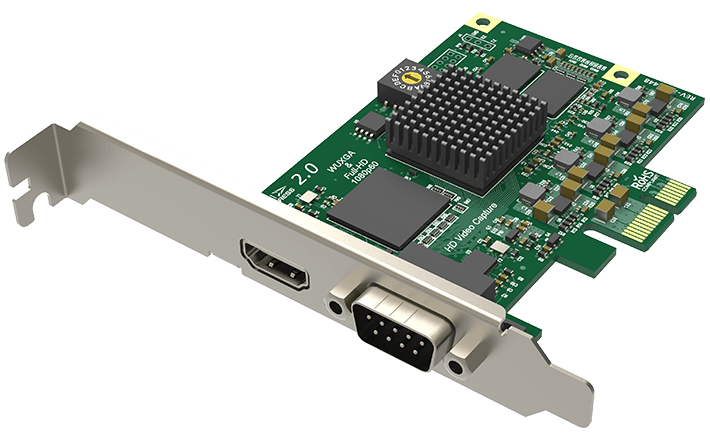
Magewell's product page identifies part 11040 and SKU 110400000 as a one-channel HD model. The front bracket has one HDMI port plus a DB9 connector. In the box, Magewell lists a DB9-to-component/composite/S-video/analog-audio breakout. That makes the board more flexible than a card with only HDMI, but the extra connectors should not be counted as extra simultaneous capture channels: the manufacturer's description says the card captures one of the listed sources at a time.
The HDMI receiver is specified for HDMI 1.4a and DVI 1.0 source compatibility. The technical page lists a maximum supported input/capture raster of 2048 by 2160 pixels, not UHD 3840 by 2160. Its headline “up to 144 fps” is not a promise of 144 fps at every resolution. Magewell explains that PCIe bandwidth and the board's pixel clock affect the result and gives about 80 fps at 1920 by 1080 as an example ceiling. A 1080p60 target is consequently a more defensible everyday assessment than assuming 1080p120 or 4K recording.
What the Windows/OBS match does—and does not—mean
The model-specific technical page lists Windows, Linux and Mac APIs and names OBS among compatible software. The Windows/OBS arrangement in this assessment uses unencrypted HDMI and a 1080p60 capture target. That is a document-based fit, not a hands-on test or a guarantee that every software revision, GPU, motherboard or source timing will behave the same way. If you want to use the analog connector at 1080p60, use a component-video source that meets the input timing requirements; composite and S-video are standard-definition formats.
For Mac, Magewell lists Mac support and the technical page describes the relevant APIs, but the reviewed source set does not give a Mac-specific capture-mode matrix. The assessment therefore records broad compatibility without copying the Windows ceiling onto Mac. Before building around that route, check the exact capture application, macOS/driver version and PCIe expansion arrangement. Linux users likewise need to align the active kernel and driver with the system rather than relying on a platform name alone.
Installation and source limits are practical filters
This is a PCIe Gen2 x1 add-in card with a low-profile bracket. The board itself measures about 92.76 by 68.88 mm without the bracket and is listed at roughly 4.59 W maximum consumption. A small card still needs an electrically available slot, compatible firmware/driver support and unobstructed access to the source connector. If a short chassis requires low-profile hardware, the included bracket is relevant; check that the exact retail package still contains it.
The HDMI path has no built-in output connector, so it does not pass the source through to a monitor. If the same console or camera must reach both a computer and a display, the display route must be supplied separately. Magewell also warns that HDCP-encrypted HDMI cannot be captured. Neither an HDMI cable nor a splitter removes that restriction, and this review does not recommend bypassing content protection.
Who should compare it with another Magewell model?
For two independent HDMI inputs, compare the Pro Capture Dual HDMI; it needs a PCIe x4 host and has no analog DB9 option. For four inputs, the Pro Capture Quad HDMI adds ports but is a larger normal-profile x4 card. If 4K60 capture or a display loop-through path is essential, these HD Pro Capture models are the wrong comparison set: inspect a model whose own mode table lists the desired capture and output modes.
Overall, the Pro Capture HDMI is attractive when the analog breakout is useful, one channel is enough and PCIe installation is acceptable. Its limitations are meaningful rather than cosmetic: single-source selection, HD-era HDMI, input protection constraints, no passthrough and no documented Mac-specific mode table. Match the exact part and package, confirm the source timing, reserve the PCIe slot, and choose another class of card if a higher refresh or monitor output is a must-have.
Key specifications
Key details at a glance
| Signal input | HDMI 1.4a type A / DVI 1.0 source compatibility / DB9 analog breakout for component, composite, S-video and stereo analog audio |
|---|---|
| HDMI generation | 1.4a |
| Confirmed capture formats | Input/capture raster up to 2048x2160; the manufacturer lists up to 144 fps in selected modes but says resolution, PCIe bandwidth and the onboard pixel clock constrain the actual rate; its example ceiling at 1920x1080 is about 80 fps. This supports a conservative 1080p60 plan, not 1080p120 or 4K capture. |
| Confirmed passthrough formats | No HDMI output or built-in display passthrough is documented. |
| Computer connection | Pcie gen2 x1 |
| Named compatible software | OBS Studio / Magewell Capture Express / Magewell Capture SDK / VLC / VirtualDub / XSplit / vMix / Wirecast |
| HDR recording | Not documented |
| VRR passthrough | No |
| Analog audio input | Hdmi embedded audio; included db9 breakout provides analog stereo audio input. |
| Cables listed in the box | DB9-to-YC/composite/analog-audio/component breakout (manufacturer accessory ACC00020) |
Use the exact model’s instructions for operating limits, supplied equipment and version differences.
Sources for this review
Sources for this assessment
- Magewell Pro Capture HDMI product page, part/SKU, inputs, OS and included breakout
- Magewell Pro Capture HDMI technical specifications
- Magewell capture-device no-signal guidance: HDCP input is not capturable
- Magewell Pro Capture family user manual
- Magewell Pro Capture download center
- B&H US identity page for Magewell Pro Capture HDMI, MFR 11040
- Exact-model Magewell Pro Capture HDMI product image

Check your complete signal path
Choose the source format, desired captured signal, passthrough target, computer connection and software together. A single device must support that whole arrangement.