
Your needs, this model
Does it fit your priorities?
Can I capture two separate HDMI sources?
Magewell identifies two input channels with two embedded-audio paths. The two inputs are not two display outputs; check that the source formats are unencrypted and verify the exact combined channel/mode load in your chosen software and host.
Explore this need in the finder →Does it support an OBS 1080p60 setup?
OBS and Windows are listed, and the technical page describes up to about 80 fps at 1920x1080 under its pixel-clock constraint. A 1080p60 target is a conservative documented match; the spec's 144 fps maximum is not a 1080p144 promise.
Explore this need in the finder →Will it feed my gaming display from the same source?
No HDMI output is listed. Route the source to the display separately; this product's HDMI sockets are two inputs, not an input/output passthrough pair.
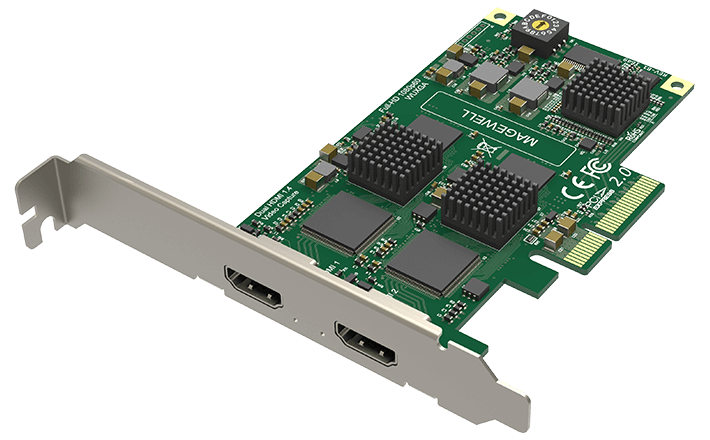
Explore this need in the finder →The Magewell Pro Capture Dual HDMI is a two-channel, internal PCIe card for a Windows/Linux/Mac production computer that needs separate HDMI capture sources. Its defining difference from the one-channel Pro Capture HDMI is not a higher gaming passthrough ceiling: it is a second input channel. The manufacturer identifies part 11080 and SKU 110800000, with two HDMI inputs and embedded audio.
Two inputs are not two outputs
The dual card has two HDMI Type A inputs, each described for HDMI 1.4a and DVI 1.0 source compatibility. Magewell specifies input and capture raster support up to 2048 by 2160 pixels. The board's capture-rate ceiling is listed as up to 144 fps in selected modes, but the technical page warns that PCIe bandwidth and onboard pixel clock limit actual rates; its 1920 by 1080 example is about 80 fps. In the source evidence reviewed here, 1080p60 is the conservative Windows/OBS target. The figures do not support interpreting the card as a 4K capture model, a 1080p120 card, or a guarantee of every input sustaining the peak mode simultaneously.
That distinction matters when choosing a multi-channel card. The product is designed to expose two separate channels, but actual recording depends on source formats, per-channel settings, software, host bandwidth and the work the computer performs after capture. Magewell lists multiple capture streams and two video-processing pipelines, yet does not convert the marketing channel count into a universal promise for every combination of frame rate, color format and concurrent streams. If the job requires two feeds at a particular rate, check that exact arrangement against current driver documentation and the host configuration.
PCIe x4 changes the installation decision
This is a low-profile PCIe Gen2 x4 card measuring about 115.99 by 68.88 mm without its bracket. Magewell lists both high-performance and low-power firmware modes, with maximum power figures of approximately 9.09 W and 8.13 W respectively. Those figures are useful when planning a compact system, but they are not a substitute for checking the motherboard slot, lane sharing, chassis clearance, cooling, firmware revision and driver support. A board's slot may be physically x16 while sharing lanes; verify the system manual rather than relying on the connector length alone.
Magewell's product page lists Windows, Linux and Mac, Capture Express and a broad set of compatible software; the technical sheet specifically names OBS and Windows/Linux/Mac APIs. For a Mac, the reviewed evidence does not supply a Mac-specific mode table, so a Mac OS match here is a broad compatibility reference, not a 1080p60 guarantee. Check the current driver and any PCIe enclosure/expansion chassis before designing around that route.
Capture-only HDMI has a clear tradeoff
The card's two HDMI sockets are inputs, not an input/output pair. Magewell does not list a built-in display output or loop-through function. If a source must continue to a display, plan a separate output path and confirm signal format and copy-protection handling. The manufacturer's troubleshooting guidance says HDCP-encrypted HDMI sources are not capturable. That rules out treating this as a device for recording protected program material.
Each HDMI input can carry embedded audio, and Magewell describes audio streams through its SDK. An OBS setup still needs the correct video/audio device selection for each source, and the computer must cope with both feeds and the encoder workload. A card can expose two channels without making the application configuration automatic. Do not count the input ports as separate monitor outputs or assume that adding a splitter solves source-protection restrictions.
How to choose among the channel counts
For a single source or an analog component/composite/S-video archive, the one-channel Pro Capture HDMI has a DB9 breakout and x1 link. For two HDMI sources, this Dual model is the more direct physical fit. If the production plan truly needs four inputs, compare the Quad HDMI, while checking its normal-profile dimensions and combined workload. None of these three is a 4K capture or display-passthrough choice.
The Dual HDMI makes sense when two independently addressable capture inputs matter more than portability, modern console passthrough or a high-resolution capture headline. It is an internal card, so there is no USB portability benefit; the host needs a PCIe x4 connection and the source must be unencrypted. Before ordering, confirm the full model name and MFR 11080, inspect the specific bundle for any cables you need, and verify the number of feeds and mode combination your software must run. The public model match is a useful filter, not proof that a particular motherboard or production configuration has been tested.
Key specifications
Key details at a glance
| Signal input | 2x HDMI Type A, HDMI 1.4a / DVI 1.0 source compatibility |
|---|---|
| HDMI generation | 1.4a |
| Confirmed capture formats | Input/capture raster up to 2048x2160; frame rates up to 144 fps apply only to selected modes and remain limited by PCIe bandwidth and the onboard pixel clock; Magewell gives about 80 fps at 1920x1080. The Windows/OBS 1080p60 plan is conservative. The data sheet does not promise all ports at the headline maximum simultaneously. |
| Confirmed passthrough formats | No HDMI output or built-in display passthrough is documented. |
| Computer connection | Pcie gen2 x4 |
| Named compatible software | OBS Studio / Magewell Capture Express / Magewell Capture SDK / VLC / VirtualDub / XSplit / vMix / Wirecast |
| HDR recording | Not documented |
| VRR passthrough | No |
| Analog audio input | Two hdmi inputs with embedded audio; the manufacturer describes audio streams through the magewell sdk. |
| Cables listed in the box |
Use the exact model’s instructions for operating limits, supplied equipment and version differences.
Sources for this review
Sources for this assessment
- Magewell Pro Capture Dual HDMI product page, exact part/SKU and package
- Magewell Pro Capture Dual HDMI technical specifications and mode limits
- Magewell capture-device no-signal guidance: HDCP input is not capturable
- Magewell Pro Capture family user manual
- Magewell Pro Capture download center
- B&H US identity page for Magewell Pro Capture Dual HDMI, MFR 11080
- Exact-model Magewell Pro Capture Dual HDMI product image

Check your complete signal path
Choose the source format, desired captured signal, passthrough target, computer connection and software together. A single device must support that whole arrangement.