
Your needs, this model
Does it fit your priorities?
Does the Quad HDMI provide four input feeds?
Magewell identifies four HDMI inputs with embedded audio. They are capture inputs, not monitor outputs; verify the precise number of simultaneous streams, pixel formats and rates your software and host must sustain rather than applying a single-channel maximum to all four.
Explore this need in the finder →Can I plan for 1080p60 capture in OBS?
OBS and Windows are listed and the technical specification gives about 80 fps at 1920x1080 as a mode ceiling. That makes a conservative 1080p60 target reasonable for an arrangement, but the four-input simultaneous workload still needs confirmation from the host/app configuration.
Explore this need in the finder →Can the card pass HDMI to the monitor?
No output connector is shown in the product page or technical drawing. Use a separate display route; do not mistake the four HDMI inputs for a four-port HDMI switch or passthrough device.
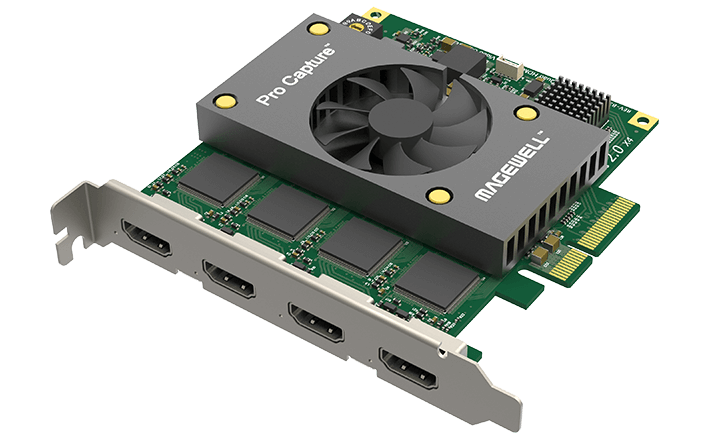
Explore this need in the finder →The Magewell Pro Capture Quad HDMI is a four-channel internal PCIe capture card with four HDMI inputs and embedded audio. It is aimed at a desktop production setup that needs several HDMI sources to appear as separate capture inputs. The manufacturer's exact identity is part 11100 / SKU 111000000. Unlike a consumer gaming card with an input and output pair, this board is an input-only capture device: none of its four sockets is a display passthrough output.
Four HDMI inputs, but no blanket four-stream maximum
The technical specifications list four HDMI Type A inputs with HDMI 1.4a and DVI 1.0 source compatibility. The maximum input/capture raster is 2048 by 2160 pixels, and the maximum capture frame rate is stated as up to 144 fps in selected conditions. Magewell explains that actual rate depends on PCIe bandwidth and the onboard pixel clock; the datasheet gives about 80 fps at 1920 by 1080 as an example. That supports a conservative 1080p60 per-arrangement assessment, not 1080p120 at that raster or UHD 4K capture.
More importantly for a four-channel card, the mode figures should not be read as proof that all four inputs can simultaneously sustain the headline maximum. The specification describes two video-processing pipelines with roughly 180 megapixels per second each, and the PCIe link and software workload also matter. The product's four-channel identity is real, but a production team should verify the exact number of active sources, resolutions, frame rates, pixel formats and audio paths it needs at once. The matcher can confirm documented device capability for the stated capture target; it cannot certify a particular multi-source build.
Check the chassis before selecting this card
This model uses PCIe Gen2 x4 and has a normal-profile add-in-card form factor. The board is approximately 112.15 by 102.92 mm without the bracket, with a listed maximum consumption around 15.39 W. It is physically larger and more power-demanding than the single-channel Pro Capture HDMI. Confirm that the case has a full-height opening, the motherboard provides a suitable x4-connected slot, lane sharing will not starve another device and neighboring cards do not block airflow. The product page lists the card as included; it does not establish that a retailer's bundle contains every cable or accessory your setup needs.
Magewell lists Windows, Linux and Mac support, OBS, Capture Express and other software. For Windows, the documented 1080p60 arrangement is a conservative starting point. The reviewed sources do not provide a Mac-specific multi-channel mode table, so Mac compatibility should not be mistaken for a promise of a particular number of simultaneous feeds or mode on a particular expansion chassis. Linux capture also depends on an appropriate driver/kernel and application configuration. Check the current product page and driver notes against the machine you intend to use.
Capture-only input means the display route is yours to solve
There is no HDMI output shown in the official interface diagram or listed in the technical specifications. If an HDMI source must also appear on a local monitor, the display chain needs a separate device or a source output designed for both destinations. The Quad is not a four-input HDMI switch, scaler or monitor distribution amplifier. Magewell's support guidance also says HDCP-encrypted HDMI cannot be captured, so the card is not a workaround for protected content.
The four inputs carry embedded audio, but a multi-source recording still requires deliberate audio routing. Each input may appear as a separate device in the capture application; choose the correct source and audio channel and test the actual output configuration. A product-page channel count does not determine how a specific encoder, motherboard, GPU or operating system schedules four live streams.
Compare it by input count, slot and mode—not by name alone
If one HDMI input is enough, the Pro Capture HDMI is a smaller x1 card and additionally has an analog DB9 breakout. The Pro Capture Dual HDMI is a low-profile x4 option with two HDMI inputs. The Quad doubles that input count again but requires a full-height case opening and more careful workload planning. All three are HD-era HDMI 1.4a devices without built-in passthrough, so a newer HDMI 2.1 gaming/display path or 4K capture requirement points elsewhere.
The Quad HDMI is a sensible candidate when the production system has four independent HDMI sources and enough PCIe, chassis and encoder capacity to process the chosen combination. It is a poor fit if the buyer mainly wants a portable streamer, one uncomplicated console input, 4K60 recording, high-refresh monitor passthrough or a guaranteed four-channel maximum-rate recording without a configuration check. Confirm the exact MFR 11100, full-height clearance, slot bandwidth, cable needs, source HDCP state and software-specific simultaneous modes before buying. These are evidence-based fit limits, not claims of hands-on testing.
Key specifications
Key details at a glance
| Signal input | 4x HDMI Type A, HDMI 1.4a / DVI 1.0 source compatibility |
|---|---|
| HDMI generation | 1.4a |
| Confirmed capture formats | Input/capture raster up to 2048x2160; up to 144 fps applies to selected modes and is limited by PCIe bandwidth and the onboard pixel clock; Magewell gives about 80 fps at 1920x1080. A Windows/OBS 1080p60 arrangement is conservative; the data sheet does not promise four inputs at the headline maximum simultaneously. |
| Confirmed passthrough formats | No HDMI output or built-in display passthrough is documented. |
| Computer connection | Pcie gen2 x4 |
| Named compatible software | OBS Studio / Magewell Capture Express / Magewell Capture SDK / VLC / VirtualDub / XSplit / vMix / Wirecast |
| HDR recording | Not documented |
| VRR passthrough | No |
| Analog audio input | Four hdmi inputs with embedded audio; the manufacturer's sdk handles multi-channel stream access. |
| Cables listed in the box |
Use the exact model’s instructions for operating limits, supplied equipment and version differences.
Sources for this review
Sources for this assessment
- Magewell Pro Capture Quad HDMI product page, exact part/SKU and four input channels
- Magewell Pro Capture Quad HDMI technical specifications and capture limits
- Magewell capture-device no-signal guidance: HDCP input is not capturable
- Magewell Pro Capture family user manual
- Magewell Pro Capture download center
- B&H US identity page for Magewell Pro Capture Quad HDMI, MFR 11100
- Exact-model Magewell Pro Capture Quad HDMI product image

Check your complete signal path
Choose the source format, desired captured signal, passthrough target, computer connection and software together. A single device must support that whole arrangement.