
Your needs, this model
Does it fit your priorities?
Will Pro Capture SDI work with one SDI camera and a separate SDI monitor?
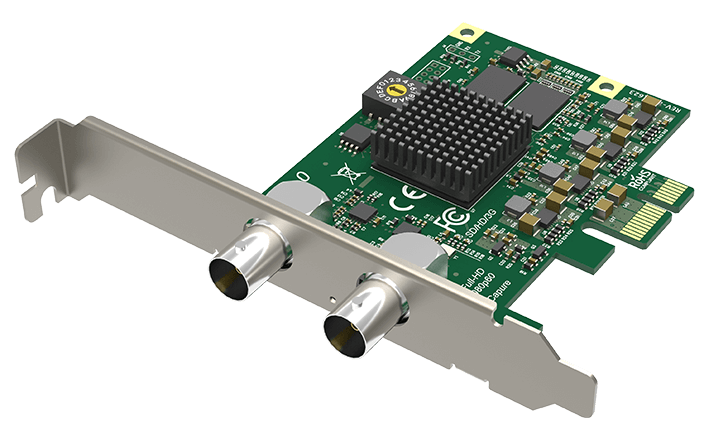
The 11050 card has one BNC SDI input and one BNC SDI loop-through. Magewell lists SD/HD/3G and supported 2K input up to 2048x1080. The output is SDI, not HDMI; check the source's exact standard, timing and cable path.
Explore this need in the finder →Does Pro Capture SDI capture 4K or 1080p120?
Neither is established by the reviewed model sources. Magewell identifies SD/HD/3G and supported 2K inputs, with a 2048x1080 input maximum; its general capture ceiling is qualified and gives about 80fps at 1920x1080. The 144fps headline should not be read as 1080p144 or 4K support.
Explore this need in the finder →What should I check before choosing the single-channel model?
Confirm an electrical PCIe x1-compatible slot, low-profile bracket fit, source standard and mode, installed driver/app, and whether the SDI loop-through is enough for the downstream device. The standard box list includes the card and low-profile bracket but not an SDI cable; inspect the specific seller package and written terms.
Explore this need in the finder →This is a specification-led assessment of Magewell’s single-channel Pro Capture SDI, part 11050 (SKU 110500000), not a hands-on test. The practical appeal is straightforward: it takes one SDI source into a PCIe desktop and exposes a separate SDI loop-through, so an existing monitor or downstream device can stay on the signal path while the workstation captures it.
One SDI input, one useful loop-through
The manufacturer identifies one BNC input and one BNC loop-through for SD, HD, 3G and supported 2K SDI, with a maximum input and loop-through raster of 2048×1080. Embedded audio travels with the SDI signal. The technical sheet lists SD/HD/3Ga/3Gb and supported dual-link mappings, 10- and 12-bit input, common RGB and YCbCr sampling modes, and up to eight mono audio channels at 48 kHz. Those are format-level capabilities, not a guarantee that every camera's output setting will lock; check the actual source standard, timing, sampling and cabling before building the rest of the chain.
The loop-through is an SDI output, not an HDMI display output. It is most useful when the existing SDI monitor, switcher or recorder should continue receiving the incoming feed. It is also a different arrangement from a gaming capture card that returns HDMI to a display. The manufacturer product page lists the input, loop-through and included card, while its technical specification gives the standard, audio and output details.
Read the rate ceiling as a boundary, not a promise
The sheet gives headline capture limits of up to 2048×2160 and up to 144 frames per second, then immediately qualifies them: actual rate depends on PCIe bandwidth and the onboard pixel clock, and Magewell gives about 80 fps at 1920×1080 as an example. That distinction matters more than the larger headline. This library uses one Windows/PCIe/OBS SDI feed at 1080p60 as a conservative assessment plan; it does not turn the sheet's maximums into a guarantee for 1080p120, 1440p144, 4K or multiple separate workloads. The card is a 3G/2K product, not a 6G or 12G UHD ingest card.
Some input mappings also need careful checking. Magewell says 3Gb-DS capture is limited to its first stream. For dual-link input, the documented 10-bit 1080p50/59.94/60 YCbCr 4:2:2 case is captured as interlaced 1080i; other listed dual-link color formats are reduced or subsampled. If the source has a specialized SDI output, ask whether that exact mapping matches the recording requirement rather than assuming “SDI” is a single universal format.
Fits a compact PCIe system, not every computer
This is an internal PCIe Gen2 x1 add-in card with a low-profile bracket listed in the standard package. Magewell lists Windows, Linux and Mac support, and names OBS among compatible applications; its detailed OS/API table includes Windows capture APIs, Linux V4L2 and macOS AVCaptureSession. That supports a Windows/OBS plan and general host compatibility, but it is not a Mac-specific frame-rate matrix. Confirm the installed driver, exact operating-system release, application version and signal mode on the target machine.
The dimensions without a bracket are 87.68 × 68.88 mm, and the specification lists a maximum draw of about 4.45 W. Those figures are useful when checking a small workstation, but the buyer still needs an available electrical PCIe slot, an opening for the bracket and clear access to both BNCs. The device has no HDMI input, USB host connection or converter. A PCIe x1 card may fit a larger compatible PCIe slot, but the motherboard slot wiring and surrounding-card clearance should be checked rather than inferred from the connector alone.
Where it sits among the SDI alternatives
Choose this one-channel card when a single SDI input and direct SDI loop-through solve the installation. The separate Dual SDI (11060) adds a second capture input and two loop-through paths but requires PCIe x4 and converts its SMA loop connectors to BNC with supplied short leads. The Quad SDI (11090) uses four inputs on a full-height x4 card and has no loop-through. The external USB Capture SDI Plus offers another one-channel route when an internal slot is not practical, but its host and audio connections are different.
The product-page image is an identity reference, not evidence of frame rate, cable distance or reliability. The official page lists the card and a low-profile bracket; no SDI cable is shown in that package list. Check whether the seller's U.S. offer is part 11050 / SKU 110500000, what revision and bracket it supplies, whether SDI cables are included, and the seller's written warranty and return terms. This is a narrow, practical PCIe choice for established SDI systems—not a universal converter or a promise that every broadcast timing will work without configuration.
Key specifications
Key details at a glance
| Signal input | 1x BNC SD/HD/3G/2K SDI input; separate 1x BNC SDI loop-through |
|---|---|
| Confirmed capture formats | SD/HD/3G/2K SDI capture; Magewell lists capture image resolutions up to 2048x2160 and up to 144fps, subject to PCIe bandwidth and the on-board pixel clock; its example is about 80fps at 1920x1080. The authored 1080p60 plan is conservative and does not establish 1080p120, 1440p144 or 4K capture. |
| Confirmed passthrough formats | One BNC SDI loop-through for the incoming signal, up to 2048x1080; no HDMI display output is documented. |
| Computer connection | Pcie gen2 x1 |
| Named compatible software | OBS Studio / Magewell Capture Express / Magewell Capture SDK / VLC / VirtualDub / XSplit / vMix / VidBlaster / Wirecast |
| HDR recording | Not documented |
| VRR passthrough | No |
| Analog audio input | Embedded sdi audio; manufacturer lists up to eight mono channels at 48 khz on supported sdi input. confirm the exact source and software audio route. |
| Cables listed in the box |
Use the exact model’s instructions for operating limits, supplied equipment and version differences.
Sources for this review
Sources for this assessment
- Magewell Pro Capture SDI model page, part/SKU, interfaces and package
- Magewell Pro Capture SDI technical specifications and operating matrix boundaries
- Magewell Pro Capture SDI technical datasheet, revision 2025-12-10
- Coremicro U.S. authorized-dealer identity bridge for Pro Capture SDI
- Magewell Pro Capture bounded family list, including three SDI channel variants
- Magewell Pro Capture family user manual
- Exact Magewell Pro Capture SDI product-page image

Check your complete signal path
Choose the source format, desired captured signal, passthrough target, computer connection and software together. A single device must support that whole arrangement.