
Your needs, this model
Does it fit your priorities?
Does Quad SDI provide four input connections?
Yes. Magewell names four SD/HD/3G/2K SDI channels and lists four MMCX-to-SDI breakout cables. That connection count is separate from the rate each channel can sustain; no all-four peak-rate matrix is asserted here.
Explore this need in the finder →Can all four inputs capture at the published 144 fps ceiling?
The reviewed technical page does not establish that combination. It qualifies the overall ceiling by PCIe bandwidth and processing limits, and cites about 80 fps at 1920x1080. The shortlist therefore does not equate four ports with four simultaneous 1080p144 streams.
Explore this need in the finder →Can this card loop SDI through to a monitor?
No SDI output or monitor passthrough connector is documented for the Eco Capture Quad SDI M.2. Add a separate router or choose hardware with a specified output path if the display must remain connected.
Explore this need in the finder →Internal SDI capture · four inputs · M.2 PCIe Gen2 x4
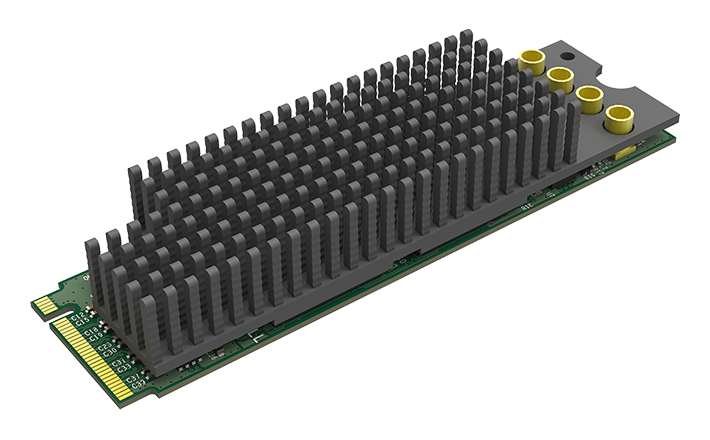
The Magewell Eco Capture Quad SDI M.2 is a compact internal capture module built around four SDI input channels. The manufacturer identifies part 11540 and SKU 115400000, with SD/HD/3G/2K SDI support and four MMCX-to-SDI breakout cables in the listed package. The U.S. MFR 11540 listing helps confirm the retail identity. Neither the board image nor the four-connector count says how fast four signals can be captured simultaneously; those are separate questions to resolve before committing to a multicamera workflow.
Four inputs are not a four-stream peak-rate guarantee
The technical sheet lists input resolutions through 2048×1080 and a frame-rate ceiling of up to 144 fps, but it qualifies the actual rate by PCIe bandwidth and the onboard processing clock. For 1920×1080 it gives an example of approximately 80 fps. The manufacturer does not provide, in the reviewed material, a complete all-four-input matrix at those upper values. This guide therefore evaluates a conservative single-source 1080p60 arrangement and treats simultaneous high-rate use as an unresolved engineering check—not as a benefit implied by the product name.
This distinction is useful when choosing between the Dual SDI M.2 and the Quad. Four inputs can be the right physical connection count for a studio that has four SDI sources to wire, while two inputs may be sufficient for a smaller setup. But the Quad asks the host for an M.2 2280 Type M PCIe Gen2 x4 interface, compared with the Dual’s Gen2 x2 requirement. Verify that the intended socket is PCIe M-key, that the system routes the necessary lanes, and that the slot remains available after accounting for storage and other internal cards. This is not mSATA, USB or a full-size PCIe add-in card.
Breakouts and standards deserve a careful inventory
Four MMCX board connectors rely on the listed breakout cables to reach SDI cabling. Confirm that all four cables are in the actual package and that the intended BNC ends, signal direction and physical routing fit the rack or enclosure. It is easy to count the card’s four channels while forgetting that the small board connectors create an adapter and strain-relief problem in a dense build.
SDI standards also have specific limits. Magewell’s technical page says 3Gb-DS support captures only the first stream. It also describes a dual-link case: with 10-bit YCbCr 4:2:2 at 1080p50/59.94/60, only the first link is captured and represented as 1080i. A buyer requiring progressive 10-bit output from a source using that dual-link transport should not infer that its four SDI connections combine into the desired capture format. Confirm the source’s signal standard and sampling with the vendor’s current documentation.
Software and computer fit
Magewell lists Windows and Linux support, its DirectShow and V4L2 paths, and OBS among supported software. That does not establish support for every kernel, motherboard lane map, capture application or four-channel scene arrangement. Check the current driver on the exact OS and confirm how the application exposes each channel. The Eco-family FAQ states that no Mac driver is supplied. The M.2 enclosure also needs adequate heat dissipation; no thermal measurements are part of this review.
This is capture hardware, not an SDI router. The product page and technical sheet reviewed here show input channels and capture features, not an SDI output to preserve a monitor feed. Plan a separate switcher or router when a display must stay connected. It also does not carry an HDMI input; for four SDI sources, its connector count is the relevant advantage, while a one-source 12G camera or 4K signal requires a different model such as the 12G SDI 4K Plus M.2.
Buying checks
Match the product label to 11540/SKU 115400000, confirm four MMCX-to-SDI breakouts, verify an M.2 2280 Type M PCIe Gen2 x4 host path, and review case clearance and cooling. Then compare each source’s link type, raster, frame rate, bit depth and embedded audio requirements with the model-specific technical sheet. For a multi-camera job, request or test the exact simultaneous channel/mode combination in your own workflow; this assessment does not claim a bench test, measured latency or four-channel throughput. The evidence supports the card’s input count and listed modes, not a universal guarantee for every four-stream workload.
Manufacturer sources
- Magewell product page: SKU, four channels and package details
- Magewell technical specifications: qualified rates and SDI exceptions
- Magewell Eco Capture FAQ: M.2 keying, software and cooling notes
- U.S. retailer identity listing for MFR 11540
Key specifications
Key details at a glance
| Signal input | Four MMCX SD/HD/3G/2K SDI inputs; Magewell lists four included MMCX-to-SDI breakouts. |
|---|---|
| Confirmed capture formats | Up to 2048x1080 SDI input; conservative single-feed 1080p60 plan. Four inputs do not imply four streams at their individual peak rate. |
| Confirmed passthrough formats | |
| Computer connection | Pcie |
| Named compatible software | OBS Studio / Magewell Capture Express / Magewell Capture SDK / VLC / VirtualDub / XSplit / vMix / Wirecast |
| HDR recording | No hdr recording arrangement is established by the reviewed model-specific sources. |
Use the exact model’s instructions for operating limits, supplied equipment and version differences.
Sources for this review
Sources for this assessment

Check your complete signal path
Choose the source format, desired captured signal, passthrough target, computer connection and software together. A single device must support that whole arrangement.