
Your needs, this model
Does it fit your priorities?
Can the HD60 digitize a component or composite retro-console signal?
No. Elgato's model-specific manual says Game Capture HD60 has no analog video input. Its 3.5 mm socket is an analog audio line input, not a video jack or microphone port. The original Game Capture HD is a separate model with A/V input; verify the device and any converter/cables rather than treating the two names as interchangeable.
Explore this need in the finder →Is HD60 a USB 3 capture device, and will it record 1080p60?
No on the USB generation; yes on the documented capture mode. Elgato specifies USB 2.0 but lists HDMI recording up to 1080p60 at up to 40 Mbps. A fast-looking host port does not turn the HD60 into a USB 3 device, and the legacy host/app combination still needs verification.
Explore this need in the finder →Can I use the original Game Capture HD60 with OBS?
Elgato describes a Windows-only Game Capture HD device workflow for OBS/XSplit, with the legacy Game Capture HD application/driver involved. Its system page gives historical Windows requirements, and the manufacturer now says legacy driver/app support is not guaranteed on new systems. The reviewed sources do not establish an OBS-on-macOS plan or current OBS compatibility.
Explore this need in the finder →Does the HDMI output mean the HD60 records HDR or 4K?
No. The documented ceiling is 1080p60 capture; HDMI output is for real-time display passthrough. The reviewed HD60 sources do not establish 4K capture, HDR recording or high-refresh passthrough. Do not transfer those capabilities from a similarly named HD60 S, S+, X or 4K model.
Explore this need in the finder →Assessment basis: This is a documentary review of Elgato's model-specific manuals, requirements, resolution guidance and legacy notices, not a hands-on test. “Game Capture HD60” is the plain HD60 model. It is not the original Game Capture HD, HD60 S, HD60 S+, HD60 Pro or HD60 X; those names refer to different input, host or software paths.
What this HD60 actually captures
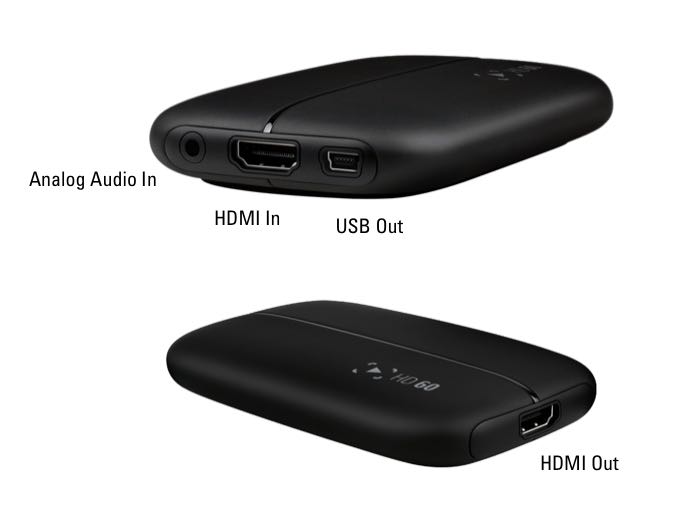
The HD60 is an external HDMI capture device for an unencrypted signal. Elgato's manual describes an HDMI input, a separate HDMI output for real-time display passthrough, USB 2.0 to the computer and a 3.5 mm analog audio input. That audio socket is documented as line-in, not a microphone port. HDCP-protected HDMI is not a usable capture source, so a console or player that keeps copy protection enabled will not become recordable merely because its cable fits.
The practical headline is narrower than the family name suggests: Elgato lists capture up to 1920 × 1080 at 60 frames per second, with a maximum bitrate of 40 Mbps. Its resolution page supports common SD and HD sources too, and cautions that its 480p entry means 720 × 480, not 640 × 480. The HDMI display path is separate from the USB preview: the former is described as real-time, while the encoded computer feed is delayed. A display connection therefore does not prove a particular host-app combination will capture reliably.
Do not buy this model expecting 4K capture, HDR recording, a high-refresh passthrough mode or analog video transfer. The family comparison says the original Game Capture HD can accept an analog A/V video adapter, but the HD60 cannot. The HD60 does have an analog audio input; that is a different signal and does not make it a component/composite capture device.
The host and software are part of the model
USB 2.0 is an important distinction from the HD60 S, which uses USB 3.0 Type-C, and from later USB or PCIe models. The HD60's manual says USB both carries H.264-encoded video and powers the unit. Elgato's requirements page gives historical Windows and Mac baselines, including a built-in USB 2.0 port, four-core CPU class and at least 4 GB RAM. Those figures describe the old supported environment; they are not a current-PC performance guarantee.
Elgato's legacy list says production stopped in January 2018 and that legacy hardware no longer receives driver or firmware development. The current compatibility table marks HD60 incompatible with Apple Silicon. For an older Intel Mac, the historical Game Capture HD application path is documented, but the reviewed sources do not establish present-day macOS or driver support. Elgato's third-party OBS/XSplit guidance for this device is Windows-only and relies on its older Game Capture HD device workflow. The existence of an OBS capture source in legacy guidance should not be read as certification for today's OBS, Windows builds or drivers. If streaming matters, confirm the exact host and software before treating this used model as a workable choice.
Elgato's OBS troubleshooting article discusses audio synchronization and gives an average starting adjustment for the older device. That is a software setup note, not an independently measured latency result or a promise that every camera, microphone and computer needs the same offset. The USB preview delay and the HDMI display passthrough are also separate paths; do not conflate either with end-to-end stream timing.
Which similarly named model solves which problem?
- Original Game Capture HD: the older sibling with analog A/V video input. Its 1080p capture is 30 fps even though its comparison table allows 1080p60 passthrough. It is the relevant Elgato path only when its adapters, input standard and legacy software are confirmed.
- Game Capture HD60: the device reviewed here. It drops that analog video input and adds documented 1080p60 HDMI capture; USB remains 2.0.
- Game Capture HD60 S: a separate model with USB 3.0 Type-C and its own computer/software requirements. Do not transfer its USB interface or current model setup instructions to plain HD60.
The manufacturer's dimensions and mass are listed as 112 × 75 × 19 mm and 106 g in its comparison table. These numbers can help identify a documented form factor, but they do not identify a particular used unit or show what a seller is including.
What to verify before choosing a used unit
First verify the exact label and ports: the un-suffixed HD60, HDMI input/output, analog audio line-in and USB connection should not be confused with a different Elgato capture device. Confirm that the source is unencrypted HDMI, uses a supported standard TV resolution and does not require analog video. If audio comes from an external line-level source, check that its level and connector suit the HD60's line input; it is not a mic socket.
Next check the host rather than assuming that an available USB port or a supported historical minimum is enough. Ask whether the intended Windows or Intel-Mac operating system can still run the required legacy application and driver, whether the chosen OBS version can see the exact device, and what cables are actually present. The manual says an HDMI cable was included historically, but no exact package SKU, seller contents, unit condition, present compatibility, warranty status or offer availability is established here. Those are seller-specific checks, not facts to infer from the product name.
For a documented earlier-model comparison and a supported input checklist, see the HD60 workflow guide. For the original model's analog video path, compare its separate Game Capture HD review. This assessment is most defensible when 1080p60 HDMI capture is enough, a legacy USB 2.0 software path can be verified, and the buyer accepts that the device is no longer manufactured or updated.
Primary references
- Elgato Game Capture HD60 Manual and User's Guide
- Elgato Game Capture HD60 Supported Resolutions
- Elgato Game Capture HD60 System Requirements
- Elgato comparison with the original Game Capture HD
- Elgato's HD60 OBS/XSplit audio-delay guide
- Elgato Apple Silicon compatibility table
- Elgato Legacy and End-Of-Life Products
Key specifications
Key details at a glance
| Signal input | hdmi_unencrypted |
|---|---|
| Confirmed capture formats | 1080p60 / 1080p30 / 1080i / 720p60 / 720p30 / 576p / 576i / 480p (720x480 only) / 480i |
| Confirmed passthrough formats | Real-time HDMI output; 1080p60 is the documented capture/input ceiling. Higher refresh, 4K and HDR passthrough modes are not established by the reviewed model sources. |
| Computer connection | Usb 2 |
| Named compatible software | Elgato Game Capture HD legacy application for historically supported Windows and Intel-era Mac configurations. / Elgato's older Game Capture HD device workflow for OBS/XSplit on Windows only; present operating-system, driver and third-party application compatibility is not established. |
| HDR recording | False |
| Analog audio input | Separate 3.5 mm analog line-level audio input; elgato says it is not a microphone port. hdmi input also carries its supported digital audio path. |
Use the exact model’s instructions for operating limits, supplied equipment and version differences.
Sources for this review
Sources for this assessment
- Elgato Game Capture HD60 Manual and User's Guide
- Elgato Game Capture HD60 System Requirements
- Elgato Game Capture HD60 Supported Resolutions
- Compare Elgato Game Capture HD60 to original Elgato
- Elgato Game Capture HD60 - Adjusting audio delay for XSplit and OBS
- Apple Silicon Compatibility
- Elgato Legacy and End-Of-Life Products
Check your complete signal path
Choose the source format, desired captured signal, passthrough target, computer connection and software together. A single device must support that whole arrangement.