
Your needs, this model
Does it fit your priorities?
Can it capture a retro console that uses component or composite video?
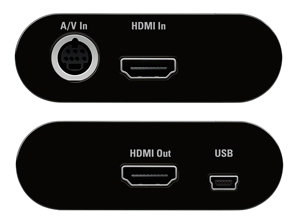
The original Game Capture HD has an A/V input for supported component or composite sources, unlike the later HD60. Match the console's actual output and standard to the correct lead; verify the analog adapter in any used offer. Elgato lists 240i/480i composite or S-Video with the required software version, while component can carry supported HD modes. S-Video needs a separate adapter.
Explore this need in the finder →Will it record 1080p60 while I use OBS?
No. Elgato's comparison says the original Game Capture HD passes a compatible 1080p60 signal to the display while capturing 1080p at 30 fps, and its software interface says 1080p is always 30 fps. The Windows OBS workflow is documented, but it does not raise the card's capture rate.
Explore this need in the finder →Can I use this with OBS on a Mac?
Elgato explicitly says its Game Capture HD hardware and software does not work with OBS for macOS. Its Intel-era Mac path uses the legacy Game Capture HD application, and Elgato's current compatibility table excludes Apple Silicon.
Explore this need in the finder →Does a USB 3 port make it a USB 3 capture card?
No. Game Capture HD is a USB 2.0 device. A host's USB 3 port may accept USB 2 peripherals, but that does not turn the card into a USB 3 link; verify the old device, cable and host software together.
Explore this need in the finder →Elgato Game Capture HD occupies an unusual place in a modern capture-card shortlist: it is an older external USB 2.0 unit that still matters when the source is an analog console. This desk-based assessment uses Elgato's archived manuals, mode tables and compatibility notes; it is not a hands-on test, and it does not assume that an individual used listing still includes its original leads or adapters.
The analog input is the reason to consider it
The original Game Capture HD has both unencrypted HDMI input and a separate A/V input for component or composite video. Elgato's manual makes that A/V connector the important difference from the later Game Capture HD60, which has no analog-video input. It is therefore a specific fit for an owner trying to capture an older console or source without first converting its analog output to HDMI. S-Video is also listed, but requires a separate Elgato adapter cable. An analog signal path is not automatic compatibility: confirm the console's connector, television standard, cable direction and the adapter actually supplied with the offer.
HDMI is subject to the usual copy-protection boundary. Elgato says HDCP-protected sources cannot be used. The input is not a way to capture protected streaming or disc playback, and the presence of an HDMI connector does not change that. Elgato's console-specific notes also distinguish source behavior: for some retro signals, the computer can capture a signal that an attached modern TV may not display through the device's HDMI output.
Separate the recording frame rate from the display path
The product can capture up to 1080p, but that headline is not a 1080p60 recording claim. Elgato's own comparison says the original passes a 1080p60 source to the display while capturing it at 30 fps; the 3.1 software interface likewise says 1080p is always 30 fps. The manufacturer lists 720p60 as a capture mode. If the requirement is 1080p60 recording, this is the wrong assessment even when the display remains smooth through the HDMI output.
For HDMI input, Elgato describes the HDMI output as real-time pass-through for play on a television. The USB computer preview, by contrast, is delayed by the H.264 compression path. The practical arrangement is to watch the television connected to HDMI Out, not to treat the captured preview as a zero-delay gaming display. The published material does not establish modern 4K, HDR, VRR or high-refresh operating modes for this product, so none is assigned here.
USB 2.0 and software are meaningful limits
This is a USB 2.0 device with a Mini-USB connection, not a USB 3.0 capture card. It should not be presented as meeting a requirement for a USB 3.0-or-faster data link simply because a newer computer has a USB 3 port. Elgato's legacy system page gives old Windows and Intel-Mac baselines and cautions that the published requirements may not match current hardware or software. A separate Elgato note says Game Capture HD is incompatible with Apple Silicon. Its older Intel Mac path should not be generalized to current Macs.
Windows OBS is documented, but through the old Game Capture HD device entry: Elgato says to install its own Game Capture HD software, quit that program, then add the capture device in OBS. Elgato specifically says its Game Capture hardware does not work with OBS for macOS. The older Elgato Game Capture HD application is also not the same label or product as the current Elgato Studio option in this site's finder. Check the exact application, driver, operating-system version and source path before relying on an old card.
End-of-life status changes the purchase decision
Elgato announced the product's end of life in 2021 and said it was no longer manufacturing it. Its notice said the card would remain supported in Game Capture software but would not be supported in 4K Capture Utility. That does not establish present-day driver maintenance, stock, seller warranty or the condition of a particular used unit. The exact US package SKU and any revision are not confirmed in the reviewed official material. Treat the original package list in the manual as a checklist—not proof that an offer contains the HDMI cable, USB cable, component adapter or PlayStation lead.
Who should keep it on the shortlist?
Its distinct analog input can make an already-owned Game Capture HD useful for a compatible legacy console, and the separate HDMI output can keep a supported HDMI gameplay signal on a television. It is a poor default for someone buying a new capture setup, expecting 1080p60 recording, needing Apple Silicon or Mac OBS, or wanting a USB 3.0 connection. Before considering an individual offer, identify its exact connector set and included analog leads, inspect the USB cable and enclosure, and verify that the intended older computer still runs the exact Game Capture application and driver. This evidence-based review cannot establish an item's condition or guarantee a working system.
Key specifications
Key details at a glance
| Signal input | hdmi_unencrypted / analog_video |
|---|---|
| Confirmed capture formats | 1080p30 (1080p capture is not 60 fps) / 1080i / 720p60 / 720p30 / 576p / 576i / 480p / 480i / 240i on composite or S-Video with the required software version |
| Confirmed passthrough formats | For HDMI source, Elgato's comparison lists 1080p60 passthrough while capture is limited to 30 fps at 1080p. This does not establish 4K, HDR, VRR or high-refresh modes. |
| Computer connection | Usb 2 |
| Named compatible software | Legacy Elgato Game Capture HD software for Windows and supported Intel-era Macs; not the current Elgato Studio application. / OBS Studio through the Elgato Game Capture HD device path on Windows; the manufacturer does not document its OBS path for macOS. |
| HDR recording | False |
Use the exact model’s instructions for operating limits, supplied equipment and version differences.
Sources for this review
Sources for this assessment
- Elgato Game Capture HD Manual and User's Guide
- Elgato Game Capture HD - System Requirements
- Supported resolutions for Elgato Game Capture HD
- Compare Elgato Game Capture HD60 to original Elgato
- Elgato Game Capture HD 3.1 Software Interface (Windows)
- Open Broadcaster Software (OBS) streaming with Elgato Game Capture HD
- Elgato Game Capture HD - Supported Game Consoles
- Capture settings and Elgato Game Capture HD
- Apple Silicon Compatibility
- USB 2.0 devices may have problems connecting to Mac USB 3.0 ports
- Elgato Game Capture HD - End Of Life Announcement
- Elgato Legacy and End-Of-Life Products
Check your complete signal path
Choose the source format, desired captured signal, passthrough target, computer connection and software together. A single device must support that whole arrangement.