
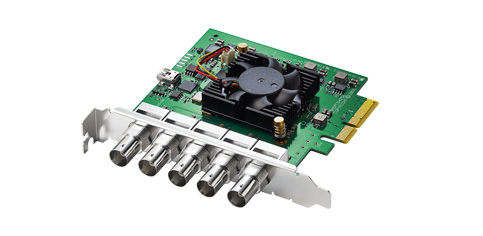
Your needs, this model
Does it fit your priorities?
Can I capture several SDI feeds with one card?
The Duo 2 has four independent bidirectional 3G-SDI connectors, each configurable for input or output, so the card is designed for multi-channel I/O. The reviewed specification does not give a complete combined bandwidth matrix for every number of simultaneous feeds and formats. Confirm your exact channel count, timing, software routing and PCIe lane budget before relying on four high-rate inputs.
Explore this need in the finder →Does the Duo 2 accept HDMI or send my captured feed to a gaming monitor?
No HDMI connector or consumer HDMI input-to-display loop-through is documented. Its SDI connectors can be configured for capture or playback, but playback outputs are not the same claim as a live input-to-monitor passthrough path. An HDMI source needs a suitable external conversion route, and a display path must be designed separately.
Explore this need in the finder →What computer and software path is documented for 1080p60?
Blackmagic lists SD/HD formats through 1080p60, PCIe Gen 2 x4, and Windows, Mac, and Linux support with a Blackmagic driver/Media Express. The page names OBS among third-party applications but warns that support may vary; this is not a tested 1080p60 OBS profile. A Mac setup must also meet the cited Mac Pro PCIe-slot condition.
Explore this need in the finder →The DeckLink Duo 2 is a broadcast-style PCIe I/O card, not a USB capture dongle. Its four independently configurable 3G-SDI connectors can be assigned as inputs or outputs, and Blackmagic lists SD and HD video standards through 1080p60. That makes it a candidate for a workstation that needs several baseband SDI routes in one internal card. The published channel count is not, by itself, a guarantee that every port can run a maximum-resolution stream at the same time.
Four routes, but direction is a setup choice
Blackmagic describes the board as four separate capture or playback cards in one, with each bidirectional SDI connection independently set to input or output. That flexibility suits ingest and playout systems where channel roles can be assigned to a particular job. It is different from a consumer card with a dedicated HDMI input and a dedicated HDMI loop-through socket: an SDI playback connector does not automatically mean that the incoming signal is mirrored live to a display.
The standard Duo 2 uses full-size BNC-style connections in the official product image. It is an important distinction from the DeckLink Duo 2 Mini, whose model-specific page names 3G-SDI mini DIN connections and a low-profile board. The Mini label here does not mean Mini PCIe. Before buying either model, match the card edition, connector family, case opening and the cables already used in the signal chain. The Duo 2 specification's included-items line names the card but does not list BNC patch leads, adapters or a reference cable.
What the format ceiling does—and does not—say
The documented standards cover standard-definition formats and common HD timings, including 720p50/59.94/60 and 1080-line progressive, PsF and interlaced modes through 60 frames or fields per second. For a simple input requirement, the authored plan treats 1080p60 as one SDI source captured on a supported Windows, Mac or Linux host. The model is not a 4K card; if the source is UHD/4K, a different format family is needed.
Four independent ports are useful capacity, yet the public technical page does not lay out a matrix of every possible simultaneous input/output combination at every format. Four connectors should therefore not be read as an unconditional four-stream 1080p60 workload guarantee. Check the exact number of live feeds, their raster and timing, whether other ports will play out at the same time, and the software's channel-routing behavior. A system builder may need to confirm available PCIe bandwidth, motherboard lane sharing and sustained storage throughput for the planned workload.
The product is SDI-only: no HDMI or analog video input is specified. An HDMI camera or console would need a separate conversion path, adding hardware and another point where signal format and latency must be considered. Likewise, the card's SDI outputs are useful for a separately configured playback route, but they should not be mistaken for a documented HDMI passthrough feature.
Host and software checks matter
The connection section specifies PCI Express Gen 2 x4. Its compatibility wording lists x4, x8 and x16 slots, while the physical-installation paragraph names x4 and x8 host slots. Because the two descriptions are not perfectly aligned, check the exact board, available electrical lanes and installation notes for the target workstation instead of relying on a slot's physical length alone. A Mac needs a PCIe-slot system; Blackmagic's page specifically calls out a Mac Pro for Mac OS installation. USB-C or Thunderbolt on its own is not the host connection.
The manufacturer lists Windows 10 64-bit and Windows 11, Mac 15 Sequoia and Mac 26 Tahoe or later, and Linux. Included software differs by operating system: Media Express and the Desktop Video driver/utility are named for all three, while the page's Windows/Mac list also includes DaVinci Resolve and other applications. OBS Studio appears in the broader supported-application list, which Blackmagic identifies as third-party software whose support can vary. That is compatibility evidence, not a tested OBS encoding result or a promise that every application will expose four independent channels in the same way.
Who should shortlist it?
Shortlist the Duo 2 when the source equipment already speaks 3G-SDI, multiple independently directed channels are useful, and the computer has the necessary PCIe slot and room for the card. Its upper format boundary is clear enough for an SD/HD workflow, while exact concurrent channel combinations remain something to validate with the chosen source and application.
Choose the Mini only when its low-profile configuration and mini DIN connector arrangement are the better physical fit; the shared “Duo 2” name does not make its ports or chassis fit identical. For a single consumer HDMI console with monitor passthrough, a purpose-built external or HDMI capture card will usually be a more direct category to compare. See the signal-path guide and the DeckLink 8K Pro G2 assessment for models whose HDMI, SDI and rate claims are different.
Key specifications
Key details at a glance
| Signal input | Four independent bidirectional 3G-SDI connections; each is independently configurable as input or output |
|---|---|
| Confirmed capture formats | SD: 525i59.94 NTSC and 625i50 PAL / HD: 720p50/59.94/60, 1080p23.98/24/25/29.97/30/50/59.94/60, 1080PsF23.98/24/25/29.97/30 and 1080i50/59.94/60 |
| Confirmed passthrough formats | |
| Computer connection | Pci express gen 2 x4 card. the connections summary lists x4/x8/x16 slot compatibility; the physical-installation paragraph names x4 and x8 host slots, so confirm the exact host slot and lane allocation. |
| Named compatible software | Blackmagic Media Express / DaVinci Resolve / Final Cut Pro X / Adobe Premiere Pro CC / Avid Media Composer / Open Broadcaster Software Studio (third-party support may vary) / vMix / Telestream Wirecast / Boinx mimoLive / Softron MovieRecorder |
| HDR recording | No model-specific frame-rate/hdr recording matrix is listed; this review does not assign a rate-specific hdr capture plan. |
Use the exact model’s instructions for operating limits, supplied equipment and version differences.
Sources for this review
Sources for this assessment

Check your complete signal path
Choose the source format, desired captured signal, passthrough target, computer connection and software together. A single device must support that whole arrangement.