
Your needs, this model
Does it fit your priorities?
How does Duo 2 Mini differ from the standard DeckLink Duo 2?
The two official model pages list four independent bidirectional 3G-SDI channels, PCIe Gen 2 x4, and SD/HD standards through 1080p60. The Mini version is explicitly low-profile and uses 3G-SDI mini DIN connectors; the standard Duo 2 uses a different full-size connector arrangement. Check the exact port family, cable ends, case bracket and package rather than treating the models as interchangeable.
Explore this need in the finder →Does “Mini” mean that Duo 2 Mini fits a laptop Mini PCIe socket?
No. Blackmagic identifies the Duo 2 Mini as a low-profile PCI Express capture/playback card and specifies a four-lane Gen 2 PCIe connection. It is not an external USB adapter or a Mini PCIe module. Confirm your case profile, PCIe lane availability and compatible driver before ordering.
Explore this need in the finder →Does the Mini provide four guaranteed 1080p60 OBS streams?
The card has four independently configurable SDI connectors and the model section lists formats through 1080p60. The manufacturer does not publish a complete simultaneous four-channel rate matrix, and its broad application list says third-party software support may vary. Use the included finder match as a one-source mode assessment and confirm exact concurrent routing with the source, driver, host and OBS version.
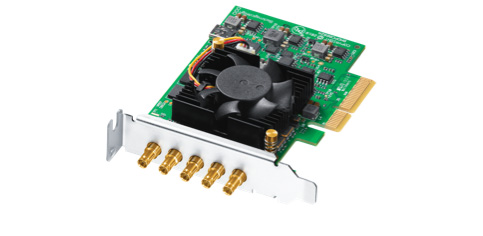
Explore this need in the finder →The DeckLink Duo 2 Mini is a small-profile professional PCIe card for SDI capture and playback. Blackmagic's model-specific description lists four independent 3G-SDI mini DIN connections, each configurable as input or output, and SD/HD signal formats through 1080p60. Its main practical distinction from the regular DeckLink Duo 2 is physical: the Mini is low-profile and has a different connector family. The shared name does not make the boards interchangeable in a chassis or with an existing cable kit.
Mini means low-profile, not Mini PCIe
This is still an internal four-lane Gen 2 PCI Express card. It is not an external USB box, and “Mini” should not be read as the smaller Mini PCIe interface used in some embedded systems. A compact low-profile PC may have the right bracket height but still lack the needed PCIe lane allocation; a laptop with only USB-C does not meet the card's host-interface requirement.
The official technical section names four 3G-SDI mini DIN connectors, while the standard Duo 2 is presented with a different, full-size BNC-style layout. Do not shop by the word “Duo” alone. Check that the offer is specifically the Duo 2 Mini, then verify the input-cable ends, the case slot opening and the supplied bracket arrangement against the equipment already installed. The manufacturer's included-items line lists the card, not a breakout lead or a bag of SDI adapters, so a buyer should not assume the Mini uses the standard Duo 2's direct cabling.
Four configurable channels, within an HD signal envelope
The published supported modes include NTSC and PAL standard definition, 720p, progressive 1080, 1080 PsF and 1080 interlaced timings. The top progressive rate in the listed HD range is 1080p60. The card does not add UHD/4K formats by virtue of having four connectors. If your source is an HDMI camera, game console or a 4K SDI camera, this model is not a direct match for that connector or signal need.
Blackmagic describes the four connections as separate capture or playback channels. That is useful when a system needs to decide which SDI lines feed software and which are dedicated outputs. However, the technical material does not provide an all-combinations table for concurrent channel counts, capture and playout directions, or peak rates. A four-port board is not proof that four 1080p60 streams will all be available in one application under every host configuration. Treat the finder result as a conservative one-source assessment; document the exact input/output map and confirm the workload with the application vendor or system integrator before building a multi-channel rig.
The outputs also need to be understood on their own terms. They can serve a playback route, but the reviewed source does not describe a consumer-style pass-through feed that simply mirrors an incoming capture to a separate gaming display. This is not the kind of HDMI “capture in, HDMI out to your monitor” layout common on gaming cards.
Host, operating systems and applications
The model section specifies PCI Express Gen 2 x4 and lists compatibility with x4, x8 and x16 slots, while its physical-installation text names x4 and x8 slots. That wording deserves a host check: verify that the target system exposes the necessary lanes and that adding the card will not conflict with other devices. Blackmagic also notes that a Mac installation needs a Mac Pro with PCIe slots; an ordinary Mac laptop's USB-C/Thunderbolt connection is not a substitute.
The current listing names Windows 10 64-bit and Windows 11, Mac 15 Sequoia and Mac 26 Tahoe or later, plus Linux. Media Express and the Desktop Video driver/utility are included in the software list for Linux; the Windows/Mac list also names DaVinci Resolve and other applications. OBS Studio appears in the broad third-party application list, but the manufacturer warns that support may vary. That list does not establish the same mode behavior or channel count in every operating system and app.
When it makes sense
Consider the Mini when the source signals are SDI, the workflow needs several configurable HD I/O paths, a low-profile board is required and the mini DIN connector layout is already planned for. The product's lower profile can solve a real chassis constraint, but it does not eliminate cable, lane or software checks.
Choose the regular DeckLink Duo 2 instead when its full-size connector layout better matches the installed cabling and chassis. If you need 4K/8K, HDMI input, external USB connection or consumer passthrough, compare a model specifically documented for those jobs rather than treating any four-channel PCIe board as a substitute. The host and software guide explains why slot shape, protocol and named app support must be evaluated separately.
Key specifications
Key details at a glance
| Signal input | Four independent 3G-SDI mini DIN connections; each is independently configurable as input or output |
|---|---|
| Confirmed capture formats | SD: 525i59.94 NTSC and 625i50 PAL / HD: 720p50/59.94/60, 1080p23.98/24/25/29.97/30/50/59/59.94/60, 1080PsF23.98/24/25/29.97/30 and 1080i50/59.94/60 |
| Confirmed passthrough formats | |
| Computer connection | Low-profile pci express gen 2 x4 card. the connections summary lists x4/x8/x16 slot compatibility; the physical-installation paragraph names x4/x8 host slots, so check the exact system and lane allocation. |
| Named compatible software | Blackmagic Media Express / DaVinci Resolve / Final Cut Pro X / Adobe Premiere Pro CC / Avid Media Composer / Open Broadcaster Software Studio (third-party support may vary) / vMix / Telestream Wirecast / Boinx mimoLive / Softron MovieRecorder |
| HDR recording | No model-specific frame-rate/hdr recording matrix is listed; no rate-specific hdr capture plan is matched. |
Use the exact model’s instructions for operating limits, supplied equipment and version differences.
Sources for this review
Sources for this assessment

Check your complete signal path
Choose the source format, desired captured signal, passthrough target, computer connection and software together. A single device must support that whole arrangement.