
Your needs, this model
Does it fit your priorities?
Can it capture 4K at 120 fps or 8K at 60 fps?
The model-specific standards list 2160p100/119/120 and 4320p up to 60, and the product description separately states up to 120 fps in HD/4K and up to 60 fps in 8K. Those are published format ceilings; they are not a promise that multiple streams can all run at those maxima simultaneously.
Explore this need in the finder →Does four-way SDI or the HDMI output guarantee four live capture feeds or passthrough?
The four SDI sockets are bidirectional and can form single-, dual- or quad-link paths. The SDK can configure up to four streams only up to 4K DCI 60p. The technical page does not promise four 8K60 inputs or an input-to-monitor loop-through, so check exact channel routing and display needs.
Explore this need in the finder →Does the G2's HDR support mean 4K60 HDR is guaranteed in an OBS recording?
The page lists HDR static metadata, HLG/PQ and HDMI 2.1 HDR, but does not give a mode-by-mode HDR capture matrix or a specific OBS recording profile. Treat that combination as unverified and check the exact card, signal, driver and app before making it essential.
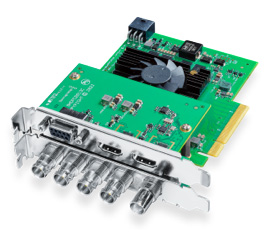
Explore this need in the finder →DeckLink 8K Pro G2 is Blackmagic Design’s high-bandwidth internal capture/playback board for a workstation that needs either HDMI 2.1 or a multi-link SDI path. The model-specific technical page lists four bidirectional 12G-SDI connectors and an HDMI 2.1 connection, with support for SD, HD, UHD, DCI 4K and 8K. Its published ceilings are unusually high: up to 120 fps in HD and 4K and up to 60 fps in 8K. Those maxima describe signal standards, not a promise that four sources can all run at the top rate at once.
Two distinct ways to bring a source in
For a single HDMI source, the card’s HDMI 2.1 input supports the listed high-rate UHD/4K and 8K standards. A protected HDMI feed is not a valid capture source: Blackmagic explicitly says the HDMI input cannot capture copy-protected content. The four SDI BNCs are bidirectional and support single-, dual- and quad-link layouts. That makes the SDI option useful when a camera or facility supplies the matching 12G-SDI signal and link arrangement; it does not turn four BNCs into four independent maximum-rate capture channels by default.
The DeckLink SDK can configure up to four video streams in any direction, format or frame rate up to 4K DCI 60p. That is a separate multi-stream statement from the single-path 4K120 and 8K60 ceilings. A production that needs multiple simultaneous streams should verify the specific SDK configuration, routing, workstation lanes, storage and application. Do not plan on four 8K60 records by multiplying the connector count.
Capture capability is not display passthrough
The board also has SDI and HDMI outputs for playback. The published spec does not give a general input-to-display passthrough matrix. A capture card that can both ingest and output a format is not necessarily a hardware loop-through device, nor does the output rate prove the same input can be monitored live while the computer records. The finder therefore treats 8K60 as a published capture standard only where the source/host path is documented; it does not treat it as an 8K60 passthrough promise.
HDR deserves the same separation. The page lists static HDR metadata packing, HLG and PQ transfer characteristics, HDMI 2.1 HDR, and 10/12-bit color support. It does not give a mode-by-mode HDR capture table that explicitly pairs HDR recording with 4K60, 4K120 or 8K60. The assessment acknowledges the HDR signal features but does not infer a specific HDR recording mode or an OBS-specific HDR result from them.
Installation and software are part of the decision
This is not an external USB or Thunderbolt device. It needs eight PCIe Gen 3 lanes in an x8 or x16 slot, two PCI slots of physical space, and a connection to the computer power supply. Blackmagic lists an HDMI 2.1 mezzanine, external power cable, spacers and screws in the package description. Check the exact card and accessories being offered, the slot layout, the available PCIe lanes and power connections before planning a dense workstation build.
The technical page lists Mac, Windows and Linux support, while noting that Mac systems need a Mac Pro with PCIe slots. It names Media Express and a broad set of editing, broadcast and third-party applications, including OBS Studio; Blackmagic cautions that third-party software support varies by vendor. This is an application-compatibility listing, not a claim that an ordinary OBS scene will expose every high-rate format, channel combination or HDR path. The selected signal, software build and storage configuration need an exact check.
Where it differs from DeckLink 4K Extreme 12G
The 8K Pro G2 is the more appropriate reference when the source can deliver HDMI 2.1, high-rate 4K/8K, or a configured multi-link SDI workflow. DeckLink 4K Extreme 12G instead offers a broader analog and professional audio/control set, HDMI 2.0b and an older eight-lane Gen 2 host interface; its UHD 60 path and DCI 4K limits need to be read separately. The G2 does not provide the analog component/composite set on the 4K Extreme page, and it asks for a newer PCIe generation, more physical slot space and a careful power plan.
Checks before buying
Identify the exact “G2” card, its HDMI 2.1 mezzanine and power lead; count the two-slot clearance and confirm the motherboard supplies an x8 Gen 3 link. For 8K SDI, verify the source’s quad-link format and clocking; for HDMI, confirm the signal is unencrypted and matches a listed standard. If the workflow needs multiple live channels, HDR recording or a simultaneous monitor feed, obtain confirmation for the exact combination rather than treating the card’s separate maximum tables as one mode. No seller inventory, price, test result or installed-workstation performance is claimed.
This is a source-led review of the model’s published design and limits. No hardware was owned, installed or measured for this article.
Sources: Blackmagic Design’s U.S. product index and DeckLink technical specifications.
Key specifications
Key details at a glance
| Signal input | HDMI 2.1 video input / Four bidirectional 12G-SDI input/output BNCs |
|---|---|
| Confirmed capture formats | HD and 4K standards to 120 fps / 8K video standards to 60 fps / up to four SDK-configured video streams in any direction, format or frame rate up to 4K DCI 60p |
| Confirmed passthrough formats | |
| Computer connection | Pci express eight-lane generation 3 card, compatible with x8 and x16 slots; two physical pci slots and host power connection required |
| Named compatible software | DaVinci Resolve / Media Express / Open Broadcaster Software Studio / Final Cut Pro / Adobe Premiere Pro / Avid Media Composer / vMix |
| HDR recording | The spec lists hdr static metadata packing, hlg/pq transfer characteristics, hdr support on hdmi 2.1 and deep color; it does not pair hdr capture with a specific frame-rate row in a capture matrix. |
Use the exact model’s instructions for operating limits, supplied equipment and version differences.
Sources for this review
Sources for this assessment

Check your complete signal path
Choose the source format, desired captured signal, passthrough target, computer connection and software together. A single device must support that whole arrangement.