
Your needs, this model
Does it fit your priorities?
Can I connect an HDMI source to the USB Capture DVI Plus?
Magewell specifies HDMI 1.4a input through the DVI-I-to-HDMI-plus-component breakout and lists that breakout in the box. The unit has a DVI-I input rather than a separate HDMI socket, so inspect a used or regional package for the adapter and verify the source is unencrypted. Its output mode table lists 1080p60, not 4K capture.
Explore this need in the finder →Does its analog support include composite VHS input?
No composite or S-video input is listed for this model. Magewell lists VGA through a DVI-to-VGA connector and component through the included breakout; those are distinct analog source types. AIO, a different part 32110, is the Magewell USB model in this reviewed group that lists composite and S-video inputs.
Explore this need in the finder →Is the product page's 'loop out' wording a video passthrough connection?
The reviewed product specification lists one DVI input and a 3.5 mm Line In/Line Out audio jack; it does not list a separate video output connector. Treat the Line Out as audio monitoring/routing and do not assume a display loop-through path from the page title.
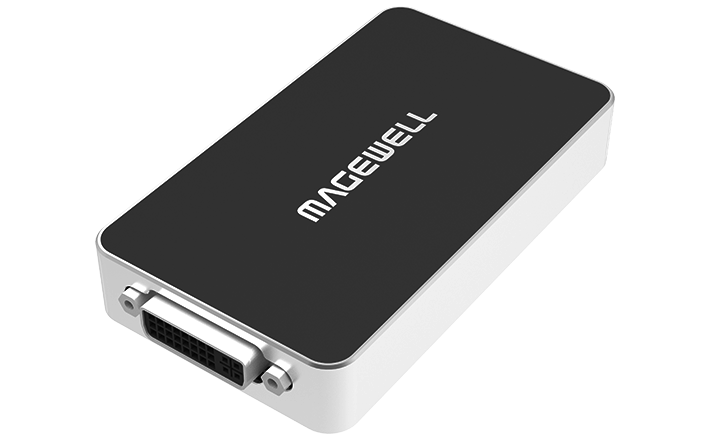
Explore this need in the finder →The Magewell USB Capture DVI Plus (part 32080, SKU 320800000) is a one-channel USB capture unit built around a DVI-I input. Its flexibility comes from the supplied conversion pieces: Magewell lists a DVI-to-VGA connector and a DVI-I breakout for HDMI and component video. That is a different proposition from a box with several active input jacks or several simultaneous capture channels. This assessment follows the manufacturer page and technical table; it is not based on hands-on testing or ownership.
Understand the connector before choosing a source
The central port is DVI-I. The product page describes capture from DVI, VGA, component or HDMI, with the latter signal types routed through the relevant adapter or breakout. The box list includes the adapters, but that does not mean they remain with a used card, nor that every regional package is identical. A buyer comparing a listing should check for the part number, the DVI-to-VGA piece and the DVI-I-to-HDMI/component breakout rather than infer them from a product photograph.
These are alternative signal paths. The device captures one video input at a time, not VGA plus HDMI simultaneously. Magewell does not list SDI, composite RCA or S-video on this model. In particular, a DVI-I-to-HDMI breakout is not an all-purpose analog converter; it is part of the specified DVI-I input arrangement. Match the exact source connector, video timing and included adapter before treating the broad input list as a fit.
The published capture table is the useful boundary
The detailed technical page lists 1920×1080p and 1280×720p output through 60 fps, alongside standard-definition modes. It also describes a broader capture-processing resolution and frame-rate ceiling, but those high-level figures do not supersede the explicit output rows. A headline maximum does not show that the unit will deliver every raster and rate combination in a chosen application. For an ordinary 1080p60 capture task, the table supplies a clear baseline; for higher frame rates, inspect the exact model table rather than assuming that 120 fps applies at 1080p.
There is no 4K recording mode documented here. Nor does the technical interface list establish a display loop-through. The product page title includes the phrase “Loop out,” but its specific connector description lists a single DVI input, USB connection and 3.5 mm audio line-in/line-out. The Line Out is audio; it is not a second video port. If keeping a monitor feed connected through the capture unit is essential, choose a model whose specific video-output diagram documents that path.
Audio and computer connection
The product can capture embedded audio with an HDMI input and accepts separate unbalanced analog audio through its 3.5 mm line-in. It also has a 3.5 mm line-out. Those connectors are useful distinctions when matching an older source or separate audio feed, but their presence does not guarantee that an application will select or mix the intended endpoint automatically. Confirm the audio source in the operating system and capture program, and check whether a downstream monitor or headphones need their own route.
The host connection is USB 3.0, with compatibility listed for USB 2.0 and USB 3.1 Gen 1. Compatible links are not necessarily equivalent for every capture rate; the technical documentation warns that frame rate can depend on bus bandwidth and internal working frequency. The product page lists Windows, Linux, Mac and Chrome OS, and names software such as OBS Studio, Capture Express and the Magewell utility. The documentation reviewed for this assessment does not provide a Mac-specific capture mode table, so the Windows 1080p60 setup should not be copied into a Mac plan without checking the exact software and host.
Package, revision and installation checks
Magewell lists a 63 cm USB cable, VGA adapter and HDMI/component breakout in the package; the Mini Repeater 4K HDMI is marked optional. The published enclosure is 101.5 × 56.8 × 17 mm and maximum consumption is about 3 W. Those are manufacturer specifications, not my measurements. Allow space for the attached DVI-I and USB leads rather than treating the case dimensions as the entire installation footprint.
The manufacturer’s July 2026 firmware page names DVI Plus Rev B. That establishes a supported revision reference, not the exact revision in a particular offer. Check the label, supplied accessories, return terms and applicable support before relying on firmware for a second-hand unit. The US retailer page corroborates the 32080 product identity, but no current price, stock, warranty eligibility or seller condition is asserted here.
Who should compare it
Compare the DVI Plus if the source is DVI, HDMI through the specified adapter, VGA or component, and a 1080p60-or-lower USB capture stream is sufficient. It may be a more useful fit for legacy computer or component sources than a camera-only HDMI dongle. It is a poor match for SDI, composite tape transfer, built-in display passthrough, HDR recording, or 4K capture. Confirm the source signal, exact 32080 identity, adapter package, USB data path and selected software as a single chain before deciding.
Key specifications
Key details at a glance
| Signal input | dvi_1_0 / hdmi_1_4_unencrypted_via_breakout / vga_via_included_adapter / component_via_included_breakout |
|---|---|
| HDMI generation | 1.4a via the included dvi-i breakout; no standalone hdmi socket is documented. |
| Confirmed capture formats | The detailed output table lists 1920x1080p and 1280x720p up to 60 fps, plus 720x576p25 and 720x480p30. The broader 2048x2160 figure is an input/capture processing ceiling, not an assertion of a 2048x2160-at-120 output mode. |
| Confirmed passthrough formats | |
| Computer connection | External USB 3.x host link; check this model's stated generation and port rate |
| Named compatible software | OBS Studio / USB Capture Utility / Capture Express / VLC / XSplit / Zoom Rooms / Microsoft Teams |
| HDR recording | Hdr file capture is not documented in the reviewed model sources. |
| Analog audio input | One selected video input can carry embedded hdmi audio; a 3.5 mm line-in accepts unbalanced analog audio. a 3.5 mm line-out carries audio, not documented video passthrough. |
| Cables listed in the box | USB 3.0 cable, 63 cm / DVI-to-VGA connector / DVI-I-to-HDMI-plus-component breakout cable |
Use the exact model’s instructions for operating limits, supplied equipment and version differences.
Sources for this review
Sources for this assessment

Check your complete signal path
Choose the source format, desired captured signal, passthrough target, computer connection and software together. A single device must support that whole arrangement.