
Your needs, this model
Does it fit your priorities?
Does AIO capture SDI, HDMI and analog video at the same time?
No. Magewell describes the model as a one-channel device that captures one of its listed source types: SDI, HDMI, DVI, VGA, component, composite or S-video. HDMI, DVI-I and analog options use the appropriate connectors or breakouts; they are alternative inputs, not concurrent capture channels.
Explore this need in the finder →Can AIO make a VHS composite signal into native 1080p video?
AIO lists composite and S-video capture through its DB9 breakout, with NTSC/PAL/SECAM detection. Those are standard-definition source formats; they cannot contain native 1080p detail. The technical output table includes HD modes, but the 1080p60 match here applies to the VGA/component-capable analog route, not a promise to restore detail from VHS.
Explore this need in the finder →Which adapters are listed with the US AIO product?
The manufacturer lists a 101.5 cm USB 3.0 cable, DVI-to-VGA connector, DVI-I-to-HDMI/component breakout, and DB9-to-YC/composite/analog-audio/component breakout. A source may still need its own cable, and the actual used or regional offer should be checked for all four items.
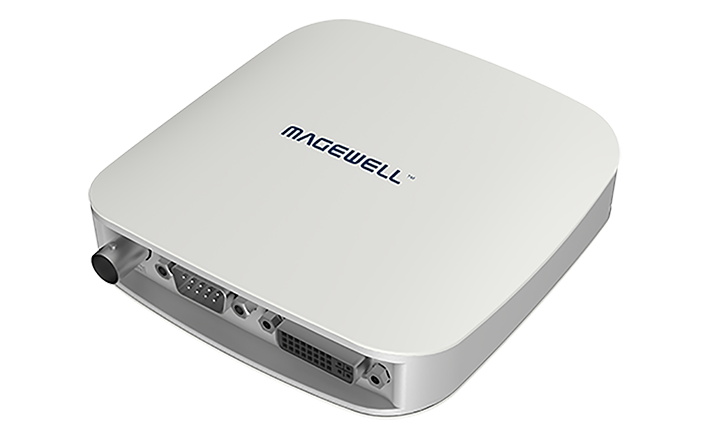
Explore this need in the finder →Magewell’s USB Capture AIO (part 32110, SKU 321100000) is an external one-channel capture box for a wider mix of signals than an HDMI-only dongle. Its page lists SDI, HDMI, DVI, VGA, component, composite and S-video. “AIO” should not be read as seven live inputs or a multi-source switcher: Magewell says it supports one video signal at a time. The practical question is which of those sources you own, which adapter it needs and what capture output that particular signal can support. This is a document-based assessment, not a hands-on test.
A versatile input list, with different paths behind it
The box has SDI, DVI-I and DB9 connectors, with the included breakout hardware mapping several formats onto those inputs. The manufacturer lists HDMI 1.4a through the DVI-I-to-HDMI/component breakout; VGA uses a DVI-to-VGA connector; composite, S-video and analog audio use a separate DB9 breakout. SDI comes through its own input. All of these are alternatives on a single capture channel, not a set of independent simultaneous recordings.
That distinction matters most for analog sources. The technical page describes a 12-bit analog-to-digital path and timing support for VGA/component, but it also lists composite and S-video as NTSC, PAL or SECAM sources. A VHS player connected through the DB9 breakout remains a standard-definition source. Choosing a 1080p capture output does not create original 1080p detail in a tape signal. For a high-definition analog source, VGA or component may be the relevant route; for a composite or S-video transfer, the source standard and interlacing need their own check.
Do not flatten the mode table into a single maximum
Magewell’s detailed table lists 1080p output modes through 60 fps and selected 720p rates through 120 fps, plus standard-definition outputs. The specifications also describe an input and processing envelope, but the broadest number is not a promise that each connector, source standard, operating system and USB link can use the maximum together. For the finder’s conservative 1080p60 Windows plan, the table supports that output mode; its analog interpretation refers to the VGA/component-capable path, not a claim that composite or S-video is a native HD signal.
The unit is a capture interface, not a monitor loop-through hub. The page lists a single selected video source feeding USB, and no separate HDMI or SDI video output is documented. If you need to pass the source onward to a monitor while capturing, include a suitable splitter or choose a model with a documented output path, and verify how that extra device changes the signal and audio chain. No HDR recording or 4K60 capture mode is established for this AIO assessment.
Audio and software are part of the workflow
The product page describes embedded audio for HDMI and SDI together with analog audio input. The DB9 breakout can carry analog L/R audio, while the technical specification describes embedded SDI and HDMI audio capture. The capture output is not an unlimited promise to preserve every input channel at the same channel count; the detailed table describes up to two audio channels at 48 kHz for SDI and up to two-channel IEC 60958 audio for HDMI. Check the recording application’s selected audio device and the planned source, especially if you need to combine analog line audio with embedded sound.
The host interface is USB 3.0, with compatibility listed for USB 2.0 and USB 3.1 Gen 1. The official page names Windows, Linux, Mac and Chrome OS and lists OBS Studio among compatible applications. These general compatibility statements do not replace a check of the exact OS, app version, host controller and chosen signal mode. The reviewed sources do not supply a Mac-specific mode matrix, so this assessment does not carry its Windows 1080p60 plan over to Mac. Capture rate can also be limited by USB bandwidth and the device’s internal working frequency.
Check every adapter in the box
Magewell lists the AIO unit, a 101.5 cm USB 3.0 cable, a DVI-to-VGA connector, a DVI-I-to-HDMI/component breakout and a DB9-to-YC/composite/analog-audio/component breakout. The two breakouts are not interchangeable. A source may still need a suitable HDMI, BNC, VGA, component, composite or S-video cable at its far end. Check the exact package if buying used; a missing little connector can make a nominally compatible source impractical without additional equipment.
The technical page specifies a 116 × 116 × 32 mm enclosure and about 5 W maximum consumption, with a stated operating-temperature range. Those are manufacturer figures, not measurements from this review. A square case with multiple source leads needs more clearance than the dimensions alone suggest. The manufacturer’s current firmware list names AIO Rev B; confirm the label and supported firmware for the actual unit instead of assuming the current page describes every used revision.
Who should compare it
The AIO makes sense to compare when an installed source could be SDI, DVI/HDMI, VGA/component or standard-definition composite/S-video, and you need to select one source for a USB capture host. Its advantage is the range of documented connection paths in one box, not simultaneous capture or format conversion without limits. It is a poor fit if you need several concurrent camera feeds, a built-in video loop-through, guaranteed Mac high-rate modes, 4K60 recording or a promise to turn analog tape into native HD. Before purchase, match the exact source standard, adapter set, host link, application and captured audio route together.
Key specifications
Key details at a glance
| Signal input | sdi_bnc / hdmi_1_4_unencrypted_via_dvi_breakout / dvi_1_0 / vga_via_adapter / component_via_breakout / composite_via_db9_breakout / s_video_via_db9_breakout |
|---|---|
| HDMI generation | Hdmi 1.4a through the included dvi-i-to-hdmi/component breakout; no separate hdmi socket is listed. |
| Confirmed capture formats | The detailed capture table lists 1080p23.98 through 1080p60, selected 720p rates through 120 fps and standard-definition outputs. The device's broad input/capture processing limits do not mean every input type originates at those modes. |
| Confirmed passthrough formats | |
| Computer connection | External USB 3.x host link; check this model's stated generation and port rate |
| Named compatible software | OBS Studio / USB Capture Utility / Capture Express / VLC / XSplit / GStreamer / Zoom Rooms / Microsoft Teams |
| HDR recording | Hdr file capture is not documented in the reviewed model sources. |
| Analog audio input | One selected video input is captured at a time; hdmi and sdi can carry embedded audio, while the db9 breakout supplies analog l/r audio and the technical table describes analog line input. |
| Cables listed in the box | USB 3.0 cable, 101.5 cm / DVI-to-VGA connector / DVI-I-to-HDMI-plus-component breakout / DB9-to-YC, composite, analog audio and component breakout |
Use the exact model’s instructions for operating limits, supplied equipment and version differences.
Sources for this review
Sources for this assessment

Check your complete signal path
Choose the source format, desired captured signal, passthrough target, computer connection and software together. A single device must support that whole arrangement.