
Your needs, this model
Does it fit your priorities?
Does Pro Capture DVI have a native HDMI input?
Its central connector is DVI-I. Magewell lists HDMI 1.4a through a DVI-I breakout, along with VGA and component adapters; check the actual offer includes the needed part. The HDMI source must be unencrypted. There is no SDI or video output listed.
Explore this need in the finder →Can I count on 1080p120 capture?
No. Magewell's technical sheet gives a qualified general maximum rate and about 80fps at 1920x1080 as an example. The example is below 120fps and is not a promise for all timings. This assessment matches only a conservative 1080p60 Windows/PCIe plan; confirm any higher-rate timing with Magewell before purchase.
Explore this need in the finder →Which source fit uses the DVI card?
It is a one-source PCIe Gen2 x1 card for DVI-I directly or a supported HDMI 1.4a, VGA or component route using the listed breakout. The assessment uses 1080p60 for a Windows/OBS-compatible plan; verify source timing, analog audio, adapter package and the low-profile bracket for the actual system.
Explore this need in the finder →Scope: this is Magewell Pro Capture DVI, part 11030 / SKU 110300000, a one-channel PCIe card. It is not the DVI Plus USB Capture model and not the Pro Capture AIO. I assessed the manufacturer product page, technical sheet and datasheet, plus a U.S. dealer listing used only to confirm the exact model identity. This is a desk-research assessment, not a hands-on installation or capture test; an identity listing does not establish present availability or the condition of a specific offer.
DVI is the physical hub for several source routes
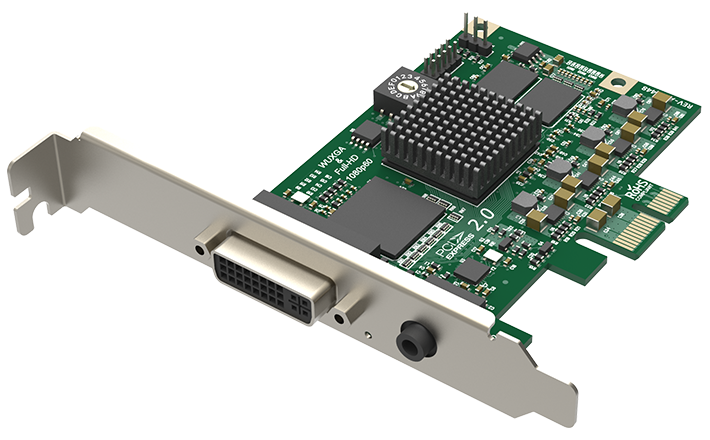
The model centers on one DVI-I input and a separate 3.5mm analog-audio input. The DVI-I connector can be used for DVI and, with the listed breakouts, compatible HDMI 1.4a, VGA or component sources. Magewell lists a DVI-to-VGA adapter and a DVI-I-to-HDMI/component adapter in its standard package. This is not a direct row of HDMI, VGA and component sockets: the intended route depends on the correct breakout, cable and source output. Confirm the adapter actually comes with the offer, especially for used or incomplete stock.
The HDMI path is HDMI 1.4a through the DVI-I breakout, and Magewell’s capture guidance requires HDMI to be unencrypted. HDCP-encrypted HDMI cannot be captured. The product does not list SDI or a separate HDMI output, and it should not be treated as a passthrough device. Choose it when a legacy DVI/analog source or the appropriate unencrypted HDMI breakout is central to the system, not simply because the name sounds like a general HDMI card.
Rate expectations: useful HD, not 1080p120
Magewell’s technical material gives a maximum input and capture raster up to 2048 × 2160 and a general capture ceiling up to 144fps, but qualifies frame rate by image resolution, pixel clock and PCIe bandwidth. At 1920 × 1080, the sheet gives about 80fps as an example. That is not an assured 1080p144 or 1080p120 mode. For a predictable conventional setup, the assessment uses 1080p60 on a Windows PCIe host with OBS-compatible software, while treating a rate above that target as something to confirm with the exact timing, driver and application. A headline raster or general engine maximum should not be read as a complete timing matrix.
The board is PCIe Gen2 x1, a narrower host link than the x4 AIO 4K models, and has a low-profile card format. Verify the motherboard slot’s physical access and electrical wiring, the case bracket, airflow and adjacent-card clearance. It is an internal capture card; a laptop’s USB connection is not a substitute for the required PCIe host. Magewell lists Windows, Linux and Mac support and OBS-compatible software, but the sources do not establish an identical mode table for every OS. The clear operating plan is Windows/PCIe x1/OBS at the conservative 1080p60 target, with source route and breakout identified first.
Choosing between digital and analog inputs
For HDMI, the card is a reasonable candidate when the source can output unencrypted video and the included DVI-I-to-HDMI adapter matches the connection you need. For analog equipment, VGA and component are the relevant high-resolution paths; check whether analog audio must enter the 3.5mm jack separately. The product is not a multiformat converter that makes every source mode interchangeable, and adapter compatibility does not guarantee source timing support. Composite and S-Video are not listed among this model’s interfaces, so avoid confusing it with the broader Pro Capture AIO that uses additional DB9 accessories.
The strongest fit is a single source with DVI or a supported adapter path, a desktop PCIe slot, and an HD-class recording target where roughly 60fps is sufficient. It is a poor fit for 4K60, 1080p120, simultaneous sources, a built-in monitor feed, or anyone who needs a direct HDMI socket without a breakout. If the requirement is a modern 4K workflow, compare a different model such as the HDMI 4K Plus family; if the source is SDI, choose a product whose SDI path is explicitly documented.
Package and compatibility checks before ordering
Confirm the identity label says Pro Capture DVI, part 11030 / SKU 110300000, and verify which DVI breakouts are in the exact box. A seller may list an adapter separately or offer a card whose accessories are missing; the manufacturer package list is not proof of an individual offer’s contents. Check the DVI connector type, analog-audio path, source timing, HDCP state for HDMI, PCIe x1 slot availability and the intended operating-system driver. Magewell names OBS-compatible applications, but that is software compatibility evidence, not a test of your particular camera, legacy computer, expansion chassis or recording settings.
In short, the Pro Capture DVI is a flexible single-channel bridge for supported digital and analog sources when its adapters and older interface choices are an advantage. Its rate guidance is bounded by actual timing and host bandwidth, and the approximately 80fps 1080p example is a reason not to infer 1080p120. If that boundary, PCIe requirement, one-source limit and lack of passthrough match the job, it can be a focused fit; otherwise, use the guide’s connector-and-rate comparison to narrow the category before shopping.
Key specifications
Key details at a glance
| Signal input | One DVI-I input accepts DVI directly or supported HDMI 1.4a/VGA/component breakouts; separate 3.5mm analog audio. One source at a time; no SDI or video output is listed. |
|---|---|
| HDMI generation | 1.4a via dvi-i-to-hdmi breakout |
| Confirmed capture formats | Input and capture raster up to 2048x2160. Technical material gives a general up-to-144fps ceiling qualified by PCIe bandwidth and pixel clock; approximately 80fps at 1920x1080 is an example. This assessment uses 1080p60 as its conservative documented target and does not claim 1080p120. |
| Confirmed passthrough formats | |
| Computer connection | Pcie gen2 x1 |
| Named compatible software | OBS Studio / Magewell Capture Express / Magewell Capture SDK / VLC / XSplit / vMix / Wirecast |
| HDR recording | Not documented |
| VRR passthrough | No |
| Analog audio input | Separate 3.5mm analog audio input; the hdmi adapter's audio path and exact source configuration should be checked. |
| Cables listed in the box |
Use the exact model’s instructions for operating limits, supplied equipment and version differences.
Sources for this review
Sources for this assessment
- Magewell Pro Capture bounded family list
- Magewell Pro Capture DVI product page, model identity and included adapters
- Magewell Pro Capture DVI technical specifications
- Magewell Pro Capture DVI technical datasheet
- Coremicro U.S. authorized-dealer identity bridge for part 11030
- Magewell support note: HDCP-encrypted HDMI cannot be captured
- Exact Magewell Pro Capture DVI product-page image

Check your complete signal path
Choose the source format, desired captured signal, passthrough target, computer connection and software together. A single device must support that whole arrangement.