
Your needs, this model
Does it fit your priorities?
Can Pro Capture Dual DVI capture VGA or component video?
Yes. Magewell lists DVI, VGA, component and HDMI-with-embedded-audio source paths on the two DVI-I inputs, with DVI-to-VGA and DVI-I-to-HDMI/component breakouts in the manufacturer's package list. The source type and timing must be selected correctly in the capture setup. Composite/S-video and SDI are not listed for this card.
Explore this need in the finder →Does the published 144fps figure mean both channels capture 1080p144?
No. Magewell qualifies the general maximum by resolution, PCIe bandwidth and pixel clock. Its DVI family table gives 1080p60 examples at 86.85fps in one 4:2:2 pixel format and 63.90fps in 4:4:4; those are not two-channel 144fps guarantees. This assessment uses one 1080p60 feed and asks buyers to validate any higher-rate concurrent configuration directly against the current mode table.
Explore this need in the finder →Does Dual DVI send a passthrough signal to a monitor?
The reviewed Magewell product and technical pages list two capture inputs but no video output or loop-through. Route a separate display split if a monitor must receive the same source; two capture channels are not two monitor outputs.
Explore this need in the finder →Research position: this is a source-based assessment of part 11070, not a report of owning, installing or testing the card. Magewell identifies the Pro Capture Dual DVI as a two-channel HD capture card with two DVI-I inputs and a PCIe Gen2 x4 host. Its useful distinction is not the word “DVI” alone: the manufacturer lists several source types routed through the DVI-I connectors, while the host slot and exact breakout package determine whether the card fits a real workstation. The official product page, technical specifications and DVI family sheet are the basis for this review.
Two capture inputs, with more than one connector workflow
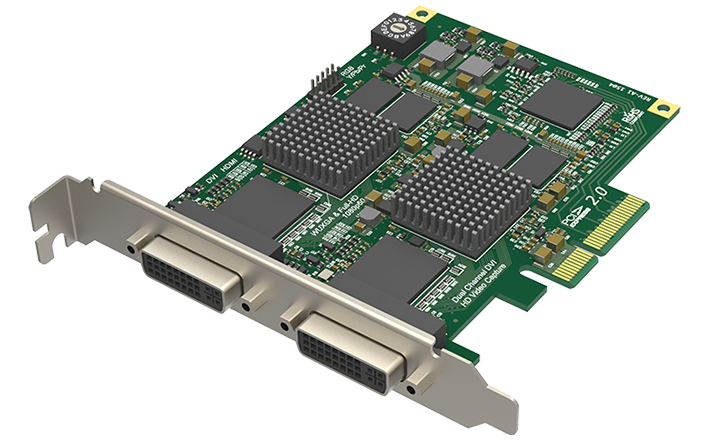
The board presents two DVI-I inputs. Magewell's product materials list DVI, HDMI 1.4a, VGA and component as compatible source paths, using the manufacturer's DVI-to-VGA adapters and DVI-I-to-HDMI/component breakouts. HDMI audio is embedded in that signal path; a separate analog audio route is also listed. These are not four extra sockets and they do not make the board an HDMI switcher. Before buying, map the source connector and signal type to one of the supplied breakouts, then check that the actual package includes it. The listing does not establish that a source cable or an external conversion device is in the box. Dual DVI makes more sense when a workstation is expected to acquire two sources, or when two feeds can be useful in a production workflow, than as a simple gaming-display passthrough solution. The two-channel identity is meaningful: the single-channel Pro Capture DVI (11030) is a separate, PCIe x1 board, while this part is the x4 dual-input model. The two input connectors do not mean that either one is a monitor output. The reviewed product and technical tables list no video loop-through, so plan a separate monitor split or output path if the source also needs to reach a display.Read the rate ceiling conservatively
The current technical page gives a general capture ceiling up to 144 frames per second, but qualifies it by PCIe bandwidth, raster size and the card's onboard pixel clock. Magewell's DVI family table is more helpful for an ordinary target: it lists typical 1080p60-class input formats and shows measured format-specific examples at 1080p60 of 86.85 fps for 8-bit 4:2:2 and 63.90 fps for 4:4:4. Those examples are not interchangeable, and neither establishes every high-rate two-channel combination. This assessment therefore treats 1080p60 on one feed as its conservative matcher target. It does not convert the generic “up to 144fps” line into a 1080p120 claim. The family user manual matters for analog workflows. It describes input-type selection and timing configuration for VGA and component, so a source that is physically connected can still need the correct crossbar selection and timing. That is an operational detail, not a reason to assume that every analog source is supported: the product list names VGA and component, not composite or S-video. Protected HDMI is also outside the fit described here; Magewell says HDMI capture requires an unencrypted source. Nothing in this review recommends bypassing content protection.Host, operating system and software
This is an internal PCIe Gen2 x4 card, not an external USB capture box. A desktop or production host needs an electrically appropriate x4 slot, a free rear bracket position and enough chassis clearance. Magewell lists Windows, Linux and Mac support and names OBS among compatible software. The sources reviewed here do not provide a Mac-specific mode table, so the authored Mac operating plan is only a compatibility listing with the source timing and application left for confirmation. The Windows/OBS 1080p60 assessment is the narrower supported path. A reader who wants an externally connected laptop workflow should shortlist USB hardware instead. No model-specific HDR recording or VRR passthrough arrangement is established in the reviewed product materials. Ten-bit processing or a maximum capture raster is not, by itself, an HDR file workflow. Likewise, Magewell's short Pro Capture FAQ describes a general 1080p60 capture-latency range and says that software affects it; that is not a measured Dual DVI result or a comparative benchmark. The assessment makes no personal latency claim.Who should shortlist it?
Consider the Dual DVI when two PCIe capture channels and legacy DVI-I source routing are deliberate requirements, especially where VGA or component sources are still part of the signal plan. Compare it with a single-channel DVI card if you only need one feed, and with a modern HDMI card if you need HDMI 2.1, 4K60 capture or a display loop-through. The model page and a U.S. channel identity page support part 11070/SKU 110700000, but neither is evidence that a particular seller currently has stock or a complete adapter package. Check the board revision, the exact breakout count, the PCIe slot and the timing you intend to capture before ordering. This is a desk-researched specification assessment. No card, workstation, signal source or application was physically tested, and no customer experience or current offer is claimed.Key specifications
Key details at a glance
| Signal input | Two DVI-I input connectors. Magewell lists supported DVI, HDMI 1.4a, VGA and component source routes using the model's DVI-to-VGA and DVI-I-to-HDMI/component breakouts; the selected source type and timing must be configured correctly. / HDMI carries embedded audio; supported analog audio is a separate input route. No SDI, composite/S-video capture or video loop-through is listed for this configuration. |
|---|---|
| HDMI generation | 1.4a via listed dvi-i-to-hdmi breakout |
| Confirmed capture formats | Magewell lists input/capture raster up to 2048x2160 and a general rate ceiling up to 144fps, limited by PCIe bandwidth and the onboard pixel clock. The DVI family table gives typical 1080p60-class timings and measured single-format examples of 86.85fps at 1080p60 8-bit 4:2:2 and 63.90fps at 4:4:4. This assessment matches a conservative 1080p60 target for one feed; those figures do not promise two channels at every maximum format simultaneously. |
| Confirmed passthrough formats | |
| Computer connection | Pcie gen2 x4 |
| Named compatible software | OBS Studio / Magewell Capture Express / Magewell Capture SDK / VLC / XSplit / vMix / Wirecast |
| HDR recording | Not documented |
| VRR passthrough | No |
| Analog audio input | Embedded hdmi audio and a separate analog audio route are listed; confirm input selection and app-level audio-device routing for the chosen source. |
| Cables listed in the box |
Use the exact model’s instructions for operating limits, supplied equipment and version differences.
Sources for this review
Sources for this assessment
- Magewell Pro Capture family list
- Magewell Pro Capture Dual DVI official product page
- Magewell Pro Capture Dual DVI technical specifications
- Magewell DVI capture-card family brochure
- Magewell Pro Capture family user manual
- Magewell short FAQ for Pro Capture
- U.S. channel product identity bridge for Pro Capture Dual DVI
- B&H U.S. listing browser-read identity for Pro Capture Dual DVI
- Magewell HDMI HDCP capture limitation support note
- Exact Pro Capture Dual DVI manufacturer product image

Check your complete signal path
Choose the source format, desired captured signal, passthrough target, computer connection and software together. A single device must support that whole arrangement.