
Your needs, this model
Does it fit your priorities?
Can Pro Capture AIO digitize an older composite or S-Video source?
Yes. Magewell lists composite and S-Video through the DB9 breakout, alongside VGA/component, DVI, HDMI-through-DVI breakout and SDI. Composite/S-Video are standard-definition routes, not 1080p60 inputs. The card selects one source at a time and does not pass video through to a monitor.
Explore this need in the finder →Does this AIO mean I can capture HDMI, SDI and analog sources simultaneously?
No. It is one capture channel with manual source selection; the multiple connector types are alternative inputs. For simultaneous feeds, choose a model with the actual number of concurrent channels and compatible slot and signal paths.
Explore this need in the finder →What package and host checks matter for the Pro Capture AIO?
Verify exact part 11020/SKU 110200000, a PCIe Gen2 x1 desktop slot, normal-profile chassis clearance and the DVI-to-VGA adapter, DVI-I-to-HDMI/component breakout and DB9 composite/S-Video/audio/component breakout. Check the exact input and audio connector you intend to use; the card has no listed monitor output.
Explore this need in the finder →This assessment covers the PCIe Pro Capture AIO, part 11020, not Magewell's separate USB Capture AIO. It uses model pages, technical material, the AIO brochure and a U.S. identity listing; no physical card was tested. The AIO's appeal is connector variety: one board can accept selected SDI, HDMI, DVI, VGA, component, composite or S-Video source types. That does not make it a multi-input switcher or a multi-channel recorder; the hardware captures one selected source at a time.
One channel with several adapter paths
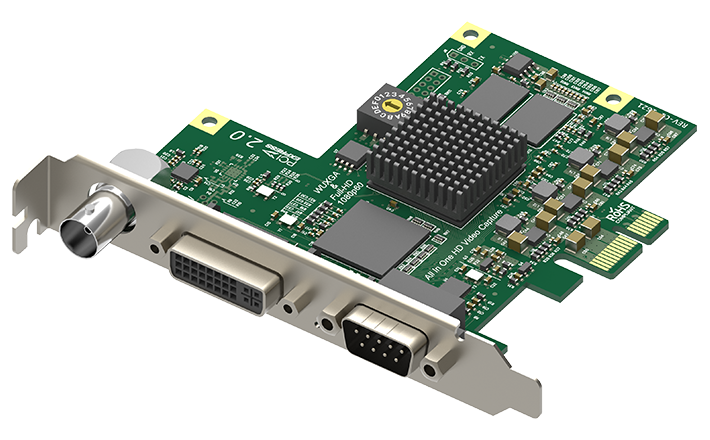
The rear panel combines BNC, DVI-I and DB9. Magewell lists one BNC SDI input, a DVI-I interface for DVI and HDMI 1.4a through a breakout, and a DB9 path for S-Video, composite, component and analog audio. A DVI-to-VGA adapter is also listed. The DVI-I-to-HDMI/component and DB9-to-YC/composite/audio/component breakouts are in Magewell's package description. Map the source's actual output to its adapter and cable before ordering. There is no ordinary standalone HDMI socket in the model's text interface table, and the HDMI source must be unencrypted: Magewell says HDCP-encrypted HDMI cannot be captured.
The product page describes the selected source as one of several alternatives, and the technical sheet says the input can be manually selected. In practical terms, a BNC SDI camera and an HDMI source are not two simultaneous capture channels. Choose one route at a time. The official AIO brochure puts 1080p60 and 1080p59.94 among the typical formats; this supports a conservative Windows/PCIe/OBS 1080p60 assessment for the HDMI and SDI paths and for VGA/component analog. It does not turn composite or S-Video into high-definition inputs. Those are standard-definition digitizing routes.
Read the resolution and rate limits together
This is an HD-generation card, not one of the newer 4K Pro Capture siblings. Magewell lists a maximum input raster of 2048×2048 and a capture engine ceiling of up to 144 fps, with actual rates limited by PCIe bandwidth and the on-board pixel clock. At 1920×1080, the specification gives about 80 fps as an example. The brochure's typical-mode table is more useful for a normal streaming setup: it includes 1080p60 and lower formats. Do not advertise the engine's 144-fps ceiling as an assured 1080p144 capture, much less a 4K mode.
Analog inputs have their own constraints. VGA/component sampling is documented up to a 165 MHz pixel rate; signals above that may be horizontally sub-sampled and are not officially supported. Composite and S-Video depend on SD standards such as NTSC or PAL. That makes the AIO useful for a collection of older sources only if each source's timing, analog audio and connector breakout are known. For a capture chain that needs a 4K60 SDI signal, compare the Pro Capture SDI 4K Plus instead; for a laptop-friendly external workflow, compare the USB Capture AIO separately.
There is no built-in monitor path
The reviewed AIO interface and package descriptions list inputs, adapters and capture software, but no HDMI or SDI output/loop-through. If a live operator needs to see a source on a monitor while the workstation records it, design that as a separate downstream or split signal path.
Desktop installation and package checks
The Pro Capture AIO uses PCIe Gen2 x1 and a normal-profile bracket; the technical sheet gives a board size of 92.76 × 96.24 mm without the bracket and maximum power of about 5.03 W. Although x1 is a modest lane requirement, the card still needs a desktop PCIe host and a suitable slot opening. It is not a USB dongle, nor does the “x1” host notation imply it is powered or operated over a USB connection. Magewell supports multiple cards in one system, but each has its own device selection and capture workflow.
Package verification matters more here than on a single-cable HDMI capture device. The manufacturer lists the DVI-to-VGA connector, the DVI-I-to-HDMI/component breakout, and the DB9-to-YC/composite/analog-audio/component breakout. A partial used package can leave a physically present input unusable for the source you intend to attach. The U.S. dealer page helps identify the 11020 model, but it does not confirm the adapter set or hardware revision in a specific offer. Check those details with the seller before ordering.
Software, audio and source selection
Magewell lists Windows, Linux and Mac support, OBS and other compatible capture software, and Capture Express. The product is still listed with current support resources, but that does not make its older driver generation a universal guarantee on every present-day system. The latest driver note reviewed here requires macOS 13 or later; the AIO sources do not provide a Mac-specific capture-mode matrix. The 1080p60 assessment is therefore a Windows arrangement and should not be silently carried across to a Mac.
Audio varies with the selected source. HDMI and SDI can supply embedded audio; the analog routes use the breakout connectors and analog audio input. Magewell's family FAQ says Windows software that does not use the Magewell SDK can capture at most two LPCM channels. A studio that needs multi-channel SDI audio or separate analog mixing should check the exact app path before assuming every input shares one audio configuration. The card's broad list of input types is valuable, but it is not a promise that all source and audio routes are active at once.
When its flexibility is worth the slot
Consider Pro Capture AIO when a desktop workflow needs to digitize one of several signal families—especially legacy VGA, component, composite or S-Video alongside SDI and HDMI—and the adapters are part of the plan. Skip it if the need is simultaneous capture, a built-in display pass-through, a 4K60 source, or an external USB host. A source-to-card map, a known capture timing, the correct breakout package and a separate monitor route are the purchase checks that matter most. The exact model number also matters: USB Capture AIO is a different product with a different host interface and should not inherit this card's facts.
Key specifications
Key details at a glance
| Signal input | One input source selected at a time: BNC SD/HD/3G SDI; DVI-I with HDMI 1.4a via the included breakout; DVI 1.0; VGA via the DVI-to-VGA adapter; component via breakout; composite and S-Video via the DB9 breakout. It has no published video loop-through. |
|---|---|
| HDMI generation | Hdmi 1.4a via the dvi-i-to-hdmi/component breakout; there is no separate hdmi socket listed. |
| Confirmed capture formats | The AIO brochure lists 1080p60/59.94 among typical formats. Magewell's specification lists capture image resolution up to 2048x2048 and a generic up-to-144fps ceiling that may be limited by PCIe bandwidth and pixel clock; it gives about 80fps at 1920x1080 as an example. These maxima do not mean all input formats reach them. |
| Confirmed passthrough formats | |
| Computer connection | Pcie gen2 x1 |
| Named compatible software | OBS Studio / Magewell Capture Express / Magewell Capture SDK / VLC / VirtualDub / XSplit / vMix / VidBlaster / Wirecast |
| HDR recording | Not documented |
| VRR passthrough | No |
| Analog audio input | Sdi and hdmi can carry embedded audio; the separate dvi/vga/component/composite/s-video paths use the listed analog audio/breakout routes. magewell's pro capture family faq says windows software without the sdk can capture at most two lpcm audio channels; confirm the exact selected audio path and app. |
| Cables listed in the box | DVI-I-to-HDMI/component breakout x1 / DB9-to-YC/composite/analog-audio/component breakout x1 |
Use the exact model’s instructions for operating limits, supplied equipment and version differences.
Sources for this review
Sources for this assessment
- Magewell Pro Capture AIO product page, exact part/SKU, input selection and included adapters
- Magewell Pro Capture AIO technical specifications
- Magewell Pro Capture AIO technical datasheet, revised 2025-12-10
- Magewell AIO Capture Cards technical brochure
- Coremicro U.S. authorized-dealer identity bridge for Pro Capture AIO
- Magewell Pro Capture bounded family list
- Exact Magewell Pro Capture AIO product-page image
- Magewell Short FAQs about Pro Capture, including SDI 4K Plus timing and family audio limits
- Magewell support note: HDCP-encrypted HDMI cannot be captured

Check your complete signal path
Choose the source format, desired captured signal, passthrough target, computer connection and software together. A single device must support that whole arrangement.