
Your needs, this model
Does it fit your priorities?
Can I transfer a VCR tape with composite or S-Video?
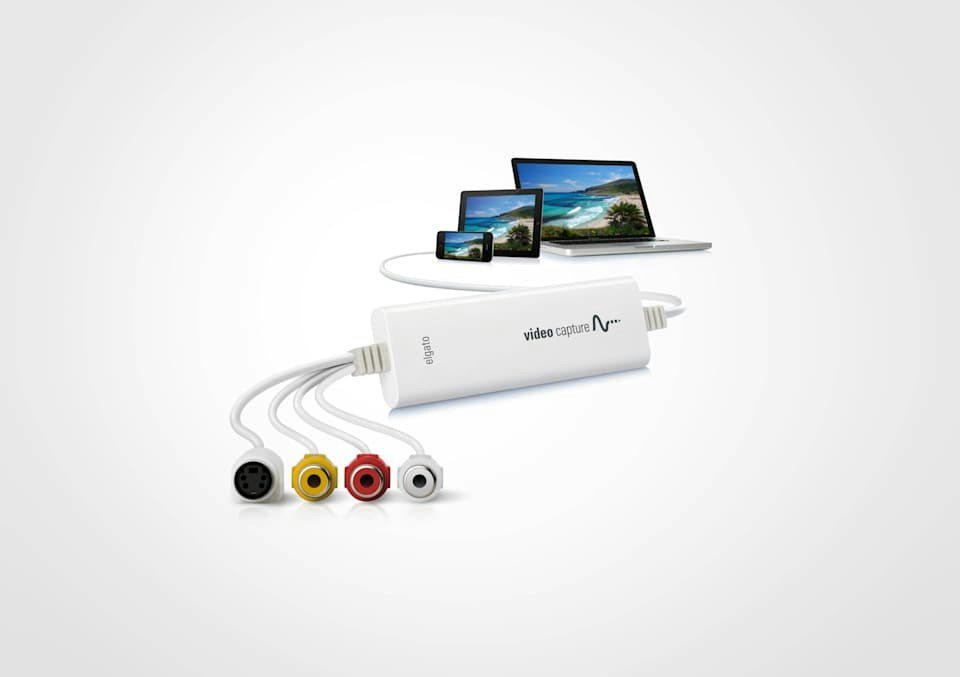
That is the device's specific job: Elgato lists composite RCA and S-Video inputs, RCA stereo audio, and NTSC/SECAM/PAL/PAL-60 support. The source machine and playback cable still need to be supplied, and the output is SD—640x480 for 4:3 or 640x360 for 16:9—not HD restoration. The manufacturer now marks the product Legacy/EOL, so check the exact software and seller terms before choosing an old offer.
Explore this need in the finder →Will it capture modern HDMI or make a 1080p60 file from my tape?
No. The hardware accepts analog composite/S-Video, not HDMI, and its stated outputs are 640x480 or 640x360. A card that records a newer HDMI signal is a different product class; do not assume an analog connector adapter changes the source into a supported digital input. If a 1080p60 output is essential, this model does not meet that requirement.
Explore this need in the finder →Can I connect Elgato Video Capture directly to an iPad?
No. Elgato's compatible-devices page expressly says Video Capture hardware does not support its iPad capture app and does not work with an iPad. Its published arrangement uses a Mac or Windows computer over USB 2.0, with the matching software; the included SCART adapter does not change the host requirement.
Explore this need in the finder →Elgato Video Capture is an earlier USB 2.0 converter for analog video, not a small HDMI game-capture card. It is aimed at a VCR, camcorder, DVR or similar source that provides composite RCA or S-Video output and needs a standard-definition file on a computer. Elgato's US page identifies SKU 1VC104001001, but the support material now labels the product Legacy/EOL. This review relies on the manufacturer documentation and makes no claim of personal tape-transfer testing or seller availability.
Start with the source connectors, not the USB plug
The source side is composite video or S-Video, with analog stereo audio on the red and white RCA leads. The included composite/RCA stereo cable and composite-to-SCART adapter help with particular source devices, but the VCR, camcorder, tapes and any source-specific leads are separate. The product is not an HDMI converter: Elgato's manual explicitly says there is no HDMI input. It cannot replace a console card simply because both products eventually connect to a computer over USB.
If the source has both outputs available, Elgato says S-Video offers higher clarity than composite. That choice depends on the VCR/camcorder and tape signal; the capture stick cannot recover detail that the source never outputs. The manufacturer lists automatic support for NTSC, SECAM, PAL and PAL/60. Check the video standard of the playback device and recording, especially when tapes and equipment come from different regions. The software's aspect-ratio setting should follow the material: a 4:3 tape with letterbox bars should not be forced into 16:9, which would stretch the image rather than remove the bars.
Set expectations at standard definition
The most important specification is the output size: 640×480 for 4:3 or 640×360 for 16:9. That makes sense for digitizing legacy footage for basic playback, sharing or editing, but it is not a modern 1080p capture path and does not upscale a tape into recovered HD detail. The product page lists H.264 at 1.4 Mbit/s for PC software and describes H.264 or MPEG-4 choices for Mac. There is a software-version caveat: Elgato's release notes say the macOS 2.0.7 update removed MPEG-4 recording and the newer 2.0.9 release is the current listed version. For a current Mac installation, do not assume MPEG-4 remains selectable based on the older static tech specification; confirm the exact installed release.
Audio is also analog. The product specification lists AAC at 48 kHz and 128 kbit/s. Elgato's usage guide walks the user through checking the audio level before recording, then trimming the beginning and end in its utility. This is a guided transfer workflow rather than a capture system for high-resolution production, multi-camera switching or a live gaming display chain.
Computer and application support needs a version check
The hardware connects through USB 2.0, and Elgato's manual says the device is not UVC. That matters because a standard USB video-device assumption is not enough; use the correct Elgato software/driver path. The manufacturer publishes a Windows 10/11 OBS Studio setup guide, including selecting Video Capture as the source and managing the device's audio entry. That makes OBS a documented Windows path, but it does not establish that every generic app will see the device, especially on macOS.
Elgato lists a Mac and Windows application. Its recent release notes list Video Capture 2.0.9 for macOS, fix a reported crash with macOS 15 Sequoia, and describe native Apple Silicon support in the preceding 2.0.7 release. On Windows the release page says to install both the Video Capture software and its separate driver. Older pages give a wider OS floor; current app versions and operating-system requirements can be narrower, so check the actual download version before selecting an older computer. The manufacturer also explicitly says Video Capture hardware does not work with an iPad or the Elgato Capture iPad app.
What an older-model label means in practice
Elgato support pages identify Video Capture as Legacy/EOL. That makes it useful to assess if you already own one or are considering a specific used or remaining offer, but not a model I would frame as a current platform investment. EOL is not proof that no seller has a unit; it is a reason to check the SKU, software download, working driver for the exact operating system, return window, warranty status and the supplied adapter/cable before purchase. The manufacturer product page still describes the US package, while third-party offers may not contain those pieces.
Shortlist it for a narrow job: an existing analog source, computer-based standard-definition transfer, and a willingness to install the matching application. It is a poor fit if the input is HDMI, the required output is 1080p60 or higher, the setup needs display passthrough, the host is an iPad, or the project depends on currently supported professional capture software. Before ordering, verify that the VCR/camcorder actually outputs composite or S-Video, choose the correct aspect ratio and video standard, confirm the USB connection and current app/driver version, and remember that no source machine is included.
Evidence note: Product identity and output details come from Elgato's US page, manual, system requirements, software notes and support guidance. The manufacturer's Mac format documentation has changed across software releases; no independent image-quality, tape-condition, playback-compatibility or capture test is claimed.
Key specifications
Key details at a glance
| Signal input | analog_video |
|---|---|
| Confirmed capture formats | H.264 video at 1.4 Mbit/s / AAC audio at 48 kHz / 128 kbit/s / macOS 2.0.7+ removed MPEG-4 recording option |
| Computer connection | Usb 2 0 |
| Named compatible software | Elgato Video Capture for Windows / Elgato Video Capture for macOS / OBS Studio on Windows (official setup guide) |
Use the exact model’s instructions for operating limits, supplied equipment and version differences.
Sources for this review
Sources for this assessment
- Video Capture — official US product page, SKU, package and output formats
- Elgato Video Capture Manual — installation, inputs, USB and operating details
- Elgato Video Capture — official system requirements
- Elgato Video Capture Software Release Notes — latest versions and OS/app changes
- Elgato Video Capture — OBS Studio Setup for Windows 10/11
- What video sources can Elgato Video Capture use?
- Elgato Capture App — Compatible Devices; Video Capture does not work with iPad
- What audio sources can Elgato Video Capture use? — manufacturer Legacy/EOL status notice
- Elgato Video Capture — fix for crashes with macOS 15 Sequoia
Check your complete signal path
Choose the source format, desired captured signal, passthrough target, computer connection and software together. A single device must support that whole arrangement.