
Your needs, this model
Does it fit your priorities?
Can the original Cam Link take a camera's 1080p60 HDMI feed into OBS on a Windows PC?
Historically, yes when the camera itself supplies clean, unencrypted 1080p60 HDMI and the computer provides USB 3.x. Elgato's supported-software page names OBS Studio and UVC webcam applications, and its source documentation lists 1080p and up to 60 fps. The model is discontinued, so verify the exact Windows, driver, camera and OBS versions rather than treating an old compatibility table as current support.
Explore this need in the finder →Can the original Cam Link pass a camera or console signal through to a 4K display?
No HDMI display output is documented. Elgato describes a female HDMI input on one end and a USB 3.0 male computer connection on the other; this is a camera-to-USB webcam path, not an HDMI loop-through card. Its older specification also limits the supported source resolution list to 720p and 1080p. A 4K display-passthrough requirement calls for a different model with an explicit output-mode table.
Explore this need in the finder →Does part number 10GAC9901 mean a listing is for Cam Link 4K?
No. Elgato's support reference calls the original Cam Link 10GAC9901 and separately labels Cam Link 4K as 10GAM9901. Elgato also says the original is different hardware and cannot be upgraded to Cam Link 4K. Because production stopped in November 2018, a used listing should show the actual device marking and the seller's included equipment rather than rely on a generic title.
Explore this need in the finder →What does the official original Cam Link box list include?
Elgato's technical-specification page lists the Cam Link, a nine-inch USB 3.0 extension cable and a Quick Start Guide. It does not list a camera-side HDMI cable, so check the particular seller package and budget for a cable with the connector size your camera actually uses.
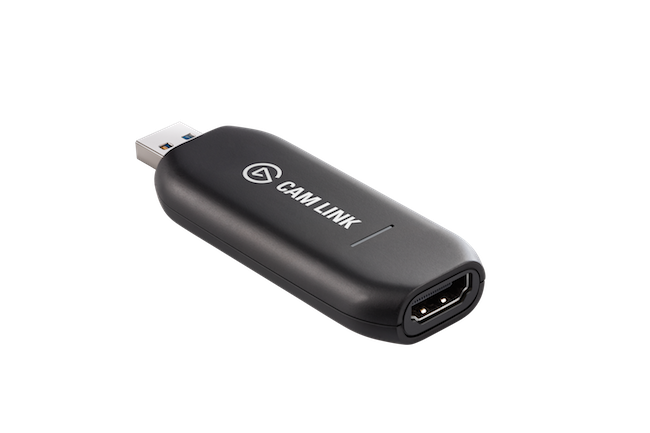
Explore this need in the finder →The original Elgato Cam Link is a compact, single-source camera bridge: a clean HDMI feed enters its female HDMI socket, and a USB 3.0 plug carries the video to a computer as a webcam source. That is a narrower job than a gaming capture card with an HDMI display output. The device is discontinued, and Elgato now treats it as legacy hardware, so this is a source-based assessment of an older product—not a report from a purchased or tested unit.
A camera-to-USB route, not HDMI loop-through
Elgato describes the Cam Link as a USB stick with one HDMI input and a USB 3.0 male connection. It is designed around unencrypted HDMI camera output; the support material names DSLRs, camcorders and action cameras as examples. Its USB Video Class (UVC) interface lets compatible software treat the incoming feed like a webcam. Elgato lists OBS Studio, Streamlabs Desktop, QuickTime, Skype and its older Game Capture HD and 4K Capture Utility software, while warning that it has not tested every webcam application.
The physical signal direction matters. The connector at one end accepts the camera's HDMI lead; the USB plug connects to the computer. The technical specification does not list a second HDMI socket or a display output, so this model does not document a monitor passthrough route. If your workflow needs a console or camera feed to continue from the capture device to a separate television, look for a card with a specific HDMI output and a supported passthrough mode. The original Cam Link should not be chosen from a list of products merely because they all contain the word “capture.”
Know the camera output before buying the adapter
The support pages list 720p and 1080p input resolutions, with video up to 60 fps. Elgato's historical macOS software notes specifically say that a software update enabled 1080p60 streaming with Cam Link. That supports a documented 1080p60 camera-to-computer use, but it is not a guarantee for every camera's HDMI timing or every modern app. Confirm the camera itself can output the selected resolution and frame rate over HDMI before treating the adapter as a match.
A camera may use micro-HDMI or mini-HDMI, so the lead must match it at one end and the Cam Link's standard HDMI input at the other. Elgato recommends checking that the camera can disable on-screen overlays, stay on continuously and accept external power if battery life is limiting. Its box list names the adapter, a nine-inch USB 3.0 extension cable and a Quick Start Guide, not a camera-side HDMI cable. Inspect a used package rather than assuming its loose cables are present.
USB 3.x and old host requirements need careful interpretation
Elgato's system-requirements page specifies a USB 3.x port, Windows 10 (64-bit) or macOS 10.12 Sierra or later, and a fourth-generation quad-core Intel Core i5 or comparable processor; it explicitly excludes Windows 7 and Windows 8. Those are legacy-era requirements, not a promise that the device and its capture applications work on a computer sold today. Elgato's current legacy notice says future compatibility with new operating systems, third-party applications and hardware is not guaranteed, and no new driver or firmware development is planned.
UVC and the listed apps do not certify every modern Windows/macOS, OBS, USB-controller, hub and camera combination. Elgato also notes that newer macOS releases may require camera and microphone permissions. Verify the exact software, OS and direct USB route before relying on a used unit for a production or time-sensitive call; a USB-C adapter's shape does not prove a USB 3.x data path.
Original Cam Link is not Cam Link 4K or Cam Link Pro
The model name is short, so seller listings can blur distinct devices. Elgato identifies the original Cam Link as part number 10GAC9901 in a support article; its separate Cam Link 4K product is identified by the different code 10GAM9901, with hardware revisions that Elgato documents separately. The original is not upgradeable to Cam Link 4K features. Cam Link Pro is a third model: an internal multi-input PCIe card, not this small USB stick. Check the model wording and photographs on the actual offer; a generic “Cam Link” title does not prove which hardware is being sold.
Elgato lists production of the original Cam Link as stopped in November 2018 and says it is no longer available from Elgato or Corsair for distribution or purchase, though limited old-store inventory may exist. The manufacturer's support and warranty caveats should not be read as a guarantee for a particular used unit. Condition, prior handling, return eligibility, serial/part markings, included extension cable and seller warranty all need separate confirmation.
Who should consider it—and who should move on
The narrow fit is an existing or clearly identified original Cam Link paired with one camera that supplies clean, unencrypted HDMI and a verified USB 3.x host/software path. For a new purchase, discontinued status and unverified current OS compatibility are substantial drawbacks. It cannot serve a workflow needing HDMI passthrough, and its 1080p/60-fps ceiling does not meet a 4K capture requirement.
Before considering any listing, confirm that the unit is original Cam Link rather than Cam Link 4K or Cam Link Pro; ask for the actual device markings; check the camera's clean HDMI and continuous-operation behavior; verify the host has a USB 3.x data port; and confirm the exact app and OS combination. The source documents establish the original model's historical capability and boundaries, not a current used-market offer, its price, present stock or the condition of an individual unit.
Read the original Cam Link setup and identity guide for a focused pre-purchase checklist, or compare the separate Cam Link 4K assessment. This review is based on Elgato's technical specifications, supported-source page, system requirements, supported-software guidance and its legacy notice; the individual model is not represented as hands-on tested.
Key specifications
Key details at a glance
| Signal input | hdmi_unencrypted |
|---|---|
| Confirmed capture formats | 1080p60 |
| Confirmed passthrough formats | |
| Computer connection | External USB 3.x host link; check this model's stated generation and port rate |
| Named compatible software | OBS Studio / Streamlabs Desktop / QuickTime / Skype / Elgato Game Capture HD / Elgato 4K Capture Utility / Elgato Camera Hub |
Use the exact model’s instructions for operating limits, supplied equipment and version differences.
Sources for this review
Sources for this assessment
- Cam Link – Technical Specifications
- Cam Link – Supported Video Sources
- Cam Link – System Requirements
- Cam Link – Supported Software
- Cam Link – Is Your Camera Compatible?
- Cam Link is different hardware from Cam Link 4K
- Elgato Legacy and End-Of-Life Products
- Elgato Facecam — How To Change USB Transfer Mode (model list naming Cam Link 10GAC9901)
- Elgato Game Capture HD Software Release Notes (macOS)
- Official Elgato Cam Link technical-specification image attachment
Check your complete signal path
Choose the source format, desired captured signal, passthrough target, computer connection and software together. A single device must support that whole arrangement.