
Your needs, this model
Does it fit your priorities?
Will Cam Link 4K make a camera work as a webcam in OBS on a Windows PC?
Elgato describes Cam Link 4K as a USB webcam path for cameras with clean unencrypted HDMI output and lists OBS Studio among its apps. The Windows setup still needs a USB 3.x port and a separate HDMI cable with the right mini- or micro-HDMI end for the camera. Before a long stream, confirm the camera can disable overlays and power-saving, stay on continuously, and accept external power if its battery runtime is short.
Explore this need in the finder →Does every Cam Link 4K support 4K60 capture?
No. Elgato identifies three unit revisions: 20GAM9901, 20GAM9902 and 20GAM9903. Its current support table limits the first two to 4K30 and adds 4K60 on revision 3; above 30 fps, the manufacturer specifies MJPEG. The US box/SKU 10GAM9901 is a separate retail code, so check the number printed on the device or obtain written confirmation of 20GAM9903 before paying for a 4K60 use case.
Explore this need in the finder →Can I use Cam Link 4K as an iPad capture card for a console and keep playing on my TV?
It can feed one compatible HDMI camera or other unencrypted HDMI source to an iPad through Elgato Capture on a supported USB-C iPad, but it has no HDMI passthrough output. If you need a console image to continue to a separate TV or monitor, choose a capture device with a documented HDMI output instead. The app compatibility list names Cam Link 4K but does not publish an iPad resolution matrix, so confirm your exact app/device workflow rather than assuming the desktop 4K60 specification carries over.
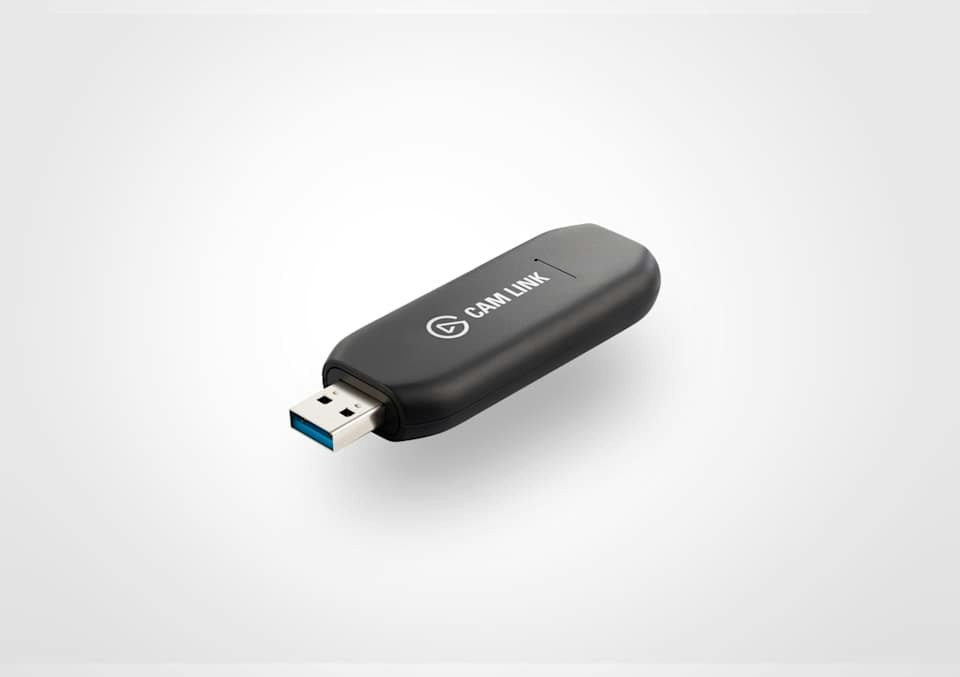
Explore this need in the finder →Cam Link 4K is a small, one-input bridge for turning a camera's HDMI feed into a USB webcam source. Its useful distinction from a conventional gaming capture card is the direction of the signal: camera to computer, with no HDMI output listed for a monitor. Elgato's US product page identifies the retail package as SKU 10GAM9901, while its system-requirements page distinguishes three hardware revisions by the part number printed on the unit. Those details matter more than the shared product name if 4K60 recording is essential. This assessment is based on manufacturer documentation, not a purchased or tested unit.
A camera-ingest tool, not a passthrough gaming card
The intended route is straightforward: a camera with clean, unencrypted HDMI output connects to the Cam Link, and the device plugs into a USB 3.x port on a computer. Elgato describes the result as a standard webcam source for applications such as OBS Studio, Zoom and Discord. That makes the device relevant when a built-in laptop camera is not the desired source, or when a camera is already part of a streaming or meeting setup.
Do not mistake the HDMI socket for an input/output pair. The product material describes one HDMI input and a USB host connection, not HDMI loop-through. If a console, game PC or other source must continue to feed a separate TV or monitor, this is the wrong signal path on its own. Cards such as Elgato's Game Capture Neo, 4K S and 4K X document separate HDMI passthrough outputs; Cam Link 4K does not. That distinction is more important than a shared brand or the word “capture.”
4K60 depends on the small part number on the device
The US retail page gives Cam Link 4K the package SKU 10GAM9901. Elgato's current revision guide calls out three different hardware part numbers: 20GAM9901, 20GAM9902 and 20GAM9903. These are not interchangeable capability claims. The first two revisions are documented up to 4K30; revision 3 adds 4K60, and Elgato specifies MJPEG for rates above 30 frames per second. A current retail page can describe the latest model without proving which revision is inside an older unit or a particular second-hand offer.
For a 4K60 workflow, check the number printed on the device or get confirmation that the exact unit is revision 3 (20GAM9903). The retail package code alone is not a safe substitute. Also check that the camera can output the resolution and frame rate you intend to ingest, and that the chosen software supports the required MJPEG mode. If the revision cannot be verified, treat the documented ceiling as 4K30 rather than purchasing on the product-family name alone.
The camera and cable remain part of the setup
The in-box list includes a 30-centimeter USB 3.0 A-to-C extension cable, but not the HDMI cable between camera and capture device. The camera-side connector may be mini-HDMI or micro-HDMI, so confirm its port and source a suitable cable separately. Elgato requires a USB 3.x connection and advises against a hub for best performance; the extension is not a remedy for a host port that lacks the required data rate.
Elgato's camera checklist calls for an HDMI video output, a compatible signal, and a clean picture with overlays disabled. It also asks users to verify continuous operation: some cameras sleep or shut down after a set interval, and long sessions may need an external camera power supply or a model-specific dummy battery. Cam Link does not charge the camera. Those are source-camera compatibility questions, not defects that a capture stick can solve, and no specific camera model has been independently tested here.
Host software is not the same as capture-mode support
The current US product page lists Windows 10 or later, macOS 13 or later, iPadOS 17 or later, USB 3.0 Type-A or Type-C, and Camera Hub. Elgato also names Cam Link 4K in its compatible-device list for Elgato Capture on supported USB-C iPads. The revision-specific support page supplies additional OS and processor requirements; for example, it lists M1-or-better Mac requirements and a later macOS floor for revision 3. Check that page against the exact revision and computer instead of assuming every unit behaves identically across operating systems.
Application compatibility does not mean that every app exposes every source mode. Elgato describes its device as UVC and lists common webcam applications, but its iPad app compatibility page does not provide an iPad-by-iPad 4K60 capture table. Treat the high-resolution mode as a Windows/Mac camera workflow only when your exact camera, revision, port and app all support it. The iPad entry is a useful portable preview or capture path, but its actual app resolution should be confirmed before it becomes a production requirement.
Where it fits—and where another card makes more sense
Cam Link 4K is most compelling when the input is a camera, the host has USB 3.x, the camera can send a clean supported HDMI signal, and the desired result is a webcam source in a computer or supported iPad app. It is compact and avoids an internal PCIe installation. The separate revisions also give existing owners a concrete way to identify why two products with the same name may not have the same 4K ceiling.
Choose a passthrough card instead when the source must also reach a display, when gaming modes such as VRR or high-refresh passthrough matter, or when a documented HDR recording path is essential. Choose only after comparing source, host and app as one plan: this device has no listed passthrough output, no documented HDR capture mode, and its 4K60 claim is revision-specific. The camera-to-HDMI lead is extra, the computer needs USB 3.x, and continuous-camera power is a separate consideration.
Evidence note: This review reconciles Elgato's US retail page and SKU, revision-specific system and resolution guidance, camera checklist, iPad application list and workflow comparison. It does not claim hands-on use, independent camera testing, measured latency, current third-party stock or compatibility with every camera and app.
Key specifications
Key details at a glance
| Signal input | hdmi_unencrypted |
|---|---|
| Confirmed capture formats | 4k60 / 4k30 / 1080p60 / 1080p30 / 1080i60 / 720p60 / 720p30 / 576p50 / 480p60 |
| Confirmed passthrough formats | |
| Computer connection | External USB 3.x host link; check this model's stated generation and port rate |
| Named compatible software | OBS Studio / Zoom / Discord / Microsoft Teams / Camera Hub / Elgato Capture for iPadOS |
Use the exact model’s instructions for operating limits, supplied equipment and version differences.
Sources for this review
Sources for this assessment
- Cam Link 4K — official US product page, SKU and technical specifications
- Cam Link 4K — official system requirements and hardware revision identifiers
- Cam Link 4K — official supported video sources and revision-specific 4K60 mode
- Cam Link 4K — official technical specifications and included equipment
- Cam Link 4K — official camera compatibility checklist
- Elgato Capture App — official compatible-device list, including Cam Link 4K
- The Difference Between Cam Link 4K and a Capture Card — official Elgato workflow comparison
- Cam Link 4K — official quick-start setup steps
Check your complete signal path
Choose the source format, desired captured signal, passthrough target, computer connection and software together. A single device must support that whole arrangement.