
Your needs, this model
Does it fit your priorities?
Can UltraStudio HD Mini capture an HDMI source?
No. Its HDMI connector is an output for monitoring; the documented capture inputs are SD/HD 3G-SDI and analog component/composite.
Explore this need in the finder →What is the documented digital capture ceiling?
Its 3G-SDI input is an SD/HD path through 1080p60, not a 4K input. Check the source timing and use the analog connector-specific formats separately.
Explore this need in the finder →What must the host provide?
A Thunderbolt 3 link over USB-C; a USB-C receptacle alone is not evidence of compatibility. It is powered by the Thunderbolt host.
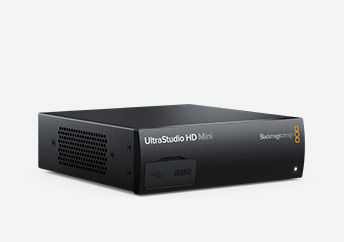
Explore this need in the finder →UltraStudio HD Mini is a small external broadcast I/O box for SD and HD workflows. It is more useful to compare by connector direction and job than by the word “capture”: the box accepts 3G-SDI and analog component/composite video, then also provides outputs for playback and monitoring. It does not have an HDMI video input. The HDMI socket is an output for viewing the signal, not a way to ingest an HDMI camera or console.
Where its inputs fit
The digital capture path is one switchable SD/HD 3G-SDI input. For a source that offers SDI, that is the straightforward option; the device’s published SDI standards extend through 1080p60. It also accepts analog YUV component and composite NTSC/PAL video. These analog inputs matter for archive work, but they should not be treated as interchangeable: component can carry selected HD or SD sources, while composite is a standard-definition path. Confirm the source’s connector, format and any breakout wiring before relying on an analog mode.
On playback, two SDI outputs can be configured for fill and key, and a separate HDMI 1.4b output is provided for monitoring. The presence of that HDMI output does not make the device an HDMI capture card, and the outputs are not a consumer passthrough loop from an HDMI source. For an editing room, tape ingest station or graphics workflow with SDI monitors, the separate output purposes can be useful. For a console user who wants to capture HDMI and keep an HDMI display path, it is the wrong input arrangement.
Plan around Thunderbolt 3 and HD ceilings
The computer connection is Thunderbolt 3 over USB-C; the specified capture interface is not plain USB 3.0. Blackmagic describes operation with Mac and Windows computers and bus power from the Thunderbolt host. A USB-C-shaped socket by itself is not proof of compatibility: verify actual Thunderbolt capability, cable generation and the chosen computer’s support. This is a compact desktop/laptop interface, not a PCIe card and not a bus-powered USB capture stick.
The 3G-SDI input makes the practical digital ceiling an HD-class choice rather than 4K capture. That distinction is important beside UltraStudio 4K Mini or the current Mini Recorder 12G: those models document 12G-SDI/Ultra HD capability, while HD Mini is designed around SD/HD. The current technical page lists current operating-system versions and editing applications; listed support is not a guarantee for every third-party app, driver combination or capture mode. This review does not claim that the author tested a particular machine or software configuration.
Trade-offs for a real setup
Its compact rack-width enclosure puts several professional I/O functions in one unit, including reference input and RS-422 deck control. These are relevant when synchronizing with broadcast equipment or controlling a compatible deck, but they add no value to a simple HDMI streaming desk. An optional Teranex Mini Smart Panel can add front-panel control/display; check whether it is separately required for your rack plan rather than assuming it is in the base box. Analog audio inputs are available for balanced or unbalanced sources, a detail that can help when archiving legacy material.
Before purchase, check that the source really provides SDI or the needed analog output, that its exact timing is within the documented SD/HD list, and that your computer has Thunderbolt 3 rather than only a mechanically similar USB-C port. Confirm the required cables or breakouts, monitoring output, software version, reference and deck-control needs, and whether HD is sufficient for the whole project. If the essential source is HDMI or the target recording is 4K, select a different model instead of inferring those features from the HDMI monitor output or from the UltraStudio family name.
Manufacturer references: UltraStudio technical specifications and the Desktop Video manual.
Key specifications
Key details at a glance
| Signal input | sdi / analog_video |
|---|---|
| Confirmed capture formats | SD/HD 3G-SDI through 1080p60; analog component YUV and composite NTSC/PAL inputs are distinct SD/HD paths. |
| Confirmed passthrough formats | |
| Computer connection | Thunderbolt3 |
| Named compatible software | DaVinci Resolve / Blackmagic Media Express / Final Cut Pro / Adobe Premiere Pro / Avid Media Composer |
| HDR recording | No model-specific hdr capture mode is assigned. |
Use the exact model’s instructions for operating limits, supplied equipment and version differences.
Sources for this review
Sources for this assessment

Check your complete signal path
Choose the source format, desired captured signal, passthrough target, computer connection and software together. A single device must support that whole arrangement.