
Your needs, this model
Does it fit your priorities?
Can Express HD take an HDMI source?
No. It accepts SD/HD 3G-SDI and analog component/composite; HDMI is an output for monitoring.
Explore this need in the finder →What computer link does this model need?
A 40Gbps USB-C data path in a compatible USB4 or Thunderbolt 4 host. A USB-C socket or USB 3 port alone does not establish support.
Explore this need in the finder →Is this the Express model for 4K?
No. The reviewed Express HD capture range is SD/HD through 1080p60. Choose a 4K-capable UltraStudio if the source needs UHD capture.
Explore this need in the finder →Does the 1080p60 SDI ceiling apply to Express HD’s analog input?
The model page identifies component YUV and composite NTSC/PAL analog inputs, and separately lists 3G-SDI SD/HD standards through 1080p60. It does not attach that timing ceiling to an analog connector, so the reviewed plan assigns no analog capture-rate floor. Confirm the exact source standard with Blackmagic before relying on a mode.
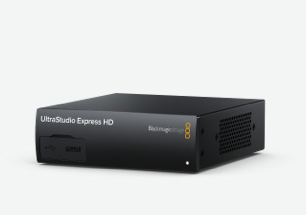
Explore this need in the finder →UltraStudio Express HD is a compact capture-and-playback interface aimed at current USB4 or Thunderbolt 4 computers and SD/HD broadcast sources. Its input/output split is easy to misread from the product name: it captures through 3G-SDI or analog video/audio inputs, while HDMI is provided as a monitoring output. There is no HDMI video input in the reviewed specification. If your source is an HDMI-only console or camera, this is not the correct Express model.
A useful bridge for legacy and SDI sources
The unit accepts one 3G-SDI SD/HD input and analog component or composite video, plus balanced analog audio. Blackmagic lists common SD and HD formats through 1080p60 for the 3G-SDI path. The technical specification names component YUV and composite NTSC/PAL inputs but does not attach an equivalent timing table to the analog connectors, so I do not extend the SDI ceiling to them. Component YUV is also a different input from composite NTSC/PAL: verify the source connector and its exact standard before planning a transfer. Balanced audio input, reference and RS-422 deck control make the box more relevant to tape ingest and production than a simple HDMI streamer dongle.
For playback, dual SDI outputs can supply fill and key, while HDMI gives an operator a monitor connection. That is a professional playback path, not a built-in HDMI loop that preserves a source signal while capturing it. In a small studio, the fill/key route can matter for graphics; for an editor digitizing an old deck, analog video and audio can reduce the need for additional converters. Use an exact input-to-output diagram before buying if you need live pass-through.
Modern host link, but not generic USB-C
Express HD uses one USB-C cable for data and power and is specified for USB4 and Thunderbolt 4 computers on Mac, Windows and Linux. The product’s USB-C shape does not imply support from every USB-C port; verify the host’s actual high-speed mode, included or suitable cable, operating system and driver. The manufacturer says the unit can run from USB power, which may be convenient on location, but that does not replace checking the computer’s power behavior and required bandwidth in the chosen workflow.
The published 3G-SDI capture/playback range is SD and HD through 1080p60; the analog input timings remain unspecified in the reviewed table. This is not a 4K capture device; compare it with the UltraStudio Mini Recorder 12G or a 4K-class UltraStudio when UHD is essential. Blackmagic advertises 10-bit video and names DaVinci Resolve and Open Broadcaster Software among supported software workflows. “Supported software” does not mean the maximum resolution, bit depth and every app have been independently tested together. Check the current Desktop Video driver, app-specific format selection and computer requirements for your actual job.
Who should choose it—and who should not
This model makes the most sense when the source is SDI, component or composite, you want a portable external unit, and the destination is a USB4/TB4 computer. The small enclosure uses one-third of a rack width; an optional Teranex Mini Smart Panel adds front-panel buttons and an LCD preview, but the exact bundle should be checked because the base product and optional panel are separate decisions. The included output facilities are useful for professional monitoring and keyed graphics, but add complexity if your only task is to capture a single HDMI gaming source.
Before purchase, verify source connector and format, computer USB4/TB4 capability, the exact cable, current OS/driver support, and whether you need the optional panel, reference, deck control or external monitoring. Confirm that 1080p60 is enough and that no HDMI input or HDMI passthrough is required. This assessment is based on Blackmagic’s model specifications and launch materials, not on a hands-on test or claim of personal use.
Manufacturer references: UltraStudio Express HD technical specifications and Blackmagic Design’s UltraStudio Express HD announcement.
Key specifications
Key details at a glance
| Signal input | sdi / analog_video |
|---|---|
| Confirmed capture formats | 3G-SDI SD/HD standards through 1080p60; Blackmagic names component YUV and composite NTSC/PAL analog inputs but the reviewed specification does not bind the 1080p60 ceiling to those analog connectors. / 10-bit video is specified. |
| Confirmed passthrough formats | |
| Computer connection | Thunderbolt4 |
| Named compatible software | DaVinci Resolve / Blackmagic Media Express / OBS Studio / Final Cut Pro / Adobe Premiere Pro / Avid Media Composer |
| HDR recording | No hdr capture mode is assigned. |
Use the exact model’s instructions for operating limits, supplied equipment and version differences.
Sources for this review
Sources for this assessment

Check your complete signal path
Choose the source format, desired captured signal, passthrough target, computer connection and software together. A single device must support that whole arrangement.