
Your needs, this model
Does it fit your priorities?
Does the 4K Mini need Thunderbolt, or will any USB-C port work?
Blackmagic lists Thunderbolt 3 as the computer interface. The device also has a USB-C 3.1 Gen 1 socket, but the specification labels that socket for a keyboard or mouse; it is not the capture connection. Check the host's actual Thunderbolt support and port, rather than relying on the shape of a USB-C connector.
Explore this need in the finder →Can the 4K Mini capture HDR at 4K60?
Blackmagic's technical description lists 8/10-bit HDR capture through 4K DCI 60p; its 12-bit HDR ceiling is 4K DCI 30p. That distinction matters if your workflow needs 12-bit precision at the top frame rate. Confirm the input timing, format, application and recording codec together; the specification is not an independent test of every OBS or editing setup.
Explore this need in the finder →Is the HDMI output a guaranteed console pass-through?
The published connections include one HDMI 2.0b input, one HDMI output and an SDI loop output, but the source does not describe a guaranteed HDMI 2.0b passthrough mode paired with every capture format. Treat the HDMI output as an output, not proof that it duplicates the HDMI input; check the exact routing in the current manual for your monitor workflow.
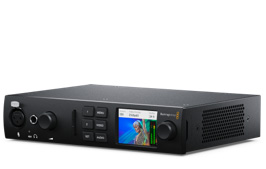
Explore this need in the finder →This is a specification-led assessment of Blackmagic Design's UltraStudio 4K Mini, a half-rack capture and playback unit for a Thunderbolt-equipped computer. It is a different proposition from a USB gaming dongle: the front panel, audio connections and SDI/HDMI/analog ports target editing, camera and broadcast workflows. Its usefulness comes from consolidating several kinds of video I/O, not from a documented console passthrough feature.
A portable breakout box with several input families
The unit accepts one selected source through 12G-SDI, HDMI 2.0b, component YUV or composite NTSC/PAL. Blackmagic lists one SDI input, two SDI program outputs plus one SDI loop output, one HDMI input and one HDMI output. Component can be switched between SD and HD; the composite connection is for standard-definition NTSC/PAL. The separate analog audio input is balanced ¼-inch jack, and the device also adds an XLR microphone input, headphone connection, front LCD and UHS-I/UHS-II SD card reader.
That mix can be valuable at a desk that alternates between a modern camera, an older deck and an SDI source. It is also a cabling project: the analog video connections are not a simple all-in-one consumer cable set, and the balanced audio connector is not a gaming headset jack. Verify the adapter or breakout lead needed for the actual source before deciding the chassis alone makes the connection complete.
What “4K60” means in this assessment
Blackmagic describes 8- and 10-bit high-dynamic-range capture across formats up to 4K DCI at 60p, then gives a separate 12-bit HDR ceiling of 4K DCI at 30p. The manufacturer also lists supported Ultra HD and DCI 4K standards through 60p for the digital connections. Those are materially different capabilities from an external card that captures a lower-rate feed while only passing a faster signal to a display.
Still, the headline is not a promise that every capture application will expose every frame rate, color format and codec in the same way. The 12-bit limit is explicitly lower than the 8/10-bit ceiling. Check the source timing, selected pixel format, capture software and recording path as one configuration. Blackmagic says the HDMI input cannot capture copy-protected HDMI content; this device does not remove HDCP or make protected streaming video capturable.
Thunderbolt is the actual computer link
The computer connection is Thunderbolt 3, with the product page listing up to 45 watts of host charging. There is a USB-C 3.1 Gen 1 connector, but Blackmagic identifies it for a keyboard or mouse, not for sending captured video to the computer. Do not choose this model because a laptop has a USB-C-shaped port: confirm that the host supports Thunderbolt 3 and that the port, OS and driver are suitable. The specifications list current Mac, Windows and Linux support, and name OBS Studio among compatible applications. That is manufacturer compatibility evidence, not a test of a particular workstation or project.
This host requirement also explains why the model does not match a shopper's “External USB 3.0 or faster” or “Internal PCIe card” selection in this guide's finder. The UltraStudio is external, but its computer data path is Thunderbolt rather than USB. Its small form factor does not turn it into an internal PCIe board.
Outputs are not automatically console passthrough
The connection list shows both HDMI and SDI outputs, including an SDI loop output, but the reviewed product page does not promise a specific HDMI input-to-HDMI monitor passthrough pairing at each capture rate. A program output, a monitor output and a signal loop are not automatically interchangeable. If you need the source duplicated to a display while the computer records, check the exact current routing instructions and the timing you intend to send. The finder deliberately does not mark a passthrough mode just from the presence of output connectors.
How it compares with other Blackmagic units
Compared with UltraStudio 4K Extreme 3, the 4K Mini is smaller and still combines SDI, HDMI and analog input, but it has a more compact half-rack layout and a Thunderbolt 3 computer link. Extreme 3 is a larger external breakout with more SDI I/O, two host-link options and more extensive analog/digital connections. Blackmagic Media Player 10G is more specialized around broadcast playback and replay, with a single 12G-SDI capture input plus fill/key outputs and 10G Ethernet for network storage. These are different workflows, not just size variants.
Checks before buying
Confirm the exact UltraStudio 4K Mini name; Thunderbolt 3 on the host; the required driver and application; the source connector and timing; whether analog capture needs an adapter; and whether the output routing meets your monitor plan. For HDR, decide whether 8/10-bit through 4K60 or 12-bit through 4K30 is the relevant target and confirm software behavior before choosing a recording format. No hands-on setup, performance test or ownership is claimed here, and no price or seller availability is inferred from the manufacturer's U.S. product page.
Sources: Blackmagic Design's UltraStudio technical specifications, UltraStudio family overview and U.S. product index.
Key specifications
Key details at a glance
| Signal input | HDMI 2.0b input / 12G-SDI input / component YUV input / composite NTSC/PAL input |
|---|---|
| Confirmed capture formats | HDMI/SDI capture up to 4K DCI 60p in 8/10-bit HDR modes / 12-bit HDR capture up to 4K DCI 30p / component analog is switchable between SD and HD / composite analog NTSC/PAL |
| Confirmed passthrough formats | |
| Computer connection | Thunderbolt 3; 45 w host charging is listed; usb-c port is for keyboard/mouse, not the computer capture link |
| Named compatible software | DaVinci Resolve / Media Express / OBS Studio / Final Cut Pro / Adobe Premiere Pro / Avid Media Composer |
| HDR recording | Blackmagic lists 8/10-bit hdr capture through 4k dci 60p and 12-bit hdr capture through 4k dci 30p; no independent app/codec test is claimed. |
Use the exact model’s instructions for operating limits, supplied equipment and version differences.
Sources for this review
Sources for this assessment

Check your complete signal path
Choose the source format, desired captured signal, passthrough target, computer connection and software together. A single device must support that whole arrangement.