
Your needs, this model
Does it fit your priorities?
Can I use the Extreme 3 as an internal PCIe card?
No: it is an external 2RU breakout. Blackmagic lists Thunderbolt 3 and PCIe Gen2 x4 as computer interfaces, but the PCIe route uses a separate Blackmagic PCI Express Cable Kit. That is not the same installation as inserting an internal capture card into a PCIe slot. Check the current cable-kit and host requirements before choosing that path.
Explore this need in the finder →Does its analog input capture 1080p60?
The technical specifications list component YUV input that can be switched between SD and HD, plus a separate composite NTSC/PAL input. The HD component route is the relevant analog input for a 1080p target; standard-definition composite is not. Confirm the component source and exact cable/breakout arrangement rather than treating all analog connectors as the same format.
Explore this need in the finder →Does every HDMI 4K mode pass through to a monitor while recording?
The published connections include HDMI input and output, SDI loop/repeated outputs and several SDI links, but a port list is not a mode-by-mode promise that each input is duplicated to each output while recording. Verify the exact capture, output, routing and timing combination in the current manual before using the unit as a console passthrough device.
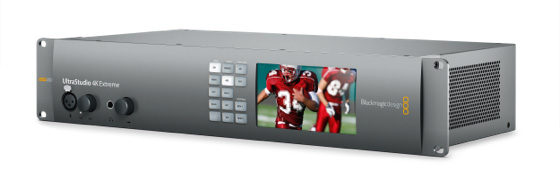
Explore this need in the finder →Blackmagic Design's UltraStudio 4K Extreme 3 is a 2RU external capture and playback breakout for a workstation or production rack. It is a much larger and more connection-dense design than a USB gaming capture device: its intended job is to bridge professional cameras, decks, routers, monitors and editing software. This assessment is based on Blackmagic's current U.S. product index and technical table, not on installation or hands-on testing.
When a big breakout makes sense
The spec sheet lists two 12Gb/s and two 6Gb/s SDI links, with single-, dual- and quad-link support for SD/HD/2K/4K signals. There are HDMI 2.0 input and output connectors, component YUV and composite NTSC/PAL video, multiple embedded-audio paths, XLR analog audio, AES/EBU, reference input and output, timecode, RS-422 deck control and optional optical-fiber modules. The SDI section also lists reclocked loop and repeated outputs. For a post-production room that actually uses these connections, the breadth is the point: one chassis can sit between several kinds of source and destination equipment.
That breadth comes with planning overhead. The SDI ports are not four interchangeable 4K60 inputs, and optional optical modules are not the same as supplied analog or digital connections. Confirm the intended number of simultaneous feeds, link grouping, audio routing and accessory needs from the model's timing and setup tables before allocating rack space.
Read the 4K rate in context
Blackmagic's current U.S. product index describes capture and playback through Ultra HD up to 2160p60. The technical page lists HDMI 2.0 with support for 2160p60 and SDI ports with multi-link SD/HD/2K/4K support. This is enough to consider a 4K-at-60 SDR capture task for the documented digital inputs, but it should not be inflated into a claim that every DCI raster, color depth, connector combination and output operates at 60p together. The individual standards and link arrangement matter.
The page also mentions HDR workflows via HDMI 2.0a and a built-in real-time H.265 encoder. Those features do not prove a particular HDR recording result or a specific H.265/OBS combination at the maximum raster. Treat codec, HDR, mode, input and application as one check-list, not as independent headlines to combine freely. The product's HDMI input cannot capture from copy-protected sources, so the device is not a way around HDCP.
Analog is useful, but not one universal mode
The model has component YUV input on three BNC connectors and composite NTSC/PAL on a separate BNC. Component supports both SD and HD; composite is a standard-definition source. The two should not be collapsed into one “analog 1080p” claim. If the source is an older tape deck or camera, verify the signal standard and the exact breakout cable. If it is a component HD source, confirm the system's selected input setting and the matching capture path.
External connection choices and space
The technical specifications list Thunderbolt 3 and PCI Express Gen 2 x4. The PCIe cable kit is separately available and provides an external link; the 4K Extreme 3 itself remains a rackmount external unit, not a board that slides into the computer. The device also has dual internal AC power supplies and a published maximum power figure, so plan a suitable rack position and power connection. Blackmagic lists Mac, Windows and Linux support and names OBS Studio among the compatible applications. That is useful compatibility evidence, but the selected software and host still have to handle the desired mode.
This means the unit will not satisfy a strict finder choice of internal PCIe card or external USB 3.0 device. Even though the separate cable-kit route uses PCIe technology, it is not the same physical installation as a card mounted inside a desktop. The product's enclosure, link and external power are part of the purchase decision.
How it compares with the 4K Mini and Media Player 10G
UltraStudio 4K Mini is the more compact half-rack alternative and already combines SDI, HDMI and analog sources, but Extreme 3 adds a substantially wider set of connectors and routing options in a 2RU chassis. Blackmagic Media Player 10G is narrower in capture inputs: it centers on one 12G-SDI input, fill/key playback, monitoring and 10G network-storage access over Thunderbolt. Choose by the actual source, output and installation plan rather than by a product name that contains “4K.”
Checks before buying
Confirm the complete model name, rack clearance, power, Thunderbolt 3 or separate PCIe-cable-kit path, available host software, input connector, link group, timing, audio wiring and required accessories. For analog, decide whether the source is component HD or composite SD. For a monitor-return setup, check the exact input/output pairing instead of assuming the HDMI output duplicates the input. For protected HDMI, this is not a compatible capture route. No personal use, performance testing, price or offer availability is claimed.
Sources: Blackmagic Design's UltraStudio 4K Extreme 3 technical specifications, UltraStudio family page and U.S. products index.
Key specifications
Key details at a glance
| Signal input | HDMI 2.0 input / 12G/6G-SDI inputs / component YUV input / composite NTSC/PAL input |
|---|---|
| Confirmed capture formats | HDMI supports 2160p60 / SDI supports multi-link SD/HD/2K/4K; use the rate and link combination in the current timing tables / component supports SD/HD / composite supports NTSC/PAL SD |
| Confirmed passthrough formats | |
| Computer connection | External unit; thunderbolt 3 or pcie gen2 x4 through a separate blackmagic pcie cable kit |
| Named compatible software | DaVinci Resolve / Media Express / OBS Studio / Final Cut Pro / Adobe Premiere Pro / Avid Media Composer / vMix / Wirecast |
| HDR recording | Blackmagic lists hdr workflow support and hdmi 2.0a/hdr connections, but this assessment does not pair hdr with a specific capture resolution or software mode. |
Use the exact model’s instructions for operating limits, supplied equipment and version differences.
Sources for this review
Sources for this assessment

Check your complete signal path
Choose the source format, desired captured signal, passthrough target, computer connection and software together. A single device must support that whole arrangement.