
Your needs, this model
Does it fit your priorities?
Is the Intensity Pro 4K a 4K60 capture card?
No. Blackmagic's mode list reaches 2160p30 UHD, while 1080p can reach 60 fps. If 4K60 is essential, do not read the model name or HDMI output as proof of that capture rate.
Explore this need in the finder →Can it digitize older component, composite or S-Video sources?
The specification lists component YUV and composite or S-Video analog input, and the box description includes an analog breakout cable. Component is the HD-capable analog route; composite and S-Video should be treated as their own standard-definition paths. Check that the exact listing contains the breakout lead and compatible cable ends.
Explore this need in the finder →Will its HDMI output mirror the capture input to a monitor?
The product lists an HDMI output, but the technical page does not specify a general input-to-display passthrough table. Confirm exact routing and timing in the current manual; the finder does not treat an output connector as a loop-through guarantee.
Explore this need in the finder →This assessment of the Blackmagic Design Intensity Pro 4K is for a particular kind of desktop build: a PCI Express card that can connect both modern HDMI gear and older analog sources. Its combination of input formats is more distinctive than the name’s “4K” label. It can capture an unencrypted HDMI source up to 2160p30, while a 1080p source can reach 60 fps. That ceiling matters: this is not the right interpretation of “4K capture” when the requirement is UHD at 60 fps.
One card for digital and legacy inputs
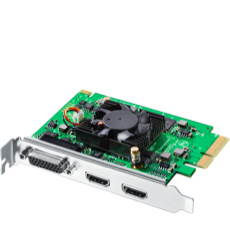
The published connections include one HDMI input and output, component YUV video, and analog composite or S-Video input and output. The component connection switches between standard- and high-definition formats; composite and S-Video are analog routes for older decks, cameras or players, not 4K paths. The package specification lists a breakout cable, so the bracket sockets alone do not complete every RCA, S-Video or component connection. Check that the particular offer includes the original lead and identify the cable ends your source requires.
On the digital side, Blackmagic lists HDMI 1.4b, embedded HDMI audio, Deep Color and formats through 2160p30. The detailed standards list reaches 1080p60, then lists UHD at 23.98, 24, 25, 29.97 and 30 fps. It does not list UHD60 capture. A separate “4K” claim in a product name should not override that per-rate table. For older material, the analog option may be more important than the maximum digital frame rate; for a current console or camera that sends UHD60, the format is a limiting mismatch.
Outputs are not a passthrough specification
The board has HDMI and analog outputs as well as capture inputs. The technical page describes playback output and software conversion, but it does not give a general input-to-display loop-through table. In the finder, the presence of a same-looking output connector is not enough to claim a particular passthrough mode. If your setup requires a separate live display, check the exact manual routing and the output timing rather than assuming the card mirrors whichever input the computer is recording.
Copy protection is clearer: Blackmagic says its HDMI input cannot capture copy-protected HDMI sources. An input socket is therefore not a way around HDCP or other rights restrictions. This assessment treats supported HDMI as an unencrypted input and does not imply that protected streaming playback can be recorded.
Host and application fit
Intensity Pro 4K is an internal four-lane PCI Express card, compatible with x4, x8 and x16 slots. A USB-C port or laptop USB socket is not a substitute for that host path. Blackmagic lists Windows, Linux and Mac support; its current technical page says Mac systems require a Mac Pro with PCIe slots. Its system list names Windows 10 64-bit and Windows 11, and Mac 15 Sequoia and Mac 26 Tahoe or later. Those are manufacturer-published floors, not a promise that an unspecified motherboard, slot, driver and application combination will work.
DaVinci Resolve and Media Express are listed among the included software. Blackmagic also names Open Broadcaster Software Studio and other third-party applications, while warning that their support may vary by vendor. That makes OBS a documented application option, not a tested capture preset or a guarantee that every analog timing appears automatically. The most defensible software plan is to verify the chosen input, video standard and driver together before relying on a recording workflow.
Where it sits beside newer cards
Compared with Blackmagic’s DeckLink 4K Extreme 12G, Intensity Pro 4K uses a four-lane PCIe connection and offers consumer-facing HDMI plus component, composite and S-Video capture; the larger DeckLink has 12G-SDI and a higher-rate UHD path, with more installation and breakout requirements. The UltraStudio 4K Mini is an external Thunderbolt 3 device rather than an internal PCIe board and has its own SDI/analog and HDR mode table. These models share a manufacturer but solve different host, connector and frame-rate problems.
Checks before buying
Confirm the exact Intensity Pro 4K model, an open four-lane PCIe slot and the operating system/driver combination. Check whether your source is HDMI, component, composite or S-Video; whether it is unencrypted; and whether the included breakout cable has the connectors you need. If your must-have is 4K60, choose a different source-documented path. If your must-have is analog digitizing or 1080p60 capture on a PCIe desktop, this card is a more relevant candidate, subject to the exact source timing and app. The official U.S. page lists a model and a reseller route, not a seller’s actual stock or a guarantee about a used package.
This is a specification-based review of manufacturer material. No card was installed, owned or tested; no signal quality, measured performance, customer experience or present offer is claimed.
Sources: Blackmagic Design’s Intensity Pro 4K product page and technical specifications.
Key specifications
Key details at a glance
| Signal input | HDMI 1.4b video input / component YUV analog input / composite NTSC/PAL input / S-Video analog input via breakout |
|---|---|
| Confirmed capture formats | HDMI up to 2160p30 UHD / 1080p60 HD / component analog switchable between SD and HD / composite NTSC/PAL and S-Video |
| Confirmed passthrough formats | |
| Computer connection | Pci express four-lane card, compatible with x4, x8 and x16 pcie slots |
| Named compatible software | DaVinci Resolve / Media Express / Open Broadcaster Software Studio / Final Cut Pro X / Adobe Premiere Pro CC / Avid Media Composer |
| HDR recording | No mode-specific hdr capture record is listed; 8/10-bit hdmi deep color is not treated as an hdr-recording promise. |
Use the exact model’s instructions for operating limits, supplied equipment and version differences.
Sources for this review
Sources for this assessment

Check your complete signal path
Choose the source format, desired captured signal, passthrough target, computer connection and software together. A single device must support that whole arrangement.