
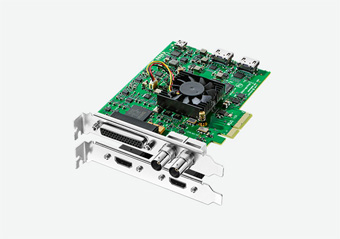
Your needs, this model
Does it fit your priorities?
Can DeckLink Studio 4K connect older analog video equipment directly?
Yes, the exact specification lists component YUV, composite and S-Video inputs. Component is described as supporting SD and HD, while the page does not give separate timing tables for each analog input; do not apply the digital 1080p60 or UHD limits to composite or S-Video.
Explore this need in the finder →Is HDMI 1.4b capture available for protected sources or UHD60?
No. Blackmagic explicitly states that HDMI input cannot capture copy-protected sources. Its listed UHD timings reach 2160p30, not 60 fps; 4K DCI modes are separately shown as SDI-only through 25p. Verify the exact source raster and legal capture path before ordering.
Explore this need in the finder →Does its separate SDI/HDMI output mean the source is passed through to a gaming display?
No such consumer-style live input-to-display path is published in the reviewed specifications. The card supports capture and playback, down-conversion and other professional routing functions, but those do not prove a particular input-to-monitor passthrough mode.
Explore this need in the finder →DeckLink Studio 4K is the more flexible of this pair, not simply a faster version of DeckLink SDI 4K. Its connection panel covers SDI, HDMI and several analog video paths, with balanced analog audio and deck-control features. That breadth is useful in a workstation that must bridge legacy and digital equipment, but the connectors do not establish that every input can be captured at once. This assessment follows Blackmagic's current U.S. model page and the exact Studio 4K specification; no hands-on installation or testing is claimed.
Its value is the variety of inputs
The specification lists one 6G-SDI input and a separate SDI output, plus an HDMI type-A input and output. It also lists component YUV on three BNC connectors, composite and S-Video input/output paths. That makes Studio 4K a plausible bridge when sources include older analog gear alongside SDI or unencrypted HDMI. The included-items section names an analog/RS-422 breakout cable and an HDMI bracket, so check the exact package—especially on used stock—rather than assuming every seller includes the documented accessories.
The analog paths are not interchangeable. Component YUV is described as supporting standard definition and high definition. Composite and S-Video are separate legacy connectors, and Blackmagic does not give them an individual timing matrix in this section. I therefore would not transfer the digital 1080p60 or UHD claims to those inputs. Before purchase, identify the source connector, sync/level requirements, breakout ends and the format you actually need to ingest.
Separate UHD, DCI and analog ceilings
The digital standards include HD through 1080p60 and UHD timings through 2160p30. The 4K DCI entries are marked SDI only and reach 25p. That distinction matters: 4K DCI is not the same raster as consumer UHD, and neither published family means UHD 60 fps capture. HDMI 1.4b is not a way around that timing table. The exact section also says the HDMI input cannot capture copy-protected sources; it is not a device for bypassing HDCP.
There is a separate SDI output and an HDMI output, and the documentation describes hardware down-conversion for playback. Those capabilities may serve professional monitoring and playout tasks, but the reviewed specs do not publish a consumer-style live input-to-display passthrough matrix. Do not interpret two connector labels or a down-converter feature as a guarantee that a console signal reaches a gaming display unchanged while being captured.
Audio and control broaden the setup
Unlike the SDI-only card, Studio 4K lists four channels of balanced analog audio input and output on quarter-inch jack connectors, two-channel AES/EBU input, and output routing that can switch analog outputs three and four to provide six AES/EBU output channels. SDI and HDMI also carry embedded audio. The specification includes Black Burst or Tri-Sync reference input, RS-422 deck control and internal keying. These are production-oriented facilities; the exact routing and downstream software support still need to be checked for the intended workflow.
The title “Studio” does not make this a mixer or a capture appliance that independently records multiple sources. Blackmagic provides individual input/output descriptions and a broad mode list, not a simultaneous multi-input matrix. Treat it as a host-installed capture/playback card and design around the one source path you need unless current driver and application documentation confirms a more complex routing plan.
Host and software checks remain essential
Studio 4K uses a PCI Express Gen 2 x4 connection; Blackmagic lists compatible x4, x8 and x16 slots. Confirm the actual motherboard lanes, available slot, bracket clearance and the cable/breakout ends before ordering. There is no documented external USB host path. The page lists Windows, Mac OS and Linux, and includes Blackmagic's driver, Desktop Video tools and Media Express. DaVinci Resolve and other editing applications are named as well.
OBS Studio is present in the manufacturer's broader third-party application list, followed by the warning that support may vary. That is useful evidence to check, not a tested OBS profile or a guarantee that every input and frame rate behaves identically on each operating system. Verify the exact current driver and software versions, especially if the system must switch between analog and digital formats.
Where the SDI 4K is the better fit
If all sources are SDI, the DeckLink SDI 4K offers a simpler path without HDMI and analog breakout complexity. Studio 4K earns its extra setup work when the specific analog/HDMI/SDI inputs, balanced audio or production connections are genuinely needed. Neither model should be chosen on the “4K” suffix alone: Studio's digital UHD mode table ends at 2160p30, and the analog ports have their own documented limits. Both are internal PCIe products, not USB capture sticks.
Who should shortlist it
Choose this card only after matching the source connector and signal to the right plan: component versus composite/S-Video, unprotected HDMI versus SDI, and UHD versus DCI. Check that a PCIe Gen 2 x4 path fits the host, then verify the desired audio routing, software and package accessories. If your essential target is UHD60 capture, a particular high-refresh gaming passthrough route, or an external laptop connection, this model's documentation does not establish the required path. Manufacturer specifications document the device, not a particular offer's stock, age, condition or warranty.
Sources: Blackmagic Design's U.S. DeckLink model list and the DeckLink Studio 4K technical specifications.
Key specifications
Key details at a glance
| Signal input | One HDMI type A input, HDMI 1.4b / One 6G-SDI input / Component YUV input on three BNCs (SD/HD) / Composite and S-Video inputs / Four-channel balanced analog audio input via 1/4-inch jacks |
|---|---|
| Confirmed capture formats | Digital SD/HD standards, including 1080p60 / UHD through 2160p30 on listed digital paths / 2K DCI through 25p over SDI / 4K DCI 23.98p/24p/25p over SDI only / Component analog input is described as SD/HD; exact component timing combinations are not separately tabulated / Composite and S-Video are analog input paths without a rate-specific HD mode claim |
| Confirmed passthrough formats | |
| Computer connection | Pci express gen 2 x4 card; blackmagic lists compatibility with x4, x8 and x16 slots. verify the actual host pcie path, card clearance and whether the included connector bracket/breakout suits the source equipment. |
| Named compatible software | Blackmagic Media Express / Blackmagic Desktop Video Utility and driver / DaVinci Resolve / Final Cut Pro X / Adobe Premiere Pro CC / Open Broadcaster Software Studio (third-party listing; support may vary) / vMix and other listed third-party applications (support may vary) |
| HDR recording | The page lists hdr static metadata packing and hlg/pq transfer characteristics, but it does not provide a rate-by-rate hdr recording table. the listed metadata support is not a blanket hdr-capture mode claim. |
Use the exact model’s instructions for operating limits, supplied equipment and version differences.
Sources for this review
Sources for this assessment
Check your complete signal path
Choose the source format, desired captured signal, passthrough target, computer connection and software together. A single device must support that whole arrangement.