
Your needs, this model
Does it fit your priorities?
What is the difference between DeckLink Mini Recorder HD's HDMI and SDI limits?
The exact technical section lists SD and HD formats through 1080p60 for both connection families. The SDI-specific section additionally lists 2K DCI timings through 2Kp60; the HDMI standards section ends at HD and does not list 2K DCI. Do not treat that SDI-only 2K mode as a 4K mode or as evidence of a 2K HDMI input.
Explore this need in the finder →Can the HD version install in a one-lane PCIe slot?
Blackmagic specifies PCI Express Gen 2 x1 and lists compatibility with x1, x4, x8 and x16 slots. It is still an internal card, not a laptop USB adapter. The installation note also says Mac OS installations require a Mac Pro with PCIe slots. Verify the chassis bracket, lane/slot routing and the current Desktop Video driver before buying.
Explore this need in the finder →Does this card provide a gaming-style HDMI passthrough output?
No output connector or consumer input-to-display path is specified in this capture-card section; its HDMI and SDI connections are described as inputs. For HDMI, Blackmagic also says copy-protected sources cannot be captured. Plan the display route separately and confirm the source is unprotected and authorized for capture.
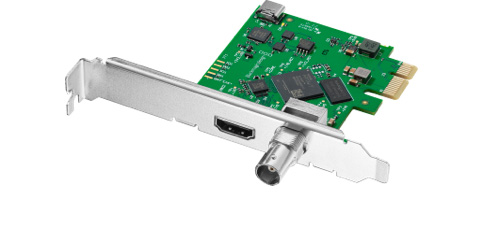
Explore this need in the finder →The DeckLink Mini Recorder HD is the lower-bandwidth, low-profile relative in Blackmagic's Mini Recorder pair. It accepts one SDI input or one HDMI input for SD and HD formats through 1080p60; its SDI section separately lists 2K DCI modes through 60p. The card uses a PCI Express Gen 2 x1 connection, so it can suit a system that has a single lane available where the 4K version's x4 link is a poor fit. It remains an internal card, however, not a USB capture dongle. This is a specification-based assessment, not an installation or test report.
Read the HDMI and SDI mode tables separately
Blackmagic lists one 10-bit 3G-SDI input and one HDMI 2.0 Type A input. The SDI standards include SD, HD and 2K DCI formats; the SDI 2K group extends to 2Kp60. The HDMI standards list SD and HD modes through 1080p60, not the 2K DCI set. This distinction matters for film and broadcast workflows: a DCI 2K frame is not UHD 4K, and an SDI timing cannot be assumed to arrive over HDMI simply because the same physical card supports both inputs.
For ordinary HD capture, both paths reach 1080p60 in the published modes. For a 2K DCI source, the documentation identifies SDI as the route. Neither connection is specified for 4K capture. If the input device offers multiple output modes, confirm the exact signal it sends and select the matching connector before choosing the card.
A single-lane PCIe card still needs a suitable computer
The technical section describes PCI Express Gen 2 x1 and lists x1, x4, x8 and x16 slot compatibility. It is not a card for a laptop's USB-C port, and a physically long PCIe socket does not guarantee the operating system, lane sharing or driver configuration the card requires. The installation note states that Mac OS systems need a Mac Pro with PCIe slots. Windows and Linux are also listed. Check the computer model, slot availability, case height and installed Desktop Video software together.
The product listing includes the low-profile bracket, but a particular used, open-box or reseller package can differ. Check the exact offer for the card, bracket and condition. A low-profile board makes a small case possible; it does not prove that the chassis has enough clearance, adequate airflow or an available slot.
Capture is not display passthrough
The reviewed HD specification describes the HDMI and SDI connections as inputs. It does not list an output connector or a gaming-style loop-through to a monitor. Do not assume that a captured signal continues to a screen simply because capture applications can preview it; a software preview and an electrical passthrough route are different paths with different latency and reliability properties.
Blackmagic also says that the HDMI input cannot capture copy-protected sources. That is an important boundary for consoles, set-top boxes and streaming devices: the ability to plug in a cable does not mean a protected signal can be recorded. Confirm the source is unencrypted and that capture is permitted. If a monitor feed is essential, design that route separately rather than treating this board as a splitter.
Software and operating-system caveats
Media Express and the Desktop Video driver/utility are listed for the supported systems. OBS Studio, Wirecast and vMix appear among the broader third-party applications, but Blackmagic warns that support may vary by vendor. That list establishes that the applications are named in manufacturer documentation, not that every format, operating-system release or input mode has a working preset. The safest pre-purchase check is to confirm the current driver and the exact application version against the required SDI or HDMI timing.
For a conservative Windows 1080p60 plan, both input paths are documented and OBS is named as an application, with the support-may-vary caveat intact. Linux plans should use the included Blackmagic driver and Media Express unless current application documentation establishes another combination. Mac users should pay particular attention to the Mac Pro PCIe requirement. A broad operating-system list is not proof that every desktop, laptop or virtualized setup will work.
How it differs from the 4K model
The DeckLink Mini Recorder 4K is a different card with a four-lane PCIe link, 6G-SDI and HDMI 2.0a inputs, and a documented UHD ceiling of 2160p30. The HD model requires one PCIe lane and stops at SD/HD for HDMI; it has the higher SDI-only 2K DCI timings but no UHD/4K table. A buyer who only needs 1080p60 may prefer the lower lane requirement, while a UHD30 source needs the other model's exact capture path. Neither product documents a consumer display passthrough output, and neither should be substituted for 4K60 capture.
Who should consider it
This is a reasonable research candidate for a low-profile workstation that needs one HD HDMI or 3G-SDI capture source, has a compatible PCIe Gen 2 x1 slot and uses a documented software/driver path. It is not suitable for a host without internal PCIe, an HDMI 2K/4K mode, a protected HDMI source or a requirement for built-in monitor output. Compare the precise input timing, check the PCIe slot and bracket, confirm the current OS/driver/application combination, and inspect the exact package before ordering. The manufacturer's page does not establish any individual seller's stock, used-card condition or return policy.
Sources: Blackmagic Design's U.S. DeckLink model list and DeckLink Mini Recorder HD technical specifications.
Key specifications
Key details at a glance
| Signal input | 1 x HDMI 2.0 Type A input; HDMI input cannot capture copy-protected sources / 1 x 10-bit SD/HD 3G-SDI input |
|---|---|
| Confirmed capture formats | SD: 525i59.94 NTSC and 625i50 PAL / HD: 720p50/59.94/60, 1080p23.98 through 60, 1080PsF23.98 through 30 and 1080i50/59.94/60 / SDI-only 2K DCI: 23.98p/24p/25p/29.97p/30p/50p/59.94p/60p plus listed PsF timings / HDMI input standards: SD and HD through 1080p60; no 2K DCI HDMI mode is listed |
| Confirmed passthrough formats | |
| Computer connection | Pci express gen 2 x1 card, compatible with x1, x4, x8 and x16 pcie slots. mac os installations require a mac pro with pcie slots. |
| Named compatible software | Media Express / Wirecast / vMix / OBS Studio (third-party support may vary) / Cinegy Capture Pro / Softron MovieRecorder / Zoom |
| HDR recording | The technical section has no model-specific hdr recording support or mode/rate matrix; no hdr capture mode is assigned. |
Use the exact model’s instructions for operating limits, supplied equipment and version differences.
Sources for this review
Sources for this assessment

Check your complete signal path
Choose the source format, desired captured signal, passthrough target, computer connection and software together. A single device must support that whole arrangement.