
Your needs, this model
Does it fit your priorities?
Does DeckLink Mini Recorder 4K capture UHD at 60 fps?
No 2160p60 mode is listed. Blackmagic documents UHD through 2160p30 and separate 4K DCI timing entries through 25p. The SDI section also lists 2K DCI modes, but 2K DCI is not the same as UHD 4K, and neither mode should be rounded up to 4K60. If 60-frame UHD is essential, choose a card whose exact input and capture table names that mode.
Explore this need in the finder →Can I capture a protected HDMI stream or send the incoming picture straight to a monitor?
Blackmagic explicitly states that the HDMI input cannot capture copy-protected HDMI sources. The specification lists HDMI and SDI inputs but no HDMI output or consumer input-to-display passthrough mode, so a monitor feed should not be assumed from the card itself. Confirm rights, signal routing and a separate display path before designing the chain.
Explore this need in the finder →Which host and software are documented for a Windows 1080p60 workflow?
The card uses a PCI Express Gen 2 x4 host link, lists compatibility with x4/x8/x16 slots and names Windows 10 64-bit and Windows 11. OBS Studio appears among third-party applications, for which the manufacturer says support may vary. This is a researched compatibility lead, not a tested 1080p60 OBS preset; check the exact slot, driver and application version.
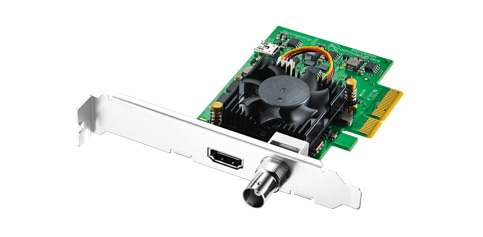
Explore this need in the finder →The DeckLink Mini Recorder 4K is a compact internal capture card for a desktop or workstation with an available PCIe path. Its “4K” name is accurate only when the frame-rate ceiling is kept in view: Blackmagic documents UHD through 2160p30, not 2160p60. The more useful decision is whether the source is HDMI or SDI, whether 30 fps UHD is sufficient, and whether the computer can spare a four-lane PCIe connection. This assessment is based on the current U.S. model listing and model-specific technical section; no card was installed or tested.
Separate the UHD and DCI format labels
The card provides one HDMI 2.0a input and one 6G-SDI input. Blackmagic lists standard-definition and high-definition timings, including 1080p through 60 fps. The UHD list reaches 2160p23.98, 24, 25, 29.97 and 30. The separate 4K DCI list goes through 23.98, 24 and 25 fps; SDI also has its own 2K DCI entries. Those are distinct raster and connector-specific mode families. A buyer asking for “4K” should compare the exact raster and frame rate in the source signal rather than treating UHD, 4K DCI and 2K DCI as interchangeable labels.
That distinction rules out this card when the essential target is UHD 60 fps capture. Blackmagic's table does not document 2160p60 here, and the card should not be represented as a 4K60 option simply because the model name contains “4K.” For a camera or console that can be set to an HD output, the documented 1080p60 range may still be useful; for UHD acquisition, the limit is 30 fps.
Two input connectors do not establish a two-source workflow
The connection table lists one HDMI input and one SDI input. The product description says the inputs detect and switch between supported formats, but Blackmagic does not publish a simultaneous dual-input capture matrix. Plan around one selected source path unless the manual, driver and application documentation confirm the exact concurrent arrangement you need. This is a PCIe capture card, not an external HDMI switcher or a dual-input production mixer.
Neither reviewed technical section lists an HDMI output or a consumer-style live passthrough route to a display. A capture input is not by itself a monitor output, and the card's professional playback features elsewhere in the DeckLink family should not be transferred to this input-only model. If the original signal must continue directly to a display, plan an external splitter or a capture device with a documented output path, then check any format, copy-protection and latency constraints independently.
Copy protection and HDR need separate checks
The HDMI note is explicit that protected HDMI sources cannot be captured. A connector that accepts an HDMI signal is not permission to record a protected program, and this product is not a way around HDCP. Check that the source output is unencrypted and that you have the rights to capture it. The SDI input has its own professional timing and metadata support, but that does not change the HDMI restriction.
HDR appears in the product documentation: the technical section lists HDR metadata and HLG/PQ support for the relevant digital signal paths. It does not provide a complete table pairing every HDR mode with every frame rate and input. Treat this as a reason to verify the exact source format and software handling, not as a blanket promise of 4K60 HDR recording. The matcher therefore makes no rate-specific HDR promise for the Mini Recorder 4K.
Host and software are part of the purchase
The card uses PCI Express Gen 2 x4. The connections table lists compatible x4, x8 and x16 slots, while the installation section also emphasizes PCIe slot compatibility; verify the motherboard's electrical lanes and available space rather than relying only on the length of a slot. The board is intended for a computer with a real internal PCIe connection. A USB-C port, laptop dock or external Thunderbolt socket is not a substitute. Blackmagic says Mac installations require a Mac Pro with PCIe slots. Two bracket heights are listed in the box, so check case clearance and which bracket the offer actually includes.
Media Express and the Desktop Video software are part of the software list, and DaVinci Resolve is among the named applications. OBS Studio also appears in the broad third-party list, accompanied by a warning that support can vary by application vendor. That citation is a useful compatibility lead, not a verified OBS preset for every input, operating system and format. Confirm the current driver, host OS and specific application workflow before making a production plan.
Compared with the HD Mini Recorder
The similarly named DeckLink Mini Recorder HD is a separate model, not a lower software setting for this board. It uses PCIe Gen 2 x1 and is aimed at SD/HD through 1080p60, with additional SDI-only 2K DCI timings. The Mini Recorder 4K requires x4 lanes and adds UHD through 2160p30 plus selected 4K DCI formats. That difference can decide both the motherboard fit and the camera mode. Do not choose by “Mini Recorder” alone; confirm the exact version on the card, bracket and seller package.
Who should shortlist it
Consider this model if you need an internal, low-profile HDMI or SDI capture path, can provide the required PCIe lanes and are satisfied with documented UHD at up to 30 fps. Look elsewhere for 4K60, an external USB device or built-in display passthrough. Before ordering, match the source's raster, frame rate, connector and copy-protection state to the correct input; confirm the chassis bracket and PCIe slot; and verify that the current driver and application support the intended route. Blackmagic's model page documents the board, not a particular retailer's inventory, condition or included used-card accessories.
Sources: Blackmagic Design's U.S. DeckLink model list and DeckLink Mini Recorder 4K technical specifications.
Key specifications
Key details at a glance
| Signal input | 1 x HDMI 2.0a input; HDMI input cannot capture copy-protected sources / 1 x 6G-SDI input |
|---|---|
| Confirmed capture formats | SD: 525i59.94 NTSC and 625i50 PAL / HD: 720p50/59.94/60, 1080p23.98 through 60, 1080PsF23.98 through 30 and 1080i50/59.94/60 / SDI-only 2K DCI: 23.98p/24p/25p and listed PsF timings / UHD: 2160p23.98/24/25/29.97/30 / 4K DCI: 23.98p/24p/25p |
| Confirmed passthrough formats | |
| Computer connection | Pci express gen 2 x4 card; the technical table lists x4, x8 and x16 slot compatibility, while physical-installation wording describes x4, x8 and x16 slots. mac os installations require a mac pro with pcie slots. |
| Named compatible software | Media Express / DaVinci Resolve / Adobe Premiere Pro CC / Avid Media Composer / Open Broadcaster Software Studio (third-party support may vary) / Telestream Wirecast / vMix / Boinx mimoLive |
| HDR recording | The technical section lists sdi hdr static metadata packing and hlg/pq transfer characteristics and hdmi 2.0a hdr support. it does not provide a complete rate-by-rate recording matrix, so no exact hdr mode is matched and the source does not support a 4k60 hdr claim. |
Use the exact model’s instructions for operating limits, supplied equipment and version differences.
Sources for this review
Sources for this assessment

Check your complete signal path
Choose the source format, desired captured signal, passthrough target, computer connection and software together. A single device must support that whole arrangement.