
Your needs, this model
Does it fit your priorities?
Can the 4K Extreme capture UHD at 60 fps?
Blackmagic lists HDMI input through 2160p60 and 12G-SDI across UHD formats, so UHD60 is a documented one-source plan. The product description separates full-width DCI 4096x2160 and gives it a lower rate; confirm the exact raster and connector rather than treating UHD and DCI as synonyms.
Explore this need in the finder →Does the card include the connections needed for a workstation?
The technical specification lists a supplied HDMI mezzanine card, analog/RS-422 breakout and external power cable. A shared Desktop Video manual says the 4K Extreme 12G ships with a mezzanine attached and notes that some high-performance PCIe computers may need the additional power cable. Confirm the seller's exact package and host power/slot plan.
Explore this need in the finder →Can I treat its HDR and HDMI output as proof of 4K60 HDR recording or passthrough?
No such mode is assigned here. Blackmagic lists HDR metadata and HLG/PQ characteristics, but not a model-specific capture table that pairs HDR recording with UHD60. The HDMI output is documented for playback, not a universal input loop-through.
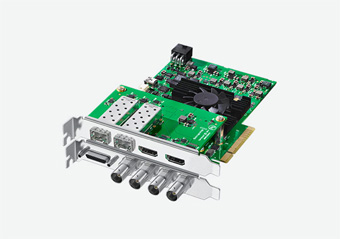
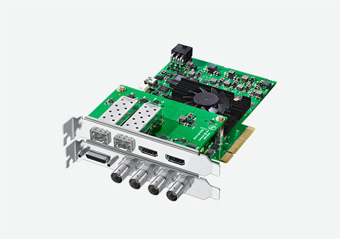
Explore this need in the finder →Blackmagic Design DeckLink 4K Extreme 12G is a professional PCIe capture/playback board for a workstation with SDI, HDMI and analog video in the same installation. Its useful distinction is not simply “4K”: it combines 12G-SDI, HDMI 2.0b and analog breakout connections, with audio and reference/control interfaces that are uncommon on small external gaming capture devices. The tradeoff is an involved internal setup and a need to match the exact signal, card, mezzanine and host configuration.
Multiple inputs, but not interchangeable formats
The technical page lists two 12 Gb/s SDI inputs, an HDMI input, and component YUV that can be switched to S-Video or composite. These are separate source paths. The SDI connections support multiple single- and dual-link 4:2:2 or 4:4:4 modes; HDMI supports 2160p60; and analog component is specified for SD/HD. Do not assume all connectors provide the same resolution or that their maximum modes operate simultaneously. For a straightforward 4K60 requirement, the documented 2160p60 UHD input is a useful reference point. Blackmagic’s description gives a lower frame-rate ceiling for full-width 4096×2160 DCI, so confirm the exact DCI standard and connector instead of treating “4K” as one timing.
The board’s output list is extensive, including HDMI, SDI and analog outputs, but output sockets are not automatically a console passthrough route. The published technical page describes playback, hardware conversions and output behavior; it does not promise that any selected input is mirrored to an attached display at every capture rate. A separate monitor chain or a verified routing configuration may still be needed.
Professional audio, sync and control connections
Beyond video, Blackmagic lists embedded SDI and HDMI audio, AES/EBU, two balanced analog audio channels, Tri-Sync or Black Burst reference input, and an RS-422 deck-control connection. Component analog video and the RS-422 connection use the listed breakout lead; the package list also names an HDMI mezzanine card and an external power cable. Optical-fiber I/O is identified as optional. These details make the card plausible for a facility or edit workstation that already has the corresponding signal infrastructure, but they also make package verification more important than a generic listing title.
The HDMI input cannot capture copy-protected HDMI sources. The specification describes HDR metadata packing and HLG/PQ transfer characteristics, and identifies HDR support for HDMI, but it does not provide a mode-by-mode HDR-recording matrix that pairs every input and frame rate. Accordingly, the finder does not promote this card to a 4K60 HDR-recording match from the general HDR heading alone. Check the exact input mode, pixel format and recording application if HDR capture is an essential requirement.
The host is a workstation, not a USB accessory
The computer interface is eight-lane PCI Express Gen 2, compatible with x8 or x16 slots. The technical page says the Mac installation requires a Mac Pro with PCIe slots. A small desktop or a laptop with USB-C should not be assumed to accept this board. Blackmagic lists Mac, Windows and Linux support, with current operating-system versions in the technical page. The current system list is not proof that an individual older chassis has an open slot, enough power, appropriate cooling or the correct driver.
Blackmagic names DaVinci Resolve, Media Express and a range of third-party applications, including OBS Studio. It notes that third-party support can vary by software vendor. The app listing therefore supports an OBS-compatible assessment, but not a tested OBS profile or an assurance that every SDI, HDMI and analog timing will be available in that app. The video standard, chosen source, software and host bandwidth should be checked as one workflow.
How it compares with Intensity Pro 4K and 8K Pro G2
Intensity Pro 4K is a simpler PCIe choice for HDMI and legacy analog sources when 2160p30 is sufficient; it does not have this model’s 12G-SDI or professional audio/control complement. DeckLink 8K Pro G2 is the newer high-resolution path, with HDMI 2.1, four bidirectional 12G-SDI links and published 4K120/8K60 standards, but it does not replace the 4K Extreme’s analog video set. Each card has a distinct interface and host-power plan, not a single interchangeable “Blackmagic 4K” profile.
Checks before buying
Verify that the seller’s exact card includes the HDMI mezzanine, analog/RS-422 breakout and external power cable described by the manufacturer. Confirm a suitable PCIe Gen 2 x8 or x16 slot, two-slot physical clearance for the assembled card, and a power supply that can support the installed configuration. Match the source to SDI, HDMI or analog, check the actual video standard (UHD and DCI are not the same raster), and confirm the chosen software and driver. If you need optical fiber, confirm the separate optional hardware rather than assuming it is in the package. No price, current stock, installation test or measured performance is inferred here.
This review is an analysis of Blackmagic’s model-specific U.S. catalogue and technical references, not a report of ownership or hands-on testing.
Sources: Blackmagic Design’s U.S. product index, DeckLink technical specifications and Desktop Video manual.
Key specifications
Key details at a glance
| Signal input | Two 12G-SDI inputs / HDMI 2.0b input through the supplied HDMI mezzanine / component YUV input switchable to S-Video or composite / balanced analog audio inputs via breakout |
|---|---|
| Confirmed capture formats | UHD 2160p60 over the documented digital paths / HD through 1080p60 / full-width 4096x2160 DCI modes require a separate exact format/connector check / component analog SD/HD / composite or S-Video analog |
| Confirmed passthrough formats | |
| Computer connection | Pci express eight-lane generation 2 card, compatible with x8 or x16 slots |
| Named compatible software | DaVinci Resolve / Media Express / Open Broadcaster Software Studio / Final Cut Pro X / Adobe Premiere Pro CC / Avid Media Composer / vMix |
| HDR recording | The specification lists hdr metadata packing and hlg/pq transfer characteristics, but no mode-by-mode hdr-recording matrix is assigned to the uhd60 matcher plan. |
Use the exact model’s instructions for operating limits, supplied equipment and version differences.
Sources for this review
Sources for this assessment
Check your complete signal path
Choose the source format, desired captured signal, passthrough target, computer connection and software together. A single device must support that whole arrangement.