
Your needs, this model
Does it fit your priorities?
Can original GC551 capture an unencrypted HDMI feed at 1080p60 in OBS on a Windows computer?
AVerMedia lists GC551 maximum recording at 1080p60 and its model-specific installation FAQ names OBS Studio as an available third-party app. The host needs USB 3.0/3.1 Gen 1; USB 2.0 is unsupported. Check the exact Windows driver, source timing and capture settings rather than assuming every listed maximum is automatic.
Explore this need in the finder →Does GC551 record 4K, or is 4K its display pass-through limit?
The GC551's maximum recording format is 1080p60. AVerMedia describes passing a 4Kp60 gaming signal to a display while broadcasting Full HD; that 4K figure is for the display path, not 4K recording. HDR, 1440p, ultrawide and high-refresh passthrough are not listed as supported.
Explore this need in the finder →Will the original GC551 suit a USB 2.0, HDCP-protected or HDR capture path?
No. AVerMedia expressly says USB 2.0 is unsupported and HDCP-protected signals cannot be viewed, recorded or streamed. The model page also says HDR is not supported; its 4Kp60 passthrough is non-HDR and does not document 1440p/high-refresh modes.
Explore this need in the finder →Should a used GC551 listing be treated as GC551G2 or as a complete, current package?
No. Best Buy identifies the black original GC551 as SKU 6288523 and says it is no longer available new; that is not the same model as GC551G2. AVerMedia's old box list includes cables and a PowerDirector 15 key card, but a used offer may differ, and the maker stopped distributing PowerDirector serial numbers in 2025. Check condition, exact model, cables and seller terms directly.
Explore this need in the finder →AVerMedia's Live Gamer EXTREME 2 GC551 is an earlier external HDMI capture unit, not the later GC551G2. A Best Buy US record identifies a black GC551 and retail SKU 6288523, while also saying the model is no longer available in new condition. The manufacturer still hosts a model page and support material, so I classify this as an earlier generation rather than claiming a formal manufacturer end-of-life notice. This is a source-based assessment, not a hands-on test.
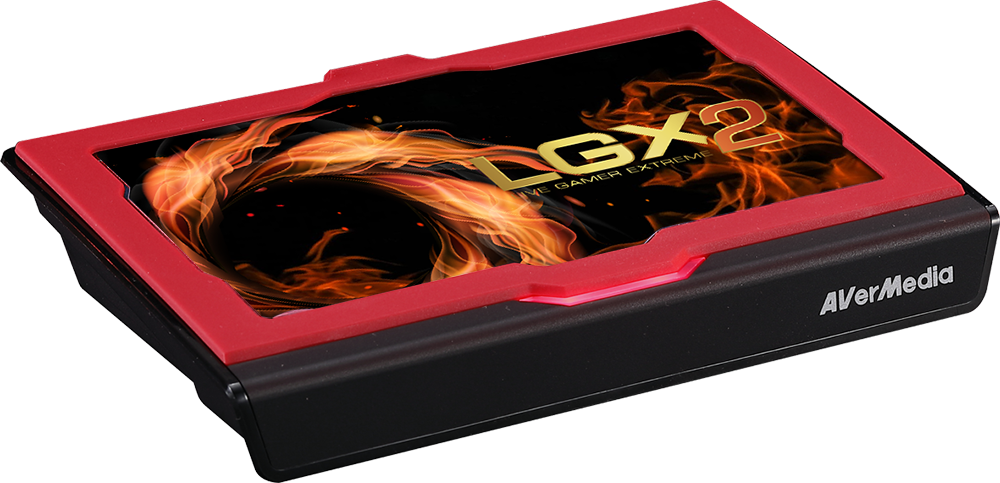
Full HD capture, 4K display path
The important distinction is between the signal recorded by the computer and the signal sent onward to a monitor. AVerMedia lists HDMI 2.0 input/output, USB 3.1 Gen 1 Type-C and maximum recording at 1080p60. It advertises the device for playing at 4Kp60 while streaming Full HD. The 4K number belongs to the display pass-through path; it does not make the GC551 a 4K recorder. The older datasheet also lists input timings such as 2160p, 1080p, 720p and standard-definition formats, but that list is not a capture-mode table for every timing.
For a straightforward Windows capture, AVerMedia's model-specific setup page says to install its RECentral 4 software and GC551 driver, while allowing third-party apps such as OBS Studio and XSplit. The product page separately frames the intended split as 1080p60 streaming with 4Kp60 gaming. This is a useful defined task, not a promise about every source, refresh rate, cable, display or app setting. The published passthrough options above 1080p60 are limited to 4Kp60; AVerMedia explicitly excludes HDR, 1440p, ultrawide and high-frame-rate pass-through. If recording 4K, preserving HDR, or playing at 1440p high refresh is essential, compare a different model and its exact current mode table rather than reading those capabilities into the GC551.
Check the host before choosing it
The small external box still needs the right computer port. AVerMedia says USB 2.0 is not supported, recommends a direct USB 3.0/3.1 Gen 1 host-controller connection instead of a hub, and prefers a native Intel controller. Its official troubleshooting note also points out that sharing a busy USB controller can affect stability. Do not treat a Type-C-shaped port as proof of USB 3.x data capability; check the host's controller, cable and route. The manufacturer's dedicated streaming-PC requirement page names Windows 10 x64 and example desktop/laptop CPU and graphics requirements, while the GC551 downloads page currently lists the model driver for Windows 10 x64 and Windows 11. The checked material does not establish a separate Mac or iPadOS recording plan for this original GC551, so I do not match it to those hosts.
Signals and restrictions that matter
HDMI audio follows the HDMI path; the published connections do not show a separate 3.5 mm analog line-in or line-out for this model. More importantly, AVerMedia says that HDCP-protected signals cannot be viewed, recorded or streamed. The model page also says HDR is not supported. A capture card is not a workaround for protected media, and passthrough to a display should not be confused with recording protected content. Buyers who need a separate microphone or commentary path should plan that route in their software and other equipment; the GC551's published product connections do not establish an analog audio port.
Old package claims need a current check
The 2018 manufacturer datasheet lists the unit, an HDMI cable, a Type-C-to-A USB cable, a backup screw, a customizable cover, a quick guide and a CyberLink PowerDirector 15 product-key card. That is a historical standard box list, not proof that an old, open-box or used listing still contains every item. AVerMedia's model page now says it stopped distributing PowerDirector 15 serial numbers on July 17, 2025; the software no longer receives updates or maintenance. Check the exact unit, cables, cover, condition, seller return terms and any remaining activation information before relying on that bundle description. Do not infer present availability or a price from a retailer's archived model record.
How it differs from nearby models
The original GC551's 1080p60 recording ceiling and 4Kp60 pass-through are not the same specification as the later GC551G2 Live Gamer Extreme 3. The suffix matters: do not let a listing title, cable or manual for one generation silently fill in facts for the other. This assessment keeps the US Best Buy SKU 6288523 attached to the black GC551 listing and uses the manufacturer page for its technical ceilings. It does not establish a current US direct-store offer, present stock, seller condition, warranty or a complete used package. Confirm the exact model, computer port and source timing first; if the task exceeds Full HD recording or needs HDR, this is the wrong capability profile.
The evaluation uses AVerMedia's GC551 model page, its 2018 datasheet, Quick Guide and installation FAQ, together with Best Buy's US model listing. No ownership, use, performance measurement, current price, availability or customer experience is claimed.
Key specifications
Key details at a glance
| Signal input | hdmi_2_0_unencrypted |
|---|---|
| HDMI generation | HDMI 2.0 |
| Confirmed capture formats | 1080p60 maximum; no 4K recording mode is listed |
| Confirmed passthrough formats | 1080p60 maximum / 4Kp60 (2160p60) maximum; the manufacturer does not list 1440p, ultrawide or high-frame-rate passthrough |
| Computer connection | External USB 3.x host link; check this model's stated generation and port rate |
| Named compatible software | AVerMedia RECentral 4 and GC551 driver package / OBS Studio (named as a third-party capture app in the GC551 installation FAQ) / XSplit (named as a third-party capture app in the GC551 installation FAQ) |
| HDR recording | No hdr recording mode is listed; avermedia expressly says hdr is not supported for this product. hdr passthrough is not an established capability. |
| VRR passthrough | No |
| Analog audio input | Hdmi 2.0 audio input; a separate analog audio input is not listed. |
Use the exact model’s instructions for operating limits, supplied equipment and version differences.
Sources for this review
Sources for this assessment
- AVerMedia US-routed Live Gamer EXTREME 2 GC551 model page
- Best Buy US Live Gamer Extreme 2 black listing
- AVerMedia GC551 datasheet (2018)
- AVerMedia Live Gamer EXTREME 2 Quick Guide
- AVerMedia GC551 installation instructions
- AVerMedia GC551 USB-host troubleshooting FAQ
- AVerMedia GC551 downloads and support page
- AVerMedia GC551 official model-page image

Check your complete signal path
Choose the source format, desired captured signal, passthrough target, computer connection and software together. A single device must support that whole arrangement.