
Your needs, this model
Does it fit your priorities?
What SDI cable connects the SDI Gen 2 to a camera or switcher?
The box list names a 33 cm MCX-to-SDI cable along with the 63 cm USB 3.0 cable. Treat the short MCX lead as the device-side connector adapter and check the exact package and the remaining BNC run needed to reach the source. Magewell recommends connecting the source directly rather than adding an AV converter when possible.
Explore this need in the finder →Does the 120 fps headline mean 1080p120 over SDI?
No 1080p120 output is listed in the reviewed technical table. It gives a broad frame-rate capability up to 120 fps but its detailed 1080p and 720p rows list rates through 60 fps, then SD outputs. For a 1080p60 task, the detailed table directly supports that mode; do not interpret a generic maximum as applying to every raster.
Explore this need in the finder →Is SDI Gen 2 a loop-through SDI device?
The reviewed exact product page lists one SD/HD/3G SDI input and USB capture output; it does not list a second SDI video connector. The short MCX-to-SDI adapter provides a cable connection to the input, not a loop-through output. Compare the separately documented SDI Plus or 4K models only after checking their own input/output diagrams.
Explore this need in the finder →The Magewell USB Capture SDI Gen 2 (part 32070, SKU 320700000) brings one SD/HD/3G-SDI feed to a computer over USB 3.0. It is distinct from the USB Capture SDI Plus and the SDI 4K Plus/Pro models: the generation name, part number, input range and physical connection arrangement all matter. The official page describes embedded audio and includes a short MCX-to-SDI lead. This is a research-based review of published specifications, not a hands-on test.
Match the SDI signal to the output table
Magewell identifies the input as SD, HD and 3G SDI, with a maximum input of 2048×1080 at 60 fps. The technical output list includes 1080p and 720p modes through 60 fps plus standard-definition formats. The product page uses a broader maximum frame-rate statement, but the detailed rows do not establish 1080p120 capture. Treat the mode table as the useful boundary for a specific recording target; do not apply the highest frame-rate number to every raster.
This is not a 4K SDI capture device. Magewell's 4K SDI Plus and Pro assessments cover separate models with different 6G/12G signal classes and capture paths. A converter can change connector or timing, but adding one does not turn this Gen 2 card into a 4K ingest device. The manufacturer recommends a direct source connection for reliability and compatibility when possible. Before relying on a converter, check its output standard, frame rate, audio embedding and how the full chain is powered.
The short device lead is not the whole cable run
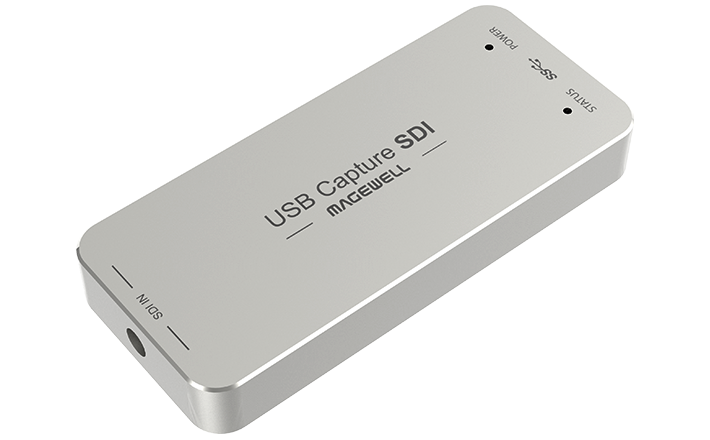
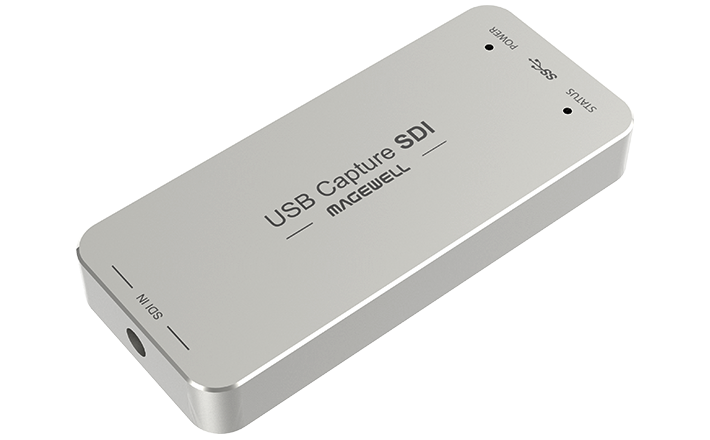
The included 33 cm MCX-to-SDI cable provides the short connection from the unit to a standard SDI lead; the package also lists a 63 cm USB 3.0 cable. Check that the exact offered box contains this small adapter and plan the rest of the BNC run to the camera or switcher. The image shows the compact capture unit, not the adapter or a finished cable installation. A missing lead can change what additional connector hardware is needed.
The product page states that 3G-SDI signals may be transmitted over distances up to 150 m. That is a manufacturer limit, not a guarantee for every cable, patch panel, connector or venue. Signal quality depends on the full physical run and source equipment. The device does not document a second SDI video output or loop-through connector, so it should not be chosen as a way to feed both a capture computer and downstream SDI monitor without separate hardware.
Audio, USB and software choices
Embedded SDI audio is part of the capture workflow. The technical page supports up to eight embedded input channels and describes up to two audio channels at 48 kHz in its output table. That is not a promise that all eight input channels will appear in the exact stereo recording format you choose. Check audio-channel selection in the operating system and capture app, particularly when the source carries multiple language, commentary or production stems.
The host link is USB 3.0, with backward compatibility listed for USB 2.0 and USB 3.1 Gen 1. Lower-bandwidth compatibility does not guarantee the same capture rate. The manufacturer lists Windows, Linux, Mac and Chrome OS and includes applications such as OBS Studio and Capture Express. Its technical sheet identifies DirectShow/audio APIs, Linux V4L2/ALSA and macOS capture APIs. Those broad support statements do not replace a check of the exact OS version, app and source format. The concrete finder plan here is Windows/USB 3.0/OBS/1080p60. No Mac-specific resolution ceiling is assigned in this review because the reviewed sources did not provide a separate Mac mode matrix.
Physical, revision and package checks
Magewell lists a 92.2 × 40.2 × 12.3 mm enclosure and maximum power consumption of about 2.5 W. These are manufacturer specifications, not measurements from a test bench. Leave room for the attached SDI and USB leads, avoid bending the short adapter sharply and confirm the host port's data capability. The capture unit is designed to be externally connected, so it does not need a desktop PCIe slot, but it still depends on a suitable USB port and software.
The current download center names USB Capture SDI Gen 2 Rev B. That is revision-support evidence, not proof that a seller's device has that revision. Before purchase, check the label, included adapter lead, USB cable, source type, return terms and current firmware notes. The US retailer listing corroborates the 32070 identity; this assessment makes no claim about its current offer, price, stock, warranty coverage or seller quality.
Who should compare it
Compare the SDI Gen 2 when a single SD/HD/3G-SDI source needs a USB capture path and 1080p60-or-lower output fits the recording workflow. Its small connector arrangement and included short MCX lead are relevant installation details, not performance extras. It is a poor fit for HDMI sources, 4K SDI ingest, 1080p120 recording, built-in SDI loop-through or any workflow that depends on a Mac mode the documents do not spell out. The most reliable decision starts with the source's exact SDI standard, then checks the capture output, audio channel plan, USB host and package as one chain.
Key specifications
Key details at a glance
| Signal input | sd_hd_3g_sdi_via_mcx_to_bnc_lead |
|---|---|
| Confirmed capture formats | The model-specific output list includes 1920x1080p and 1280x720p at rates through 60 fps, plus 720x576p25 and 720x480p30. A broad 'up to 120 fps' claim does not make 1080p120 a listed mode. |
| Confirmed passthrough formats | |
| Computer connection | External USB 3.x host link; check this model's stated generation and port rate |
| Named compatible software | OBS Studio / USB Capture Utility / Capture Express / VLC / XSplit / GStreamer / Zoom Rooms / Microsoft Teams |
| HDR recording | Hdr file capture is not documented in the reviewed model-specific sources. |
| Analog audio input | Sdi input carries embedded audio; the technical table supports up to eight input audio channels and lists up to two-channel 48 khz audio output for capture. no audio-channel count beyond the documented output is asserted. |
| Cables listed in the box | USB 3.0 cable, 63 cm / MCX-to-SDI cable, 33 cm |
Use the exact model’s instructions for operating limits, supplied equipment and version differences.
Sources for this review
Sources for this assessment
- Magewell USB Capture family comparison
- USB Capture SDI Gen 2 product page, SKU and included MCX lead
- USB Capture SDI Gen 2 technical specifications and SDI modes
- USB Capture firmware applicability and download center
- Official USB Capture SDI Gen 2 product image
- B&H US listing identifying Magewell MFR 32070
Check your complete signal path
Choose the source format, desired captured signal, passthrough target, computer connection and software together. A single device must support that whole arrangement.