
Your needs, this model
Does it fit your priorities?
Does SDI 4K Plus record 4K60?
No 4K60 recording mode is documented. Magewell's summary identifies 3840x2160p30 capture; the product's maximum SDI input/loop-through is 4096x2160p30. The detailed table lists 1080p through 90 fps and 1440p60, so do not turn the input maximum into a 4K60 capture claim.
Explore this need in the finder →Is 1080p120 a supported SDI 4K Plus capture choice?
The detailed table's 1080p capture ceiling is 90 fps, not 120 fps. A conservative Windows/USB 3.0/OBS plan is 1080p60; verify the exact 1080p90 pixel format and app support if you need more than 60 fps.
Explore this need in the finder →Does SDI 4K Plus capture 1080p120?
No 1080p120 mode appears in the reviewed technical table. The documented 1080p ceiling is 90 fps, while its conservative Windows/USB 3.0/OBS plan is 1080p60. Do not round a listed 90-fps maximum up to 120 fps.
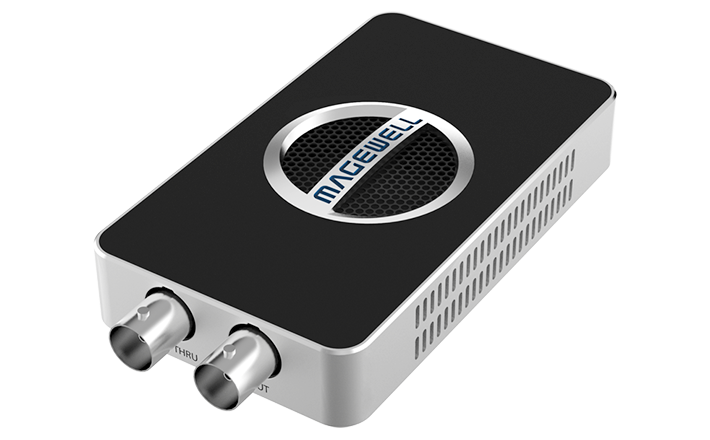
Explore this need in the finder →The USB Capture SDI 4K Plus is a compact external capture device for a single SDI source. The exact Magewell product page identifies the model as part 32100, SKU 321000000. Its 6G-SDI connection and USB 3.0 host make it a different proposition from the 12G-SDI, 20 Gbps USB Capture SDI 4K Pro. This is a document-based assessment rather than a report of hands-on use.
4K30, not 4K60 recording
Magewell specifies one 6G-SDI BNC input with a loop-through path and a maximum input raster of 4096×2160 at 30 fps, 10-bit 4:2:2. The product summary describes capture up to 3840×2160p30, while the detailed mode table lists 1080p capture through 90 fps and 1440p through 60 fps. Those values answer different questions: the input/loop-through rate is not evidence of 4K60 capture, and a 90-fps 1080p row does not establish 1080p120. The public finder offers 1080p60 as a supported capture target; it does not overstate the card's ceiling.
The 6G-SDI label is useful for comparing source paths, but the actual camera, switcher or recorder output standard and timing still need to match the mode table. The SDI loop continues to another BNC destination; it is not HDMI passthrough. If the display or recorder expects HDMI, the conversion and its format limits are a separate part of the system.
USB and software fit
The host interface is USB 3.0, with USB 2.0 compatibility also listed by Magewell. The product page names Windows, Linux, Mac and Chrome OS and identifies OBS among compatible software. That is broad operating-system and application support, not a promise that the same pixel format is available across all of them. For a conservative Windows arrangement, the detailed capture table supports 1080p60; the table also contains a 1080p90 ceiling and 1440p60 mode. Neither is a 1080p120 or 4K60 claim. The reviewed source material does not publish a separate Mac capture-mode matrix, so the operating-system label should not be used to transfer Windows limits to a specific Mac app or version.
The device also lists a 3.5 mm line input and output alongside embedded SDI audio. That can simplify routing for some installations, but the source documents do not establish an exact software mixer, sync delay or audio-monitor experience. Confirm that the chosen application sees the intended video and audio devices and that the BNC source is correctly terminated and routed.
Compare the two SDI 4K Plus/Pro paths carefully
The names are close, but the interfaces and bandwidth class are not. The SDI 4K Plus is a 6G-SDI, 4K30-class device using USB 3.0. The SDI 4K Pro uses 12G-SDI, supports a 4Kp60 capture class and relies on a 20 Gbps USB 3.2 Gen 2x2 maximum-performance link, with model-specific mode tables. The older USB Capture SDI Plus (part 32050) is another separate model; its 3G/2K table is not a substitute for either 4K model. Match the exact printed part and SKU rather than searching by a shortened “SDI 4K” name.
Where it fits
Shortlist the SDI 4K Plus if a 6G-SDI source and external USB capture are central to the setup and a 4K30 or lower capture target is sufficient. It may also suit a 1080p workflow that benefits from a documented mode above 60 fps, provided the required timing, format and app are confirmed. Avoid it for 4K60 recording, 1080p120, 4K120/144 capture or an HDMI source without an independently checked conversion route. The product page and current download material establish a technical reference, not the state of a specific retailer offer. Before ordering, check part 32100 / SKU 321000000, exact package contents, the source's SDI standard, computer OS/app support, seller return terms and firmware applicability. No price, rating, stock or independent test is asserted.
Key specifications
Key details at a glance
| Signal input | sdi |
|---|---|
| Confirmed capture formats | Product summary lists capture through 3840x2160p30; detailed table includes 1080p through 90 fps and 1440p60. It does not document 4K60 or 1080p120 capture. |
| Confirmed passthrough formats | One SDI loop-through up to 4096x2160p30. No HDMI output and no 4K60 loop-through claim. |
| Computer connection | External USB 3.x host link; check this model's stated generation and port rate |
| Named compatible software | OBS Studio / USB Capture Utility / Capture Express / VLC / XSplit / Zoom Rooms / Microsoft Teams / GStreamer / QuickTime Player / software using DirectShow, V4L2 or AVFoundation |
| HDR recording | Hdr capture is not established in the reviewed product page or technical table. |
| Analog audio input | Embedded sdi audio, 3.5 mm line input and line output are listed. a specific application mix/synchronization result is not established. |
Use the exact model’s instructions for operating limits, supplied equipment and version differences.
Sources for this review
Sources for this assessment
- Magewell USB Capture family comparison, ten named entries
- USB Capture SDI 4K Plus product page: exact model and 6G-SDI path
- USB Capture SDI 4K Plus technical specifications and capture-mode table
- The LA Firm US listing identifies USB Capture SDI 4K Plus SKU 321000000
- Exact USB Capture SDI 4K Plus manufacturer image

Check your complete signal path
Choose the source format, desired captured signal, passthrough target, computer connection and software together. A single device must support that whole arrangement.