
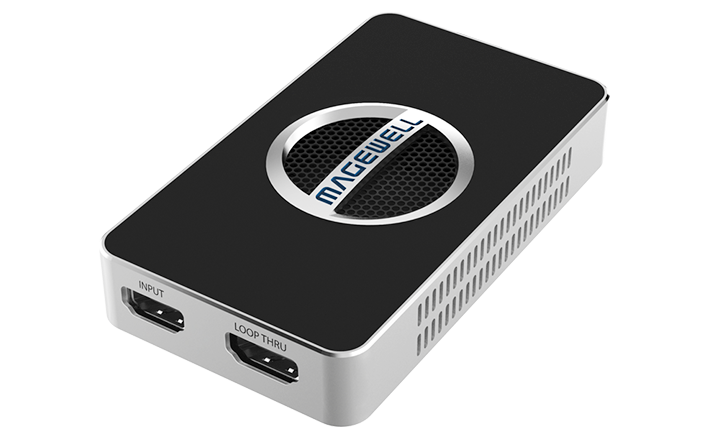
Your needs, this model
Does it fit your priorities?
Does the USB Capture HDMI 4K Plus record 4K60?
No. The product page's capture summary reaches 3840×2160p30, and the detailed technical table also lists 4K capture through 30 fps. Its 4K60 specification describes HDMI input and loop-through, not a 4K60 recording stream. A Windows 1080p60 OBS plan is documented; confirm the source, USB link, OS and chosen capture mode before relying on it.
Explore this need in the finder →Can I keep a 4K60 signal on my display while capturing?
Magewell specifies HDMI 2.0 input and loop-through up to 4096×2160 at 60 fps and separately documents capture modes such as 1080p60. That is a lower capture target than the display path; do not interpret the output maximum as 4K60 recording or assume every color format works with every display. Check the source and display format and the current host/app mode list.
Explore this need in the finder →What cable comes with the USB Capture HDMI 4K Plus?
The technical specification lists one 63 cm USB 3.0 cable, and the product page lists the capture device and that cable. A Mini Repeater 4K HDMI is presented as optional, not as a standard included item. Check the exact seller's box contents and warranty terms, and use an authorized sales channel for your country or region.
Explore this need in the finder →The USB Capture HDMI 4K Plus is an external, one-channel HDMI capture box whose two headline paths are easy to confuse: the computer capture stream and the HDMI loop-through to a monitor. Magewell identifies it as part 32090, SKU 320900000, with HDMI 2.0 input, a USB 3.0 host interface, audio connections and a single HDMI loop-through. This is a document-based assessment, not a hands-on test; the cited manufacturer material is the basis for the mode boundaries.
4K60 belongs to the input/display path
Magewell specifies that the input and loop-through path can reach 4096×2160 at 60 fps, and its product page also names 2560×1440p144. The capture table is lower: it lists 4K up to 30 fps, 1440p up to 60 fps, and 1080p up to 60 fps. The product-page summary describes 4K capture at 30 fps or 1080p capture at 90 fps. Those figures do not mean the box records 4K60. That distinction matters if a console or camera should continue to a 4K60 display while a computer records a smaller stream; the loop-through maximum alone is not a recording target.
Color and chroma format also matter. The technical page describes an HDMI 2.0 receiver, supported 4:4:4 and subsampled inputs, and warns that actual capture rates can be limited by USB bandwidth and internal working frequency. Its 1440p capture table stops at 60 fps, even though the input/display path includes a 144Hz 1440p mode. The selection list does not offer every signal a capture card might accept, so use the source's full mode documentation before treating a video setting as compatible.
Check the host and app, not just the connector
This is an external USB device, not a PCIe card. Magewell lists USB 3.0, compatibility with USB 2.0 and USB 3.1 Gen 1, and Windows, Linux, Mac and Chrome operating systems. OBS Studio appears among the compatible applications. Those compatibility statements are not a promise that every operating system, port, codec and resolution can be combined at the maximum rate. Magewell says available capture modes vary with the operating system and host performance; its page does not provide a complete Mac-by-app mode matrix. The cautious documented finder scenario uses Windows, an unencrypted HDMI source, USB 3.0, OBS and a 1080p60 capture target. For a Mac workflow, check the current application and mode table for the exact computer rather than borrowing the Windows limit.
Use the included 63 cm USB cable and connect to a host port that meets the requirement for the chosen mode. A USB-C adapter or hub is another link to check, not proof that the data path is fast enough. The device is bus-powered in the technical description, with a stated maximum consumption of about 7 W. The cited model specification lists a 98.1 × 56.8 × 17 mm case; that is product size, not the space needed for cable bends or ventilation. Magewell lists operation from 0 to 45°C and non-condensing humidity limits, which matter in a warm equipment enclosure.
Audio and package details
Embedded HDMI audio reaches the computer, and the unit has a 3.5 mm microphone input plus a headphone jack that can monitor source or host audio. That arrangement can reduce separate audio adapters in a simple capture chain, but the sources do not guarantee a particular mixer, headset or software routing choice. Set the audio source in the operating system and capture app, then check for a duplicate or delayed monitor path in the actual workflow.
The manufacturer page lists the capture unit and one USB 3.0 cable. A Mini Repeater 4K HDMI is shown as an optional accessory, so do not assume it is in the box. The manufacturer’s download center applies a July 2026 firmware release to the 4K Plus Rev C; confirm the hardware revision and upgrade instructions for the offered unit instead of applying firmware by name alone. Firmware support does not establish a seller’s warranty or the condition of a used card.
Who should compare it
Compare the 4K Plus when you need a documented HDMI 4K60 display path and a lower capture-to-computer target, or when a 1440p60 recording ceiling is sufficient and a simple USB installation matters more than internal PCIe. It is a poor fit for a 4K60 recording requirement, HDR file capture, or 1440p144 recording. The similarly named USB Capture HDMI Plus is a distinct part and SKU, has an HDMI 1.4 interface and a 2K capture ceiling; do not confuse the two packages. If the listing uses an older or regional suffix, check the exact printed part number, included USB cable, seller return terms and applicable regional warranty. No price, rating, buyer experience or independent test is implied here.
Key specifications
Key details at a glance
| Signal input | hdmi_2_0_unencrypted |
|---|---|
| HDMI generation | HDMI 2.0 |
| Confirmed capture formats | Up to 3840×2160p30 or 1920×1080p90 in the product-page summary; the detailed technical table lists 4K/1080p modes through 60 fps and 1440p60. No 4K60 recording mode is documented. |
| Confirmed passthrough formats | HDMI input/loop-through up to 4096×2160p60; product page also specifies 2560×1440p144. These are display/input path figures, not capture maxima. |
| Computer connection | External USB 3.x host link; check this model's stated generation and port rate |
| Named compatible software | OBS Studio / USB Capture Utility / Capture Express / VLC / XSplit / Zoom Rooms / Microsoft Teams |
| HDR recording | No hdr recording mode is documented in the reviewed product page, technical specification or manual. |
| Analog audio input | Hdmi embedded audio and a 3.5 mm microphone input; a 3.5 mm headphone jack can monitor source or host audio. |
| Cables listed in the box | One USB 3.0 cable, 63 cm, listed in the technical specification. |
Use the exact model’s instructions for operating limits, supplied equipment and version differences.
Sources for this review
Sources for this assessment

Check your complete signal path
Choose the source format, desired captured signal, passthrough target, computer connection and software together. A single device must support that whole arrangement.