
Your needs, this model
Does it fit your priorities?
Is Pro Capture Mini HDMI an external USB capture card?
No. It is an internal Mini PCIe Gen2 x1 card with a JST SHD input connection. The listed SHD-to-HDMI Type-A breakout gives the card a standard HDMI source path, but does not make the host connection USB. Confirm that the computer or carrier provides Mini PCIe and the needed internal clearance.
Explore this need in the finder →Which Mini HDMI heat-sink configuration should I check?
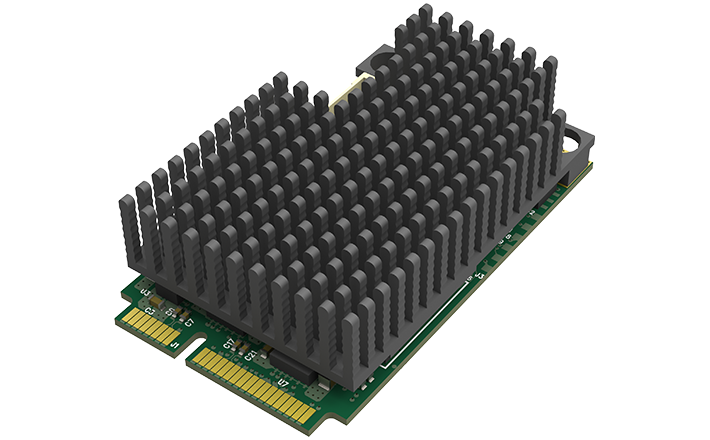
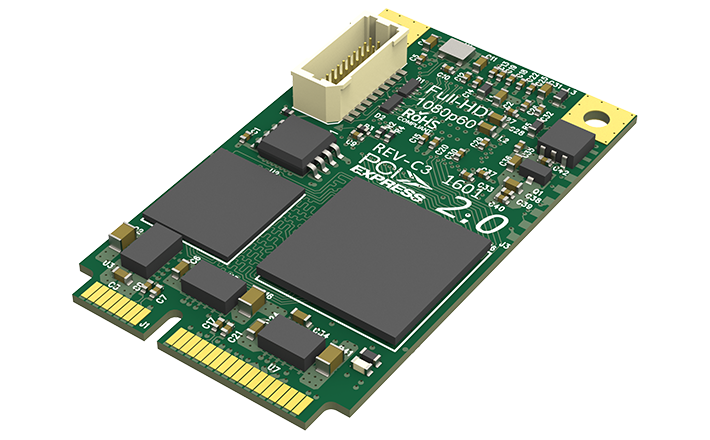
Magewell lists three exact part/SKU choices: 111100000 small heat sink, 111100001 large heat sink and 111100002 no heat sink. The product page provides different images and identifies the configurations but does not establish a tested thermal-performance ranking. Match the SKU to available card height, airflow and the host's design; do not rely on a generic listing title.
Explore this need in the finder →Does its 2048x2160 maximum raster mean 4K or 144fps capture?
No. The family literature lists typical input formats such as 1080p60 and gives a separate maximum raster and general rate ceiling qualified by PCIe bandwidth and the card's pixel clock. This assessment matches 1080p60 only; it does not classify that raster as 4K, 1080p120 or 1440p144 capture.
Explore this need in the finder →Research position: this is an original, specification-led assessment of Magewell's Pro Capture Mini HDMI, part 11110. It is an internal Mini PCIe capture card, not a USB adapter. The exact configuration matters: Magewell lists three part/SKU choices with small, large or no heat sink, each paired with a SHD-to-HDMI breakout. I reviewed the official model page, technical specifications and Mini family literature; no card or host was physically tested.
Three exact heat-sink SKUs, one capture model
The official product page offers SKU 111100000 with a small heat sink, 111100001 with a large heat sink and 111100002 with no heat sink. The three images below show those exact configurations from the same model page; they are not illustrations of different capture capabilities. Magewell directs readers to identify the SKU and its corresponding picture. The manufacturer sources do not publish a tested heat comparison or a different mode table for each heat-sink choice, so this review does not claim that the larger sink produces a measured performance gain or that the no-sink board cannot be used. The sensible purchase check is physical: match the exact SKU to the host's clearance, airflow and thermal design, and do not assume a seller's generic “Mini HDMI” title identifies which card is being offered.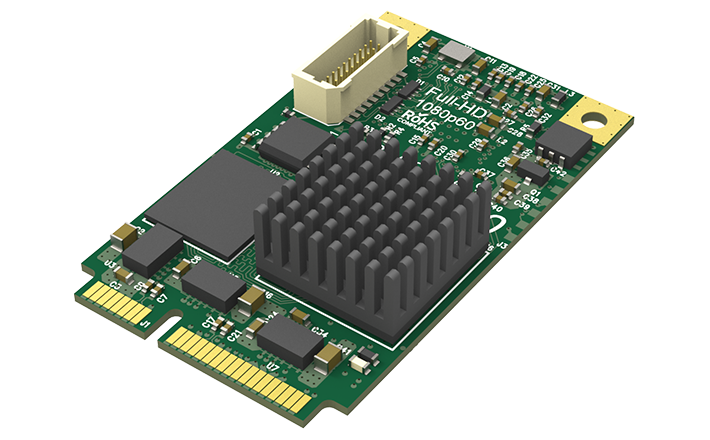
Internal host connection and the HDMI breakout
The capture board uses a Mini PCIe Gen2 x1 host and a JST SHD 20-pin source connection. Magewell lists an SHD-to-HDMI Type-A breakout with each SKU. This creates a standard HDMI source path at the card's input end, but it does not turn the host connection into USB or add a regular HDMI socket directly on the card. Check that the computer or a purpose-built carrier exposes the correct Mini PCIe connection and that the chosen configuration fits. It is not the simple external-cable option for a modern USB-only laptop. The device is a single-channel HDMI capture card. Magewell's Mini family literature lists typical input formats including 1080p60/59.94, 1080i60/59.94, 1080p30, 720p and standard-definition timings. It separately lists a maximum capture raster up to 2048 × 2160 and a rate ceiling up to 144 fps, while warning that actual frame rate can be restricted by PCIe bandwidth and the onboard processing clock. Those are different kinds of specification: the general maximum does not show that the device captures 1080p120, 1440p144 or a 4K mode. The conservative Windows/OBS setup assessed here is one unencrypted HDMI source at 1080p60.Software, signal limits and what is missing
Magewell lists Windows, Linux and Mac support and identifies OBS among compatible software. The precise host still matters more than the word “Mac” on a compatibility list: the physical Mini PCIe installation, driver version, operating-system release and application's capture path all need to be checked together. This review uses the narrower Windows plan. The three heat-sink configurations do not change the documented signal path in the reviewed sources. No HDMI loop-through or video output is listed. If the source must also feed a display, plan a separate output or distribution path; capture input is not passthrough. The reviewed materials also do not establish a model-specific HDR recording mode or VRR display route. HDMI protection remains a restriction: Magewell requires an unencrypted source. No workaround is proposed. The Mini form factor is an advantage only when the host was built for it. It becomes a compatibility burden if the system has only a conventional full-size PCIe slot or external USB ports. Before buying, confirm the actual Mini PCIe host, card clearance, heat-sink SKU, included SHD breakout, source resolution/rate and software driver. For a plug-and-play external console setup, a USB capture device is a better category to compare; for a desktop PCIe slot, compare full-size cards rather than assuming a carrier board is included.Assessment boundary
The official product page provides three physical configurations and exact identifiers; the model-specific mode evidence supports a 1080p60-class workflow. U.S. identity pages help distinguish the small, large and no-sink packages, but they do not establish a current offer, package condition or thermal result. No price, stock, personal use, customer experience, benchmark or measured card temperature is represented here. The review is a desk-based buying analysis, not a hands-on test.Key specifications
Key details at a glance
| Signal input | One HDMI 1.4a source route through the card's JST SHD 20-pin connection and the listed SHD-to-HDMI Type-A breakout. / Mini PCIe Gen2 x1 host connector; no external USB interface, SDI input, analog input or video loop-through is listed. |
|---|---|
| HDMI generation | 1.4a via shd-to-hdmi breakout |
| Confirmed capture formats | The Mini family sheet lists typical 1080p60/59.94, 1080i60/59.94, 1080p30, 1080i30, 720p60, 720p30 and SD input modes. A separate maximum-raster statement is up to 2048x2160 and a general 144fps rate ceiling; actual rate can be limited by PCIe bandwidth and the card's pixel clock. The conservative matcher plan is 1080p60, not 1080p120, 1440p144 or 4K capture. |
| Confirmed passthrough formats | |
| Computer connection | Mini pcie gen2 x1 |
| Named compatible software | OBS Studio / VLC / VirtualDub / XSplit / vMix / Wirecast / Magewell Capture Express / Magewell Capture SDK |
| HDR recording | Not documented |
| VRR passthrough | No |
| Analog audio input | Hdmi embedded audio is supported; exact stream exposure can depend on the capture api and application. |
| Cables listed in the box | SHD-to-HDMI Type-A breakout lead |
Use the exact model’s instructions for operating limits, supplied equipment and version differences.
Sources for this review
Sources for this assessment
- Magewell Pro Capture family list
- Magewell Pro Capture Mini HDMI official product page
- Magewell Pro Capture Mini HDMI technical specifications
- Magewell Mini Capture Cards family literature
- Magewell Pro Capture family user manual
- B&H browser-read U.S. identity for Mini HDMI small-heat-sink configuration
- U.S. channel identity bridge for Mini HDMI large-heat-sink configuration
- B&H browser-read U.S. identity for Mini HDMI no-heat-sink configuration
- Magewell HDMI HDCP capture limitation support note
- Exact Mini HDMI small-heat-sink image
- Exact Mini HDMI large-heat-sink image
- Exact Mini HDMI no-heat-sink image


Check your complete signal path
Choose the source format, desired captured signal, passthrough target, computer connection and software together. A single device must support that whole arrangement.