
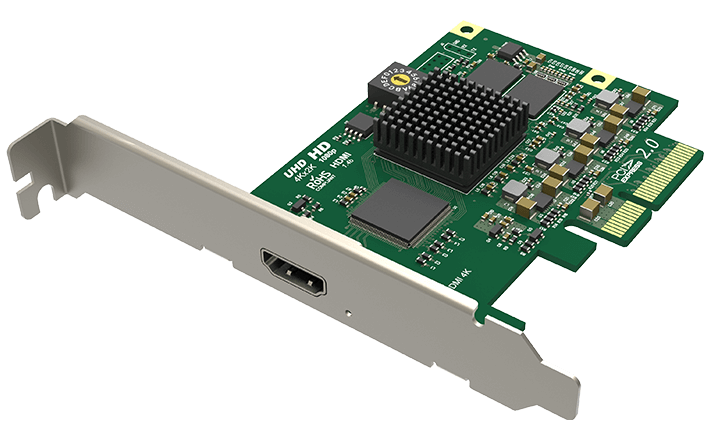
Your needs, this model
Does it fit your priorities?
Is Pro Capture HDMI 4K the 4K60 version?
No. Magewell identifies part 11120 as an HDMI 1.4, single-input card; its current technical sheet does not show a full combination table, and B&H's dated staff answer distinguishes it as 4K30. The 4K60 Pro Capture models are the separate HDMI 4K Plus LT and Dual HDMI 4K Plus LT (parts 11152 and 11260). Verify the label before applying either sibling's 4K60 or loop-through claim.
Explore this need in the finder →Does the 11120 card send video on to a monitor?
The product page shows one HDMI input and no HDMI loop-through output. Plan a separate display path or an external splitter if the source must continue to a monitor; do not confuse this card with a similarly named LT model, whose output is a material hardware difference.
Explore this need in the finder →Can I install it in a Mac?
Magewell lists Mac OS support, but this is an internal PCIe Gen2 x4 board, not a USB device. Confirm a compatible Mac PCIe expansion chassis or workstation, driver version and capture app. The reviewed sources do not provide a Mac-specific capture-mode table, so no Mac refresh-rate claim is assigned.
Explore this need in the finder →Scope of this assessment: this is the one-channel Pro Capture HDMI 4K, part 11120 / SKU 111200000. It is not the similarly named Pro Capture HDMI 4K Plus LT (11152), and it is not the older one-channel Pro Capture HDMI (11040) with its separate analog breakout. Those distinctions change the input generation, output path and recording ceiling.
What the 4K label does—and does not—mean
Magewell identifies one HDMI input with embedded audio and specifies support for input and capture rasters up to 4096 × 2160. Its current technical sheet also gives a general capture-rate ceiling of up to 144 fps, limited by resolution and PCIe bandwidth. That is not a mode table: the sheet does not say that the maximum raster and the maximum rate occur together. A dated B&H staff answer for MFR 11120 describes the card as a 4K-at-30-Hz capture model and points to the separate 11152 for 4K60. I use that answer as a qualified model-specific bridge, not as a substitute for a missing Magewell combination chart. If a project must meet a particular timing, color depth or rate, ask Magewell or the seller for the exact current table for the physical revision before treating the broad 4K or 144-fps language as sufficient.
That makes the 11120 a different proposition from the HDMI 4K Plus LT: the LT moves to HDMI 2.0, adds an HDMI loop-through output and has manufacturer material explicitly describing 4K60 and 1440p144 paths. This 11120 has HDMI 1.4 and no loop-through output. It may still be useful for a fixed source where a single capture feed and the documented lower 4K tier are enough, but it should not be bought on the assumption that “4K” automatically means 4K60 recording.
One digital input, not the analog-breakout sibling
The official page lists one HDMI input with embedded audio. It does not list the DB9 analog breakout supplied with Pro Capture HDMI part 11040, so do not plan to connect component, composite or S-Video through this board. The HDMI connector can accept supported unencrypted digital sources; Magewell's capture guidance says HDCP-encrypted material is not capturable. This is a real source restriction, not a prompt to defeat copy protection. The device has no HDMI display output, so it cannot act as a capture-and-loop-through hub. If a console or workstation must continue to a separate display, plan a separate output path or compare an LT model with documented pass-through.
Desktop installation and software fit
This is an internal PCIe Gen2 x4 card, even though its card length is relatively short. Magewell lists a low-profile bracket in the package. Confirm the motherboard slot has an electrical x4 connection and that the case opening, adjacent GPU, cooling and cable access all work; a physically long x16 slot is not by itself proof of the intended lane allocation. The manufacturer's sheet lists Windows, Linux and Mac APIs/software. It names OBS as compatible software, which supports a Windows/PCIe/OBS plan, but the public mode information is not a Mac-specific or app-by-app timing matrix.
The board needs a compatible desktop or PCIe expansion host. A laptop with an ordinary USB port is not a substitute. Magewell lists Mac support, but that does not turn the product into a direct-connect Mac accessory. A Mac user should verify the actual PCIe host or expansion chassis, current driver, application and chosen signal as one chain. I do not carry the Windows rate note across to a Mac plan because the sources reviewed do not give a Mac format table.
A sensible pre-installation check
- Match the printed model or seller part number to 11120 / SKU 111200000. Do not use the 11152's loop-through or 4K60 facts for this unit.
- Check the exact HDMI output timing and confirm that it is unencrypted. Confirm whether embedded audio is present in the source output.
- Verify a PCIe Gen2 x4 electrical connection, low-profile chassis clearance and current Magewell driver for the operating system.
- Set up the capture application and check its detected resolution, frame rate, color format and audio route before relying on a live recording. Do not treat the 144-fps general cap as a 4K144 mode.
Where it fits in this family
The 11120 is the restrained, single-source 4K PCIe choice when a loop-through port is not required and 4K30 is enough. The 11152 is the closer fit for a one-source 4K60 recording plus a display connection, while the 11260 is for two simultaneous 4K60 HDMI sources and requires a larger PCIe x8, normal-profile installation. Part 11040 is a different single-channel card with an analog breakout and a lower HD-era input path. Similar branding is not a reason to transfer specifications between them.
Bottom line
There is a clear case for the Pro Capture HDMI 4K when a fixed, unencrypted HDMI source, one-channel ingest and an internal x4 board suit the computer. Its strongest practical boundary is also its most important caveat: the manufacturer documents the 4K raster but does not provide a full public timing matrix in the reviewed sheet, and the U.S. retailer answer distinguishes it from the 4K60 sibling. Check the exact source mode and board revision before buying for a required frame rate. This assessment is based on manufacturer and retailer documentation; it does not claim hands-on installation, testing, ownership or measured performance.
Key specifications
Key details at a glance
| Signal input | HDMI 1.4 / DVI-D 1.0 compatible input; no DB9 analog breakout is listed |
|---|---|
| HDMI generation | 1.4 |
| Confirmed capture formats | Input and capture raster up to 4096x2160. B&H's dated staff answer identifies 4K30, not 4K60, for part 11120. Magewell's current datasheet gives a general up-to-144-fps ceiling with resolution and PCIe caveats but no full mode matrix; no 4K60, 1080p60 or 1440p144 mode is inferred for this fact. |
| Confirmed passthrough formats | No HDMI output or built-in display loop-through is listed. |
| Computer connection | Pcie gen2 x4 |
| Named compatible software | OBS Studio / Magewell Capture Express / Magewell Capture SDK / VLC / XSplit / vMix / Wirecast |
| HDR recording | Not documented |
| VRR passthrough | No |
| Analog audio input | Hdmi-embedded audio. |
| Cables listed in the box |
Use the exact model’s instructions for operating limits, supplied equipment and version differences.
Sources for this review
Sources for this assessment
- Magewell Pro Capture family list
- Magewell Pro Capture HDMI 4K product page, part/SKU, interface and package
- Magewell Pro Capture HDMI 4K technical specification
- Magewell Pro Capture HDMI 4K technical-specification PDF
- B&H U.S. identity and model-specific 4K rate bridge for Magewell part 11120
- Magewell HDCP capture guidance
- Magewell Pro Capture family manual
- Magewell Pro Capture download center
- Exact-model Magewell Pro Capture HDMI 4K product image

Check your complete signal path
Choose the source format, desired captured signal, passthrough target, computer connection and software together. A single device must support that whole arrangement.