
Your needs, this model
Does it fit your priorities?
Can Pro Capture HDMI 4K Plus record 4K60 in OBS?
Magewell lists OBS as supported software and separately documents 4096×2160p60 capture, so the reviewed fact set includes a Windows/PCIe/OBS SDR 4K60 arrangement. The sources do not establish OBS HDR capture for this model. Confirm the mode negotiated by your exact host, input format and OBS version before relying on the full-rate configuration.
Explore this need in the finder →Will a Mac use this as a PCIe card?
Magewell lists Mac support for Pro Capture HDMI 4K Plus, and the model uses PCIe Gen2 x4. This is a Mac-compatible host path, not a USB accessory; verify that the particular Mac has an appropriate PCIe expansion enclosure/system and that its driver and capture application support the chosen signal. No Mac-specific mode ceiling is asserted here.
Explore this need in the finder →Does this card pass HDMI video through to my monitor?
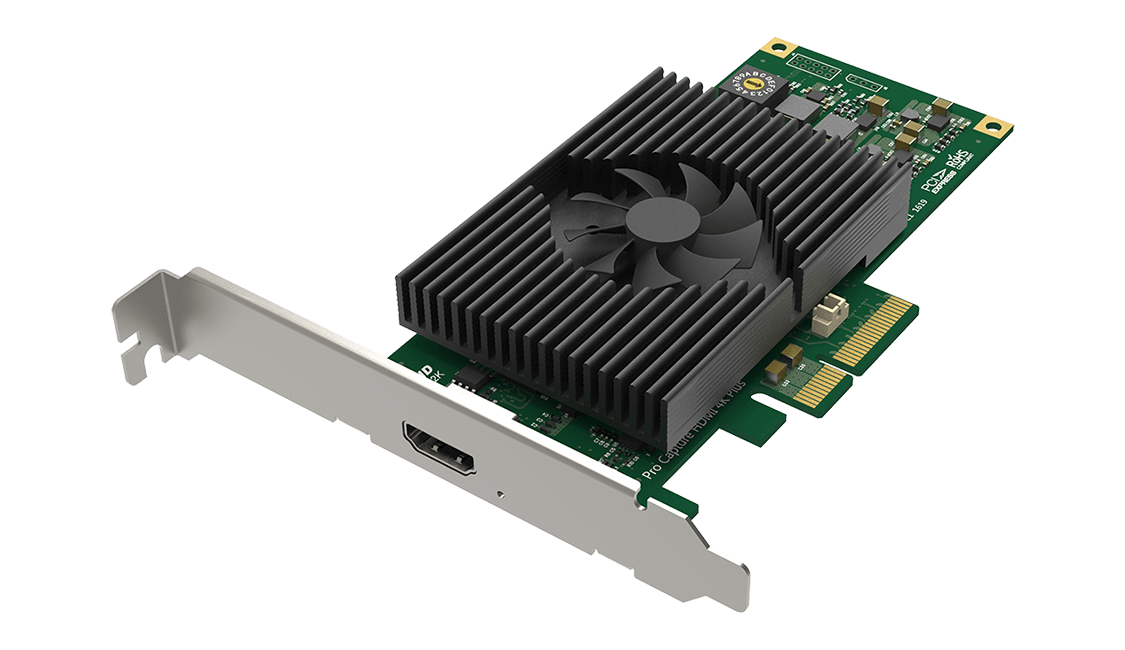
No built-in HDMI output is listed for this one-channel capture card. Its input and capture capability should not be mistaken for an HDMI loop-through. If the same source must feed a separate display, plan an external signal split or choose a model with a documented passthrough output.
Explore this need in the finder →What the “4K Plus” name does—and does not—mean
The Magewell Pro Capture HDMI 4K Plus is a one-channel, internal PCIe capture card, not a USB interface or an HDMI switch. Its single HDMI input accepts a documented HDMI 2.0 signal and the technical sheet also lists DVI-D 1.0 input when the appropriate adapter is used. It carries embedded audio with the video. There is no built-in HDMI output, so a display that needs to continue receiving the source signal needs a separate splitter or a different pass-through card. The name’s “4K” is a capture capability; it does not promise a monitor loop-through path.
Read the resolution table by mode, not by its headline
Magewell’s mode table lists 4096×2160p60 and 3840×2160p60 capture for YUY2 and BGR24, along with 1080p60 and 1080p144. The broader specification says capture can reach 144 frames per second, but that ceiling is not a claim that every resolution can run at 144 fps. The published row set does not establish 1440p144, 4K120, or an HDMI output mode. For a production plan, check the actual signal timing, pixel format, sample depth, driver and application rather than extrapolating from “up to 144 fps.” Magewell lists 8-, 10- and 12-bit input support, several RGB and YCbCr sampling formats, and additional SDK capture formats; those facts do not mean every app exposes every combination.
HDR is the software and configuration decision
This card is specifically named among Magewell’s HDR-capable Pro Capture models, and the documentation limits that support to HDR10. That is not the same as promising HDR recording in every compatible program. Magewell lists OBS among supported applications for ordinary capture, but the material reviewed here does not document an OBS HDR recording plan for this model. Magewell’s Capture Express manual says HDR output depends on the capture card, an HDR-capable EDID and codec: its HDR recording path uses H.265, while the manual’s H.264 row does not record HDR. Magewell’s SDK release notes also provide an HDR capture example. Treat those as separate, setup-dependent options; do not infer HDR from a display-path label or from the ordinary OBS compatibility list.
If HDR is essential, confirm the source’s HDR10 signal, load an EDID that advertises HDR as Magewell instructs, use the documented HDR-aware Capture Express or SDK workflow, and verify that the computer can encode the chosen H.265 output. Capture Express lists Windows support and requires a suitable Intel or NVIDIA graphics device for 4K encoding. The card’s HDR input support alone is not a guarantee of the final file’s metadata, color range or playback on another device.
Plan the host before opening the chassis
The host connection is PCIe Gen 2 x4. That makes this a desktop installation with a compatible PCIe slot and enough physical clearance, not an accessory for a laptop’s USB port. The manufacturer lists Windows, Linux and Mac support, and its technical sheet names OBS and common capture/streaming programs. The model-specific capture table is not divided into an equivalent mode matrix for every operating system, so the Windows/Linux/Mac compatibility list should not be read as identical performance under all three. Check the current driver for the exact OS and processor architecture, the available PCIe lanes, and any GPU/codec needs of the selected app before choosing a recording workflow.
Where it differs from the smaller Eco model
The similarly named Eco Capture HDMI 4K Plus M.2 also targets single-channel 4K60 capture, but it uses an M.2 2280 Type M PCIe module, lists Windows and Linux rather than Mac, and needs attention to chassis cooling. It is not a smaller interchangeable version of this full PCIe card. The Pro Capture is the more straightforward fit when the host has a suitable desktop slot and a Mac-capable driver path matters; the Eco module is for a system designed around the correct M.2 PCIe socket. Neither model supplies video passthrough. External USB cards may be easier to install, but their capture ceilings and output paths are different.
Check the exact card, revision and package
The manufacturer product page identifies part 11150 and SKU 111500000, and lists a low-profile bracket in the box. The optional Mini Repeater 4K HDMI is not a standard included item. Firmware applicability notes name hardware revisions A and D, so inspect the actual card label before applying a revision-specific update. A U.S. retailer listing corroborates the 11150 model, but its warranty wording differs from the manufacturer’s product page. Confirm the written regional warranty and the package contents with the seller for the exact offer. These documents establish the model’s intended functions, not an independent bench test, a specific seller’s inventory or a promise that every host/app combination will expose every listed mode.
Key specifications
Key details at a glance
| Signal input | hdmi_2_0_unencrypted / dvi_d_1_0 |
|---|---|
| Confirmed capture formats | 4096x2160p60 / 3840x2160p60 / 1920x1080p144 / 1920x1080p60 |
| Confirmed passthrough formats | |
| Computer connection | Pcie |
| Named compatible software | OBS Studio / Magewell Capture Express / Magewell Capture SDK / VLC / XSplit / vMix / Wirecast |
| HDR recording | Hdr10 capture is documented via magewell sdk / capture express setup with hdr-capable edid; this fact does not assign obs an hdr mode. capture express h.265 output can preserve hdr when the input/card/edid support it; codec and host matter. |
| Analog audio input | Hdmi embedded audio; model supports audio streams via magewell sdk. |
Use the exact model’s instructions for operating limits, supplied equipment and version differences.
Sources for this review
Sources for this assessment
- Magewell Pro Capture family list: 21 named model entries in six input groups
- Magewell Pro Capture HDMI 4K Plus product page: part, SKU, input, host, bundle and warranty
- Magewell Pro Capture HDMI 4K Plus technical specification and capture mode table
- Magewell Short FAQs about Pro Capture
- Magewell Capture Express user manual V3.5
- Magewell SDK release notes
- B&H U.S. product identity listing for Pro Capture HDMI 4K Plus, MFR 11150
- Magewell exact-model Pro Capture HDMI 4K Plus product PNG

Check your complete signal path
Choose the source format, desired captured signal, passthrough target, computer connection and software together. A single device must support that whole arrangement.