
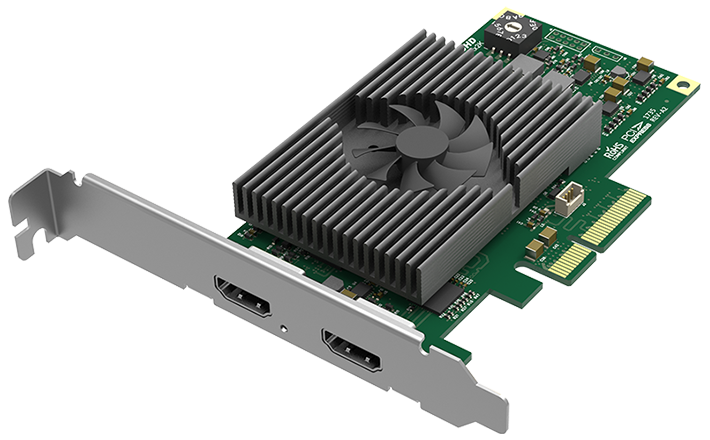
Your needs, this model
Does it fit your priorities?
Can the 11152 capture 4K60 while keeping a display connected?
Magewell identifies one HDMI 2.0 capture input and one HDMI loop-through output, and its model-specific news page documents up to 4096x2160 at 60fps plus forwarding the source to a display. This is a source signal loop, not a second capture channel. Check the source, monitor, EDID, color format and PCIe host together.
Explore this need in the finder →Is 1440p144 a supported capture/display path on this LT model?
Magewell's own setup guide names the Pro Capture HDMI 4K Plus LT for 2560x1440 at 144Hz; it requires importing a Magewell-provided EDID, and its LT solution uses the LOOP THRU connector for the monitor. The guide is model-specific, so do not extend this exact mode to 11120 or 11260 without separate evidence.
Explore this need in the finder →Does an OBS setup record HDR10 from the LT model?
Not on the ordinary OBS plan reviewed here. Magewell labels the card HDR10-capable, but its HDR capture path uses Capture Express or SDK behavior and an HDR-capable EDID. Treat OBS support and HDR-file preservation as separate claims, and verify the exact source/output pipeline before buying for an HDR archive.
Explore this need in the finder →Scope of this assessment: part 11152 / SKU 111520000 is the single-channel Pro Capture HDMI 4K Plus LT. “LT” is consequential: this model adds an HDMI loop-through output to its capture input. It is still an internal PCIe card, not an external USB capture device, and it is distinct from the two-channel x8 11260.
Two separate video paths on one card
Magewell specifies one HDMI 2.0 input and one HDMI loop-through output, each with embedded audio. Its model-specific announcement documents capture up to 4096 × 2160 at 60 frames per second and explains that the source can also be sent onward to a display. The loop-through is useful when the source needs to feed both a computer and a monitor, but it is not a second capture channel. It also does not mean every signal accepted by the input will be recorded at the same rate, color format or HDR state. Confirm the exact console/camera output, monitor timing, cabling and EDID behavior for the setup you intend to use.
The official specification also uses broad language about raster size up to 4096 × 2160 and capture rates up to 144 fps subject to resolution and PCIe bandwidth. That headline is not a combined 4K144 promise. Magewell's support article documents one particularly useful exception to guesswork: a 2560 × 1440, 144-Hz workflow for the 11152, involving a Magewell-provided EDID file. Its LT-specific solution uses the card's LOOP THRU connector for the monitor. That is a specific setup, not a claim that all displays, sources or capture apps will negotiate the same mode without configuration.
HDR requires a different software decision
Magewell names HDR10 support for this model, but a signal's HDR metadata entering the card is not proof that the resulting file preserves HDR. The reviewed HDR path is Windows Magewell Capture Express or SDK with an HDR-capable EDID and compatible encoding. The ordinary OBS compatibility listing does not establish OBS HDR capture, so the fact and finder keep those two plans separate. If a project relies on HDR, check the source's HDR output, the EDID advertised to it, the app/SDK configuration, encoder support and the saved file's color metadata. A 4K60 pass-through result and an HDR recording are separate requirements.
Installation: low-profile x4, not a desktop shortcut
The card uses PCIe Gen2 x4 and is listed as a low-profile add-in board; the manufacturer package lists the matching low-profile bracket. Measure the case opening and check electrical lane availability rather than judging from a slot's outer length. It is not directly suited to a typical laptop. Magewell lists Windows, Linux and Mac support and names OBS among compatible software, but the detailed Mac mode matrix was not present in the sources reviewed. Treat Mac as a driver/application compatibility question and verify the actual PCIe host or expansion arrangement; do not carry a Windows capture-rate claim over to Mac without evidence for the chosen path.
Before connecting the source
- Confirm the exact part number 11152. The non-LT 11120 is an HDMI 1.4 one-input card without a listed loop-through; the 11260 has two inputs/outputs but needs PCIe x8 and a normal-profile case.
- Use an unencrypted HDMI source. Magewell's HDCP guidance says protected HDMI content is not capturable; this product is not a protection workaround.
- For 1440p144, obtain the model-specific Magewell EDID and follow the driver-panel workflow. For 4K60, validate source output, display support and PCIe/host requirements together.
- Choose OBS for the reviewed SDR plan. Choose Capture Express/SDK only when the HDR10 workflow itself is required and its EDID/encoder conditions are met.
The product page lists a Mini Repeater as optional, not standard equipment, and does not list HDMI cables as included. The manufacturer page lists a two-year warranty, but actual regional coverage and an offer's condition are seller-specific; check the exact package and terms rather than relying on a catalog image.
Who should choose it?
The 11152 is a credible fit when one HDMI source needs a documented 4K60 capture route and a same-source display loop, or when the exact 1440p144 EDID workflow matches a project. Its compact low-profile x4 card separates it from the two-channel 11260, whose source and monitor count is higher but whose board, slot and power demands are larger. It also separates cleanly from the 11120: choose the LT for HDMI 2.0, loop-through and documented 4K60—not just because both model names contain “4K.”
Bottom line
This is a specialized desktop capture board whose most useful claims are model-specific and verifiable: one HDMI 2.0 channel, one loop-through, 4K60 capture, and a separate EDID-guided 1440p144 route. Its HDR10 support should be evaluated as a Windows Capture Express/SDK workflow, not as an automatic OBS feature. Check the exact input signal, slot, app and monitor before purchase. The assessment is based on published documentation and does not claim hands-on use, testing or measured latency.
Key specifications
Key details at a glance
| Signal input | HDMI 2.0 / DVI-D 1.0 compatible input |
|---|---|
| HDMI generation | HDMI 2.0 |
| Confirmed capture formats | Up to 4096x2160p60 capture over HDMI 2.0. Magewell separately documents a 2560x1440p144 live/record workflow for this exact model; that path imports Magewell's EDID file. The sheet's general 144-fps maximum is not applied to every resolution. |
| Confirmed passthrough formats | One HDMI loop-through output is listed. Magewell documents the 4K60 loop-through path and a model-specific 1440p144 monitor workflow using the LT output and supplied EDID configuration. |
| Computer connection | Pcie gen2 x4 |
| Named compatible software | OBS Studio / Magewell Capture Express / Magewell Capture SDK / VLC / XSplit / vMix / Wirecast |
| HDR recording | Hdr10 capture is documented through a windows magewell capture express or sdk workflow with hdr-capable edid; do not attribute hdr capture to the general obs plan. |
| Analog audio input | Hdmi-embedded audio; manufacturer lists the loop-through audio path. |
| Cables listed in the box |
Use the exact model’s instructions for operating limits, supplied equipment and version differences.
Sources for this review
Sources for this assessment
- Magewell Pro Capture family list
- Magewell Pro Capture HDMI 4K Plus LT product page
- Magewell Pro Capture HDMI 4K Plus LT technical specification
- Magewell Pro Capture HDMI 4K Plus LT technical-specification PDF
- Magewell news: Pro Capture HDMI 4K Plus LT 4K60 capture and loop-through
- Magewell 1440p144 Pro Capture setup guide
- Adorama U.S. identity bridge for Pro Capture HDMI 4K Plus LT
- Magewell HDMI capture HDR guidance
- Magewell Short FAQs about Pro Capture
- Magewell Capture Express user manual V3.5
- Magewell SDK release notes
- Magewell HDCP capture guidance
- Magewell Pro Capture family manual
- Magewell Pro Capture download center
- Exact-model Magewell Pro Capture HDMI 4K Plus LT image

Check your complete signal path
Choose the source format, desired captured signal, passthrough target, computer connection and software together. A single device must support that whole arrangement.