
Your needs, this model
Does it fit your priorities?
Can both 11260 inputs capture 4K60 at once?
Magewell's model-specific launch announcement says its two discrete channels each support up to 4096x2160 at 60fps simultaneously, with independent capture settings. That is stronger evidence than combining separate maximum numbers. The practical workload still depends on source timing, driver, software, PCIe x8 electrical connection and host processing; check both channels together.
Explore this need in the finder →Does the Dual LT include display loop-through for both sources?
The product page lists two HDMI inputs and two HDMI loop-through connectors, and Magewell describes each source feeding another display while it is captured. Those connectors are not two more capture channels. Confirm the source/monitor timing and the exact normal-profile board/package before installation.
Explore this need in the finder →Will it fit a compact case or PCIe x4 slot?
This model is a normal-profile PCIe Gen2 x8 card, not the low-profile x4 11152. Check an electrically suitable x8-capable slot, chassis opening, nearby cards and airflow, and account for the manufacturer's 22 W maximum. Connector shape alone does not verify lane wiring or physical clearance.
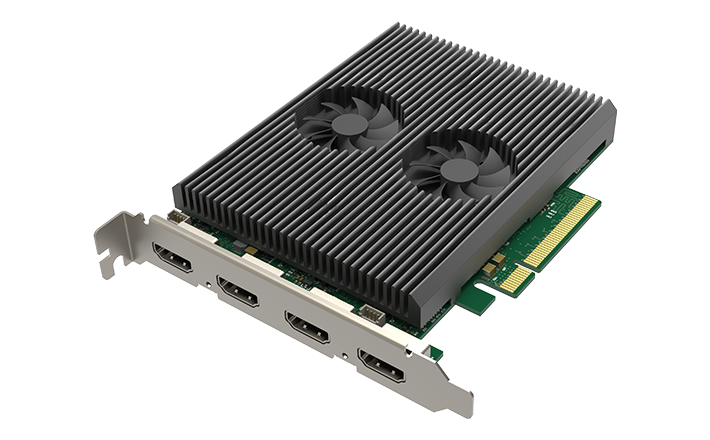
Explore this need in the finder →Scope of this assessment: part 11260 / SKU 112600000 is the Pro Capture Dual HDMI 4K Plus LT, a two-channel internal card. It is not the one-channel low-profile 11152. The Dual LT combines two HDMI inputs, two matching loop-through outputs and a PCIe Gen2 x8 host connection, so its central question is whether a workstation has the lanes and physical room for two simultaneous sources.
The distinctive evidence: both 4K60 channels at once
Many product pages list a maximum resolution and a maximum frame rate separately. Magewell's launch announcement is more specific here: it describes two discrete HDMI 2.0 channels, each supporting up to 4096 × 2160 at 60 fps simultaneously, with independent capture resolution, frame-rate and processing controls. It also says each source can be looped to additional displays or equipment. This is a meaningful difference from the single-channel 11152 and from the non-LT 11120, which has no listed output. It is the model-specific concurrent statement—not the generic “up to 144 fps” line in a broader specification—that supports the 4K60 matcher plan.
The headline still does not make every host automatically suitable. A normal desktop must provide an electrical PCIe Gen2 x8 connection, enough room for a normal-profile board and enough processing/storage/network capacity for the streams and the application's chosen encode. The specification lists roughly 22 W maximum power consumption. Check motherboard lane sharing and physical clearance, especially where a GPU or storage cards occupy adjacent slots. A PCIe slot that looks long enough may be wired for fewer lanes than the card requires.
Two input ports plus two outputs
The four HDMI connectors should be understood as two input/output paths, not four capture channels. Each loop-through sends the corresponding source onward while capture is running. That can simplify a two-camera, two-computer or multi-source production layout, but the display still needs to support the input's actual timing and color format. Confirm both sources are unencrypted; Magewell's support guidance states that an HDCP-encrypted HDMI feed cannot be captured. A loop-through output does not change that restriction and should never be treated as a copy-protection bypass.
The manufacturer lists OBS among compatible programs, and the reviewed Windows plan uses OBS at the documented 4K60 level with loop-through. HDR should be treated separately. Magewell identifies HDR10 on the product and supports a Capture Express/SDK workflow with appropriate HDR EDID, but the regular OBS plan is not tagged for HDR recording. The fact sheet therefore does not promise two simultaneous HDR recordings, or claim HDR preservation in an arbitrary app. If HDR is essential, validate the source, capture app, EDID and the computer's encode path as a separate engineering task.
Normal-profile x8 has installation consequences
This is the physically larger sibling in the group: Magewell's technical page lists a normal-profile PCIe x8 card, about 127.89 × 102.92 mm without the bracket, and up to 22 W. Make a case and motherboard check before choosing it. Account for the normal-height slot opening, neighboring GPU cooler, intake airflow, card retention and the motherboard's electrical x8 wiring. The card is not a compact low-profile x4 replacement. If only one source is needed and the case is small, the 11152 has a very different board and slot profile. The optional Mini Repeater is not listed as standard package contents, and the page does not list HDMI cables as included; verify the offered package rather than assuming accessories from a product photo.
Software and operating-system limits
Magewell lists Windows, Linux and Mac support, with Windows/Linux SDKs on the product page, and the current family resources include driver material. The present fact is intentionally conservative about Mac: an OS and API listing is not a Mac-specific two-channel 4K60 test or mode matrix. Because each channel contributes high-bandwidth video, check the current driver, OS, application, PCIe host and intended channel count for the target workstation. The product is a PCIe card rather than a direct USB capture device; laptop use would require a suitable expansion system and should not be assumed from the connector name alone.
A practical pre-buy checklist
- Match part 11260 / SKU 112600000 and the two-channel LT name; avoid confusing it with part 11152 or the HDMI 1.4 11120.
- Verify two compatible, unencrypted HDMI 2.0 sources and two monitor/output paths if both loop-through connectors are needed.
- Confirm PCIe Gen2 x8 electrical lanes, a normal-profile case, 22 W power allowance, clearance, airflow and lane sharing.
- For Windows/OBS, validate the exact source modes and both channels together on the intended host; for HDR recording, separately review the Magewell Capture Express/SDK and EDID requirements.
- Check the exact revision, brackets/cables, seller, condition and regional warranty before relying on a specific offer.
Bottom line
The 11260 is the most capable of these three Pro Capture HDMI 4K references for multiple simultaneous inputs: manufacturer material explicitly describes two channels at 4K60 and a loop-through path for each. That makes it relevant to fixed production installs with compatible desktop infrastructure, not a universal plug-and-play recommendation. Its x8, normal-profile and power needs are substantial, and HDR10 recording is a separate app/EDID plan. This assessment is based on source documentation; it does not claim the card was installed, tested or measured by the author.
Key specifications
Key details at a glance
| Signal input | 2x HDMI 2.0 / DVI-D 1.0 compatible inputs |
|---|---|
| HDMI generation | HDMI 2.0 |
| Confirmed capture formats | Two separate HDMI channels; Magewell's model-specific announcement says both can capture up to 4096x2160 at 60fps simultaneously with independent capture settings. The general datasheet rate ceiling remains resolution/PCIe-limited and is not generalized to higher per-channel rates. |
| Confirmed passthrough formats | Two HDMI loop-through outputs; Magewell describes each source signal being forwarded while the card captures. The documented 4K60 source path is the relevant 4K passthrough boundary. |
| Computer connection | Pcie gen2 x8 |
| Named compatible software | OBS Studio / Magewell Capture Express / Magewell Capture SDK / VLC / XSplit / vMix / Wirecast |
| HDR recording | Hdr10 capture is documented in the windows magewell capture express/sdk workflow with hdr-capable edid; obs hdr capture is not assigned. |
| Analog audio input | Two hdmi inputs with embedded audio; two loop-through outputs are listed. |
| Cables listed in the box |
Use the exact model’s instructions for operating limits, supplied equipment and version differences.
Sources for this review
Sources for this assessment
- Magewell Pro Capture family list
- Magewell Pro Capture Dual HDMI 4K Plus LT product page
- Magewell Pro Capture Dual HDMI 4K Plus LT technical specification
- Magewell Pro Capture Dual HDMI 4K Plus LT technical-specification PDF
- Magewell news: two-channel 4K60 capture and HDMI loop-through
- B&H U.S. identity bridge for Pro Capture Dual HDMI 4K Plus LT, MFR 11260
- Magewell HDMI capture HDR guidance
- Magewell Short FAQs about Pro Capture
- Magewell Capture Express user manual V3.5
- Magewell SDK release notes
- Magewell HDCP capture guidance
- Magewell Pro Capture family manual
- Magewell Pro Capture download center
- Exact-model Magewell Pro Capture Dual HDMI 4K Plus LT image

Check your complete signal path
Choose the source format, desired captured signal, passthrough target, computer connection and software together. A single device must support that whole arrangement.