
Your needs, this model
Does it fit your priorities?
Can Eco Capture HDMI 4K Plus M.2 capture 4K60 with OBS on Windows?
The model-specific technical table includes a 4096×2160p60 capture row, the product page lists Windows drivers and Magewell lists OBS. The fit here is a Windows/PCIe-M.2/HDMI/OBS arrangement, subject to the host’s PCIe bandwidth, internal working frequency, input timing and app setup. It does not imply passthrough or HDR recording.
Explore this need in the finder →Can I install the Eco module in mSATA or a Mac?
No. Magewell says Eco Capture uses a PCIe M.2 2280 Type M socket and does not work in mSATA; the family FAQ also says there are no Mac drivers. Verify the exact key, PCIe wiring and Windows/Linux support before choosing this small board.
Explore this need in the finder →Does the HDMI 4K Plus M.2 record HDR or pass video through?
The specification lists HDR10 input support, but the reviewed sources do not establish HDR file capture for this exact model. The product/technical pages also do not list an HDMI pass-through output. Do not count either as a requirement match without model-specific written confirmation.
Explore this need in the finder →A small capture module with a non-negotiable host interface
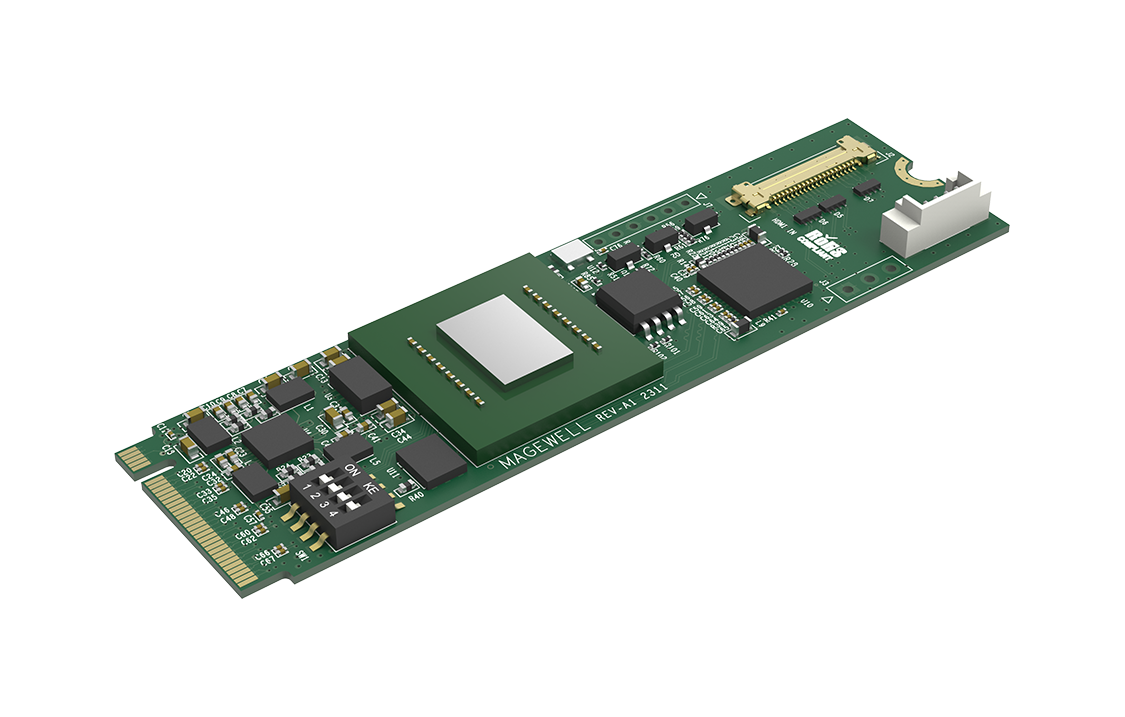
Magewell’s Eco Capture HDMI 4K Plus M.2 is a single-channel HDMI capture module built in the M.2 2280 form factor. Its motherboard-side interface is M.2 2280 Type M over PCIe Gen 3 x4. “M.2” is not a generic compatibility promise: Magewell says Eco Capture modules use an M-Key PCIe connection and specifically says they do not work in an mSATA socket. Confirm the motherboard or carrier has the right keyed socket, PCIe routing and available lanes before ordering. The module is intended for compact or custom systems that lack a full-size PCIe slot; it is not an external USB capture device.
Separate the incoming signal from the captured stream
The model-specific sheet lists HDMI input up to 4096×2160 at 60 frames per second, and its typical capture rows include 4096×2160 and 3840×2160 through 60 fps as well as 1080p120. It also lists 720p120. The page’s broader “up to 240 fps” statement is not the same as a 4K240 or 1080p240 capture mode; actual rate depends on the signal row, PCIe bandwidth and internal working frequency. Do not treat that card’s capture connector as an HDMI output. Neither the product page nor technical sheet documents video passthrough, so a separate display path would be needed if the source must also feed a monitor.
Magewell lists OBS and other DirectShow/V4L2 software and provides Windows and Linux support. Its Eco FAQ says there are no Mac drivers. The cited mode table is a product capture table, not proof that every resolution is exposed in every operating system, codec or motherboard. Confirm the source timing and the application’s negotiated format on the intended host; the public matcher’s 4K60 and 1080p120 labels are minimum capability boundaries, not guarantees about a particular recording bitrate or stability.
HDR10 input does not establish an HDR recording workflow
The technical specification names HDR10 support at the HDMI input and lists 8-, 10- and 12-bit signal formats. The sources reviewed for this exact Eco model do not establish that a particular application records the input as an HDR file, nor do they provide an HDR recording-mode matrix. For that reason, HDR10 is treated here as an input capability, not as a match for an HDR-recording requirement. If HDR capture is essential, request model-specific software/driver documentation for the exact host and output format rather than inferring it from HDMI HDR support.
Compact size makes cooling and exact package checks important
The card measures 22×80 mm and its maximum power draw is listed at about 6.6 W. Magewell’s Eco FAQ explains that small chassis ventilation matters and recommends keeping the card’s core chip at or below 85 °C. That is a manufacturer recommendation for the core, not a temperature I measured and not a promise that any particular case will meet it. Check the case airflow and the exact heatsink arrangement. A U.S. retailer distinguishes SKU 115900001, listed without a heatsink, from SKU 115900000, listed with a heatsink/fan unit. They are package configurations of the same capture function, but the cooling hardware changes what must fit in the system. The official product package also lists an LVDS 20-pin cable and an LVDS-to-HDMI adapter; verify the exact seller’s box contents.
Choose it for an M.2 design, not as a shortcut around PCIe
The Pro Capture HDMI 4K Plus offers a full PCIe Gen 2 x4 card, a documented Mac path and a separate Magewell HDR workflow; this Eco version trades that slot format for the M.2 module and does not list Mac support. The Eco board’s small footprint can suit a compact carrier, but it brings host-board, adapter and thermal questions that a plug-in external device avoids. It does not add more HDMI channels or a display loop-through output. For a system integrator, the M.2 form factor and Linux/ARM driver support can be useful, provided the carrier is actually wired for PCIe and cooling is adequate. For a desktop already equipped with a standard expansion slot, compare the conventional PCIe card instead of assuming M.2 will be simpler.
Before selecting a listing
Match the printed model and SKU, check whether the included heatsink/fan is required for your chassis, verify the M.2 key and PCIe generation, confirm Windows or Linux driver support for the system, and trace the source’s HDMI timing through the capture application you intend to use. Do not buy this model expecting Mac drivers, mSATA compatibility, video passthrough or documented HDR recording. Magewell maintains current product and driver references, but a currently listed model is not a guarantee of regional stock or of the condition of an individual offer. The product specifications are useful evidence for an arrangement; they are not hands-on testing or a substitute for host-specific validation.
Key specifications
Key details at a glance
| Signal input | hdmi_2_0_unencrypted / dvi_d_1_0 |
|---|---|
| Confirmed capture formats | 4096x2160p60 / 3840x2160p60 / 1920x1080p120 / 1280x720p120 |
| Confirmed passthrough formats | |
| Computer connection | Pcie |
| Named compatible software | OBS Studio / VLC / Magewell Capture SDK / XSplit / vMix / Wirecast |
| HDR recording | The reviewed model-specific sources do not establish a supported hdr recording workflow or output file mode; hdr10 input detection is not tagged as hdr capture. |
Use the exact model’s instructions for operating limits, supplied equipment and version differences.
Sources for this review
Sources for this assessment
- Magewell Eco Capture family page: seven named M.2 models
- Magewell Eco Capture HDMI 4K Plus M.2 product page: part, package, support and driver
- Magewell Eco Capture HDMI 4K Plus M.2 technical specification and mode rows
- Magewell Short FAQs about Eco Capture
- Magewell Eco Capture HDMI 4K Plus M.2 quick start guide
- B&H U.S. identity listing for Eco Capture HDMI 4K Plus M.2 without heatsink, MFR 115900001
- B&H U.S. identity listing for Eco Capture HDMI 4K Plus M.2 with heatsink/fan, MFR 115900000
- Magewell exact SKU 115900001 Eco Capture HDMI 4K Plus M.2 product PNG

Check your complete signal path
Choose the source format, desired captured signal, passthrough target, computer connection and software together. A single device must support that whole arrangement.