
Your needs, this model
Does it fit your priorities?
Can Dual HDMI M.2 take two HDMI sources?
Yes, the manufacturer describes two HDMI capture channels and U.S. listings distinguish the two connector packages. The conservative matcher arrangement is one HDMI 1080p60 feed; check both source paths, host bandwidth and application channel handling before relying on a dual-feed workload.
Explore this need in the finder →Will it record 1080p120 from both inputs?
That is not established. Magewell's technical notes give a qualified 144fps ceiling but cite about 80fps at 1920x1080 and warn that bandwidth/pixel clock limit actual rates. This assessment therefore does not match 1080p120 or claim two simultaneous high-rate feeds.
Explore this need in the finder →What is the difference between MFR 11514 and 11510?
The 11514 package uses two FPC sockets with ribbon cables and FPC-to-HDMI adapters; 11510 uses JST SHD sockets and SHD-to-HDMI breakout cables. The product page groups them as connector choices for the same capture model, but the physical cable paths and pictured configuration differ. Verify the exact MFR before installation.
Explore this need in the finder →This specification-led review covers Magewell Eco Capture Dual HDMI M.2, a two-channel HDMI capture card built on an M.2 module. Its useful distinction is not just the word “dual”: Magewell sells two physical input-connector versions under the model family, and each requires a different breakout package. The selected U.S. assessment is the FPC version, part/MFR 11514. The alternate JST SHD version, MFR 11510, is recorded as a same-function configuration rather than a second capture engine.
Two channels, but first check the cable version
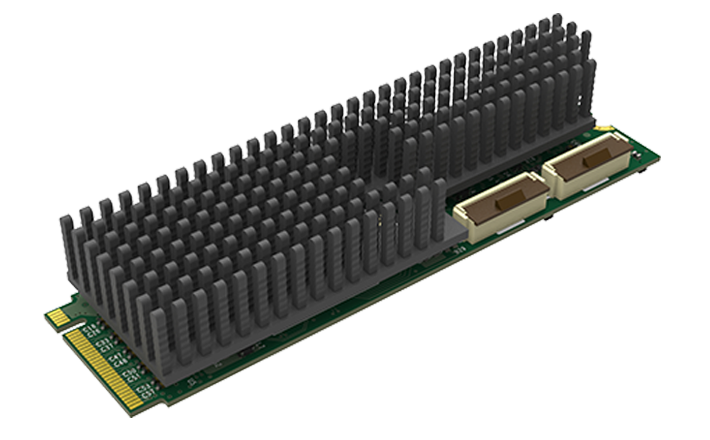
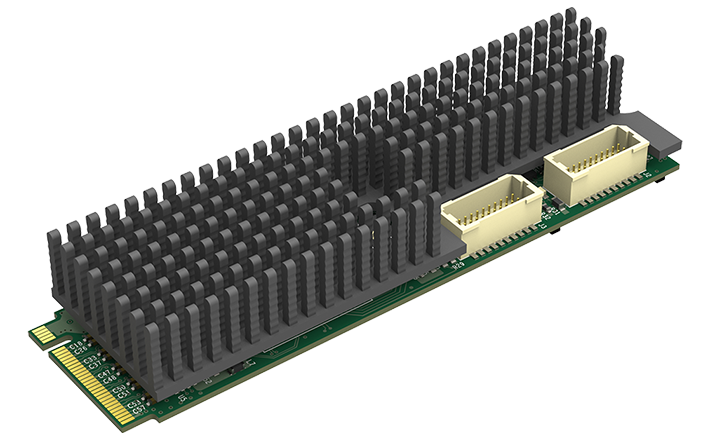
The product page identifies two HDMI 1.4a inputs with embedded audio and says two connectivity options are provided. Part 11514 has two FPC 20-pin sockets; Magewell lists two FPC-to-HDMI Type A adapters and two 20-centimeter ribbon cables. Part 11510 instead has two JST SHD sockets with its own HDMI breakout cables. U.S. retailer listings identify each part number. These are not cosmetic packages: an FPC adapter will not attach to an SHD socket. Match the seller's exact MFR to the board and the required leads before planning a rack, miniature workstation or custom carrier.
The official 11514 image shows two FPC sockets. Magewell maps SKU 115100000/part 11510 to a separate gallery whose first render shows two JST SHD sockets. These manufacturer renders identify connector layout, not a seller's package or operating performance. Confirm the MFR and matching breakouts before ordering.
Internal M.2, not an external USB solution
Both variants use M.2 2280 Type M over PCIe Gen2 x4. That can fit a host designed for an appropriate M-key PCIe module, but it is not a USB capture device or a full-size PCIe card. Confirm the host manual's slot wiring, lane sharing, BIOS behavior, mechanical mounting and clearance at the ribbon/breakout ends. A similarly sized M.2 connector may be SATA-only or routed differently; Magewell's Eco-family FAQ specifically distinguishes PCIe M.2 from mSATA. The board's compact footprint does not remove the need for an electrically correct slot and adequate cooling.
Read the frame-rate qualification before assuming two fast feeds
The technical table lists capture rasters up to 2048×2160 and a top rate of 144 fps, but it explicitly qualifies that maximum by PCIe bandwidth and the onboard pixel clock. For 1920×1080, Magewell gives an example ceiling of approximately 80 fps. That figure is a useful warning against translating a high overall maximum into a specific Full HD promise. The public match plan here is one conservative 1080p60 HDMI input in OBS. It does not claim 1080p120, 1440p144 or that both channels can each run at the card's maximum simultaneously.
The manufacturer identifies two independent channels and the U.S. listing describes capturing two sources at once, so this is a real multi-input product rather than a single input with two connectors. But the reviewed table does not provide a single combined dual-channel performance matrix for every source timing, bit depth and application mode. If your production depends on two simultaneous 1080p60 or higher streams, ask Magewell to confirm the exact combination with the host's lane allocation and software. The matcher returns the model for a conservative HDMI/1080p60 request, not as proof that a particular paired setup will work without configuration.
Although the technical specification includes DVI 1.0 support through the listed interface, that does not turn this into a native DVI card. The reviewed U.S. packages are HDMI-oriented and the user still needs the right adapter path. HDMI input format support is not a passthrough claim: the product page does not list an HDMI output or a display loop-through. HDR recording is also not established by the input color-depth/sampling rows.
Software and operating-system limits
Magewell lists Windows and Linux, with DirectShow/DirectKS on Windows and V4L2/ALSA on Linux; OBS is named in the supported software list. These references support Windows and Linux capture arrangements, but do not promise that every OBS profile, driver, source timing or dual-input scene will be available identically. Check the current driver and application format list, and test audio channel selection during a configuration review before committing a multi-source build.
The family FAQ says Magewell does not provide Mac drivers for Eco Capture. A Mac PCIe enclosure therefore is not a supported use simply because the module is electrically PCIe. The device is not an iPad capture path either. If the computer is part of a production appliance, confirm the OS and kernel before making a mechanical carrier around the card.
How it differs from other M.2 options
Eco Capture Dual SDI uses two SDI paths rather than two HDMI inputs, and Quad SDI extends the source count further; neither is interchangeable with this board's adapter package. Eco Capture AIO has one selected HDMI or SDI source instead of two HDMI channels. The HDMI 4K and 12G SDI 4K Plus modules are single-channel, higher-raster alternatives with different input standards and more demanding PCIe/cooling considerations. Do not transfer their 4K60 rows to this Dual HDMI model. If an external USB host or display passthrough is essential, the USB Capture HDMI models offer a different installation and output path.
Checks before buying
Verify MFR 11514 for the two-FPC package or MFR 11510 for the two-SHD package; confirm its matching breakouts and cables; confirm an M.2 2280 Type M PCIe Gen2 x4 host; and compare your source timings with the detailed table. For a simple one-feed Windows/OBS 1080p60 route, the evidence supports a conservative fit. For dual high-rate capture, 4K, 1080p120, Mac support, HDR recording or display passthrough, it does not. This assessment is based on manufacturer product/technical sources and browser-read U.S. identity listings; no card was installed or tested, and no price, stock state or buyer experience is claimed.
Sources: Magewell product page, model technical specifications, U.S. 11514 listing and U.S. 11510 listing.
Key specifications
Key details at a glance
| Signal input | two HDMI 1.4a inputs via the selected FPC or JST SHD connector package; DVI 1.0 is listed via appropriate supported interface |
|---|---|
| Confirmed capture formats | Up to 2048x2160 raster; 1920x1080 capture example reaches approximately 80fps in the model technical notes; assigned plan is one 1080p60 feed. |
| Confirmed passthrough formats | |
| Computer connection | Pcie |
| Named compatible software | OBS Studio / Magewell Capture Express / Magewell Capture SDK / VLC / VirtualDub / XSplit / vMix / Wirecast |
| HDR recording | No hdr recording plan is established by the reviewed model-specific sources. |
Use the exact model’s instructions for operating limits, supplied equipment and version differences.
Sources for this review
Sources for this assessment
- Magewell Eco Capture Dual HDMI M.2 product page and two connector options
- Magewell Eco Capture Dual HDMI M.2 technical specification PDF, revision 2026-01-15
- B&H U.S. listing for the FPC Dual HDMI M.2 configuration, MFR 11514
- B&H U.S. listing for the JST SHD Dual HDMI M.2 configuration, MFR 11510
- Magewell Short FAQs about Eco Capture
- Magewell capture-device troubleshooting guidance for encrypted HDMI sources
- Exact Magewell FPC Dual HDMI M.2 official image, part 11514
- Magewell official SKU-specific 11510 JST SHD product render


Check your complete signal path
Choose the source format, desired captured signal, passthrough target, computer connection and software together. A single device must support that whole arrangement.