
Your needs, this model
Does it fit your priorities?
Can HD60 S+ pass 4K60 HDR to my display while OBS records 1080p60?
Elgato's supported-resolution guide says a 2160p60 source passes through at 2160p60 but captures at 1080p60 because USB 3.0 cannot transfer the entire 4K60 stream. The device-specific OBS/software pages document OBS, and the manufacturer describes the separate 4K60 pass-through and 1080p60 capture paths. Check the HDMI source/display chain, software version and exact HD60 S+ model. This is not 4K60 capture, nor proof that every app setting or seller package will work.
Explore this need in the finder →Does HD60 S+ record HDR on macOS or 4K60 HDR on Windows?
No to both as phrased. Elgato says the Mac mode can pass HDR through, but HDR capture is unavailable on macOS. For Windows 10, HDR recording is limited to up to 1080p60 and requires Elgato 4K Capture Utility plus NVIDIA GeForce GTX 10-series or later; the manufacturer identifies the HDR recording format as HEVC. The public questionnaire does not offer 4K Capture Utility as an app choice, so an HDR match appears only when you leave software unspecified. Neither model table nor workflow says HD60 S+ records 4K60 HDR.
Explore this need in the finder →What separates HD60 S+ from HD60 S, and is 20GAR9901 a retail SKU?
Both siblings use USB 3.0 and can capture 1080p60, but S+ adds HDMI 2.0 and documented 4K60 HDR10 passthrough, UVC, 2160p30 capture in compatible apps, and Windows HDR capture up to 1080p60. S has no 4K capture and depends on its own older app/driver route. A Corsair declaration identifies 20GAR9901 as the S+ model code; it does not establish a US retail package SKU. Check the seller's exact model, included USB/HDMI leads, used condition, return terms, host requirements and available software before comparing a listing.
Explore this need in the finder →Earlier model · HDMI 2.0 · 4K60 display / up to 1080p60 HDR capture
This is an evidence-based assessment of Elgato Game Capture HD60 S+, not a hands-on test. Its central distinction is useful but easy to overstate: it can carry a 4K60 HDR10 signal to a display while the computer captures a lower-resolution stream, and it can record HDR under a separate, Windows-specific arrangement. It is not a 4K60 capture card. Elgato now lists this exact model as Legacy/EOL, so older software and host requirements deserve the same attention as the format headline.
Two video paths, not one 4K60 recording mode
Elgato specifies HDMI 2.0 unencrypted input, HDMI 2.0 output, and USB 3.0 at 5 Gbps over USB-C. The official resolution guide says a 2160p60 source can pass through at 2160p60 while the capture stream is 1080p60. If the source is 2160p30, compatible software can capture 2160p30. This is why “4K60 passthrough” and “4K capture” must remain separate requirements: HD60 S+ does not capture 4K60. The frame rate and refresh ceiling is 60; it does not document 1080p240, 1440p144 or other higher-refresh passthrough modes.
Capture resolutions include 1080p60 and 2160p30, but the 4K30 mode is not available in every app. Elgato names Elgato Studio, 4K Capture Utility 1.6.3+ and OBS on Windows, and says the model cannot use Game Capture HD software on Windows. On macOS it documents OBS and the older Game Capture HD app. These paths are not interchangeable.
The source must be unencrypted HDMI. Elgato calls the input unencrypted and lists HDCP restrictions in its compatibility material. There is a 3.5 mm TRS stereo line input, not a microphone socket. The original box list includes a USB-C cable and a premium High Speed HDMI cable, but a used offer may be missing either. Confirm the seller's actual package and condition rather than assuming original contents.
HDR is especially dependent on host and application
Elgato's comparison page lists HDR10 capture up to 1080p60, and the model-specific resolution guidance narrows the Windows recording path: Windows 10, Elgato 4K Capture Utility, an NVIDIA GeForce GTX 10-series or later GPU, and HEVC recording. HDR passthrough is a different feature; Elgato describes it through 4K60 on Windows and macOS. The company's requirements article says HDR capture is not available on macOS, even though the display path can pass HDR there.
The finder does not offer 4K Capture Utility as an app option, so selecting OBS or Elgato Studio does not prove its HDR mode. Leave the app open in an HDR search and inspect the utility/GPU conditions in the review. A match cannot verify the buyer's exact GPU, source or driver.
On macOS, Elgato's legacy OBS guide lists OBS 27.2.4+, macOS 10.13+ and an Apple M1 or qualifying Intel processor. Compatible software can capture up to 2160p30, but not HDR. The older Windows requirements list Windows 10, USB 3.x, older CPU/GPU baselines and 4 GB RAM; verify the actual system.
What the “plus” changes relative to HD60 S
Both models use USB 3.0, accept most unencrypted HDMI sources and capture 1080p60. The original S is HD-only, without documented HDR capture or 4K60 passthrough. S+ adds HDMI 2.0, UVC, 4K60 HDR10 passthrough, compatible-app 2160p30 capture and the Windows HDR path. A dropped plus sign changes the assessment.
Elgato lists S+ as UVC, so compatible apps use a standard USB video route and no separate Windows driver download is listed. However, the Multi App page excludes S+; a workflow needing simultaneous access from several apps is not documented.
Legacy status and seller checks
Elgato records production stopping in November 2022 and says no further firmware or driver development will occur, while legacy support continues. The 4K Capture Utility remains compatible but is itself legacy software; Elgato's June 2026 page separately says current Elgato Studio supports the model. Check the app, OS and mode you need rather than assuming either software has disappeared or all current systems are supported.
Corsair's declaration names 20GAR9901 as the product model code, not a proven US retail/package SKU. The source set does not establish an exact US bundle identifier. Confirm the printed label, included cables, condition, returns and warranty with the seller; no current direct-sale availability is asserted.
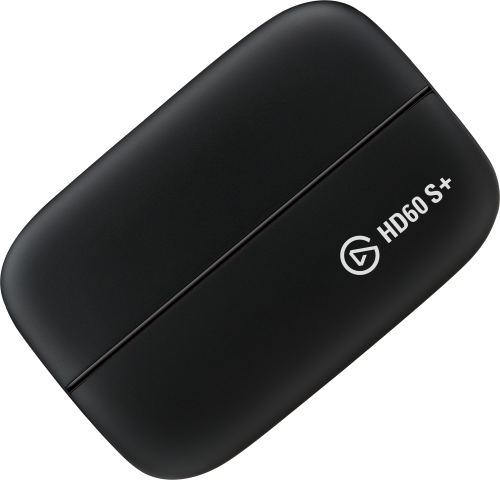
The S+ does not fit 4K60 recording or frame rates above 60. Its potential niche is a 4K60 HDR display path with a lower-resolution file, provided the exact Windows/4K Capture Utility or macOS/OBS requirements match. The image identifies the device, not a seller package.
Practical pre-purchase checklist
- Check the label: HD60 S+ is not HD60 S. For 4K60 display output, verify the HDMI chain and accept 1080p60 capture rather than 4K60 recording.
- Verify the app-specific 2160p30 mode. For HDR recording, check Windows 10, 4K Capture Utility and the NVIDIA GPU requirement; Mac is passthrough-only for HDR.
- Confirm a USB 3.0 data path, single-app workflow, exact model label and included HDMI/USB leads. The 3.5 mm input is line-level audio, not a microphone jack.
HD60 S+ is more flexible than HD60 S in the display path and HDR capture, but those additions do not erase its recording ceiling or legacy dependencies. The useful decision is not simply “older or newer”: it is whether the particular operating plan documents the combination of input, passthrough, capture format, host, app and HDR requirement you actually need.
Primary sources: Elgato's technical specifications, supported resolutions, software support, system requirements, macOS OBS guide, multi-app support list, driver list, Legacy/EOL notice, and Corsair declaration of conformity.
Key specifications
Key details at a glance
| Signal input | hdmi_2_0_unencrypted |
|---|---|
| HDMI generation | HDMI 2.0 |
| Confirmed capture formats | 2160p30 / 1080p60 / 1080i / 720p60 / 576p / 480p |
| Confirmed passthrough formats | 2160p60 (4K60) HDR10 / 1080p60; no frame rates or refresh rates above 60 Hz are supported |
| Computer connection | USB-C host link (USB 3.0 / 5 Gbps) |
| Named compatible software | Elgato Studio / Elgato 4K Capture Utility 1.6.3 or later for Windows / OBS Studio on Windows / OBS Studio 27.2.4+ on macOS |
| HDR recording | Up to 1080p60 hdr10 on windows 10 using 4k capture utility and nvidia gtx 10-series or later; hevc. hdr capture is not available on macos. |
| Analog audio input | 3.5 mm trs stereo line-in; not a mic input |
Use the exact model’s instructions for operating limits, supplied equipment and version differences.
Sources for this review
Sources for this assessment
- Elgato Game Capture HD60 S+ — Technical Specifications
- Elgato Capture Devices — Device comparison
- What are the differences between HD60 S+ and HD60 S?
- Elgato Game Capture HD60 S+ — Supported Resolutions
- Elgato Game Capture HD60 S+ — What Software Can It Use?
- Elgato Game Capture HD60 S+ — System Requirements
- Elgato Game Capture HD60 S+ — Set Up in OBS Studio on macOS
- Elgato Capture Devices and Multi App Support
- Elgato Hardware Drivers
- Elgato Legacy and End-Of-Life Products
- UK Declaration of Conformity — Elgato Game Capture HD60 S+
- Play and Create Without Compromises with the New HD60 S+ Capture Card from Elgato
Check your complete signal path
Choose the source format, desired captured signal, passthrough target, computer connection and software together. A single device must support that whole arrangement.