
Your needs, this model
Does it fit your priorities?
Can HD60 Pro fit a Windows OBS setup that records unencrypted HDMI at 1080p60?
Yes, within an older desktop configuration: Elgato specifies a PCIe 2.0 x1 card and its internal PCIe guide includes HD60 Pro in the OBS setup. The supported table tops out at 1080p and Elgato lists 1080p60 capture. Confirm the motherboard's electrical lane and clearance, exact Windows build, driver, OBS version, unencrypted source and seller's included bracket/cable. This is source-based compatibility guidance, not a test of a particular PC.
Explore this need in the finder →Will HD60 Pro work with a laptop or Mac?
No. Elgato's current system-requirements page explicitly says the HD60 Pro does not work with a laptop or with Mac/OS X; it requires a Windows PC with an available PCIe 2.0-or-higher slot. A Thunderbolt adapter or external PCIe chassis is not established as a supported configuration in the model-specific documents reviewed. Choose an external card with its own documented host plan instead.
Explore this need in the finder →Does HD60 Pro capture 4K or HDR, or pass a high-refresh display signal?
No such mode is documented. Elgato lists 1080p60 capture but no 4K or HDR10 capture in its comparison; it also marks HD60 Pro absent from the 1080p240/1440p144 passthrough row. The HDMI output is a display path, but the reviewed evidence does not establish 4K60 or HDR passthrough. Keep it in the HD/60-fps class rather than inferring 4K features from the separate 4K60 Pro names.
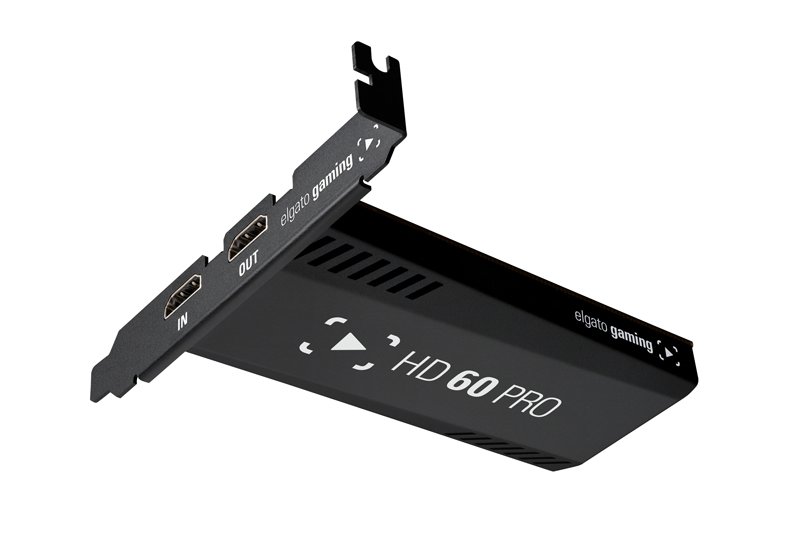
Explore this need in the finder →Elgato Game Capture HD60 Pro is an earlier internal capture card for a Windows desktop, not a portable USB recorder. Its strongest documented use is a single unencrypted HDMI source captured at up to 1080p60 through a PCIe 2.0 x1 connection. The board also has an HDMI output for a display. That makes it a narrowly useful choice when the computer already has a compatible slot and the workflow is deliberately Full HD; it is the wrong shortcut for a laptop, a Mac, HDR recording, 4K capture or a high-refresh gaming display.
Identity and signal path
Elgato's device-specific technical page names Game Capture HD60 Pro and specifies PCIe 2.0 x1, one unencrypted HDMI input and one HDMI output for lag-free passthrough. The input must not be protected by HDCP. The manual also says the card has no analog video input, so composite, component and other analog sources do not plug into it directly. Its PS3 exclusion is a useful illustration of the protection limit: the manual attributes that block to HDCP, not to a general inability to process all HDMI sources.
The supported-mode list tops out at 1080p, and Elgato's current comparison marks 1080p60 capture but no HDR10 capture or 1080p240/1440p144 passthrough. A separate HDMI output should not be read as proof of a 4K60 or high-refresh loop-through mode. This review therefore treats the card as an HD capture route and does not match it to any of the questionnaire's higher-rate passthrough choices. The manufacturer page says the output carries the game signal in real time, but the exact seller's card, cable and display chain still need checking.
Why the host connection changes the decision
This is an add-in card for a desktop case. Elgato calls for a PCIe 2.0-or-higher x1 slot and says x1, x4, x8 or x16 slots are usable; the system-requirements article expressly rules out laptops. Before considering an offer, compare the motherboard manual with the card's physical slot position, available electrical lanes, neighboring GPU or M.2 devices, case opening and bracket height. A board that physically fits a longer slot is not, by itself, proof that the host has the required lane or that another device will not disable it.
Elgato's legacy requirements name Windows 10 64-bit, a quad-core fourth-generation Intel Core i5 or comparable AMD processor, at least 4 GB of installed RAM and a GeForce GTX 6-series-or-better GPU. Those are historical support requirements, not a compatibility guarantee for a particular present-day motherboard or operating-system build. Elgato explicitly says the HD60 Pro does not work with Mac or OS X, and the current legacy policy warns that new operating-system and third-party-software support is not guaranteed.
Capture software is part of the configuration
Elgato's current internal-PCIe OBS guide includes HD60 Pro, so an OBS Studio workflow is documented for the card family. That does not mean OBS receives the onboard H.264 encoder: Elgato's bitrate note says third-party programs such as OBS receive uncompressed YV12/4:2:0 video, with no defined maximum recording bitrate in the card's spec. The 60 Mbps hardware-encoding figure applies to Elgato Game Capture HD. A separate 4K Capture Utility page allows up to 1080p60 recording using the host CPU or GPU but says the utility cannot stream and does not use the HD60 Pro onboard encoder. Do not compare those app-specific figures as though they described one identical workflow.
Elgato also lists Multi App Support for HD60 Pro, but its support article limits that feature to Windows 10 and names a minimum driver version. Sharing one incoming feed with several applications can increase host resource use. The separate multi-device feature—using more than one card—is not the same thing. Neither feature should override a dated driver, operating-system or application requirement.
How it differs from nearby Elgato names
HD60 Pro and HD60 S are not the same host configuration: the former is an internal PCIe card, while the reviewed HD60 S is an external USB model. HD60 S+ is another distinct device; its extra display-path capability must not be copied onto HD60 Pro. “Game Capture 4K60 Pro” and “Game Capture 4K60 Pro MK.2” are separate names in Elgato's support material too; this assessment does not merge those two or transfer their 4K features to HD60 Pro. Check the label on the offered board rather than relying on a shortened marketplace title.
Legacy status and purchase checks
Elgato lists production of HD60 Pro as stopped in January 2022. Its October 2026 policy says legacy hardware still receives support and valid warranties are honored, but no new inventory or spare parts will be made and no driver or firmware development is planned. Game Capture HD software is also legacy, with development stopped in January 2020; the 4K Capture Utility is listed as legacy software with development stopped in March 2026. These dates do not establish that an individual used board is broken or unsupported in every setup. They do mean buyers should confirm the seller's return terms, warranty, driver availability and exact host/app path before relying on it.
The technical page's original-box list includes the HD60 Pro, a high-speed HDMI cable and the low-profile bracket, with the high-profile bracket already installed. A used listing may not include those parts, and no reviewed official source established a universal US retail/package SKU. Confirm the card's printed HD60 Pro identity, bracket, cable, working PCIe slot and seller package directly; do not infer condition, stock or price from this desk-based assessment.
Assessment
HD60 Pro belongs on a shortlist only when PCIe installation is acceptable, the source is unencrypted HDMI, Full HD at no more than 60 frames per second is enough, and the intended Windows software path is independently checked. Its internal slot and documented OBS setup distinguish it from external USB Elgato cards, but discontinued development and explicit Mac/laptop limits are substantial tradeoffs. This is a source-based assessment, not a hands-on test; it makes no claim about present availability or the condition of any individual offer.
Key specifications
Key details at a glance
| Signal input | hdmi_unencrypted |
|---|---|
| Confirmed capture formats | 1080p60 / 1080p30 / 1080i / 720p60 / 720p30 / 576p50 / 576i / 480p60 / 480i |
| Confirmed passthrough formats | HDMI output sends the source signal to a display in real time. The reviewed manufacturer tables do not establish 4K60, HDR10, 1080p240 or 1440p144 passthrough for this model; no higher-rate questionnaire passthrough mode is assigned. |
| Computer connection | Pcie |
| Named compatible software | Elgato Game Capture HD on Windows; the HD60 Pro onboard H.264 encoder supports up to 1080p60 and 60 Mbps. / Elgato 4K Capture Utility on Windows; up to 1080p60 software CPU/GPU recording, not streaming, and not the HD60 Pro onboard H.264 encoder. / OBS Studio is included in Elgato's internal PCIe setup guide; its third-party bitrate note says the card supplies uncompressed YV12/4:2:0 video. |
| HDR recording | False |
Use the exact model’s instructions for operating limits, supplied equipment and version differences.
Sources for this review
Sources for this assessment
- Elgato Game Capture HD60 Pro – Technical Specifications
- Elgato Game Capture HD60 Pro – Supported Resolutions
- Elgato Game Capture HD60 Pro – System Requirements
- Elgato Game Capture HD60 Pro – Installation Guide
- Elgato Game Capture HD60 Pro – Manual and User’s Guide
- Compare Elgato Game Capture HD60 Pro to other Elgato Gaming products
- Elgato Capture Devices – Device comparison
- Elgato Legacy and End-Of-Life Products
- Elgato 4K Capture Utility and Elgato Game Capture Devices
- Elgato internal PCIe Capture Card – OBS Studio Setup
- Elgato Capture Devices and Multi App Support
- Elgato Game Capture HD60 Pro – Maximum Bitrate
- Game consoles that Elgato Game Capture HD60 Pro supports
Check your complete signal path
Choose the source format, desired captured signal, passthrough target, computer connection and software together. A single device must support that whole arrangement.