
Your needs, this model
Does it fit your priorities?
Can Cam Link Pro expose four HDMI sources separately in OBS?
Yes, the official product page describes four independent HDMI inputs, and Elgato's OBS guide shows each appearing as its own source. The guide specifies OBS 27.0 or newer and 4K Capture Utility 1.7.4 or newer for its setup, but the same support page labels Cam Link Pro Legacy/EOL. Confirm a current software/driver combination before relying on it for a new production system; the card does not itself supply the cameras or their HDMI leads.
Explore this need in the finder →Will the four ports pass a 4K120 signal through to my gaming monitor?
No display passthrough is documented. The four ports are described as HDMI inputs, and the product page lists the card itself as the only in-box item; it does not specify a display output. Its supported-resolution list tops out at 2160p30 or 1080p60 capture, not 4K120 recording. Do not infer a loop-through path from the word HDMI or from the four inputs.
Explore this need in the finder →Can I install Cam Link Pro in a Mac or laptop?
No. Elgato states that Cam Link Pro is Windows-only and requires installation in a desktop PCIe slot; it is not compatible with laptops. Check the motherboard for a slot with PCIe 2.0 x4 bandwidth, not just a long-looking x16 slot: Elgato notes that physical size and electrical lane width can differ.
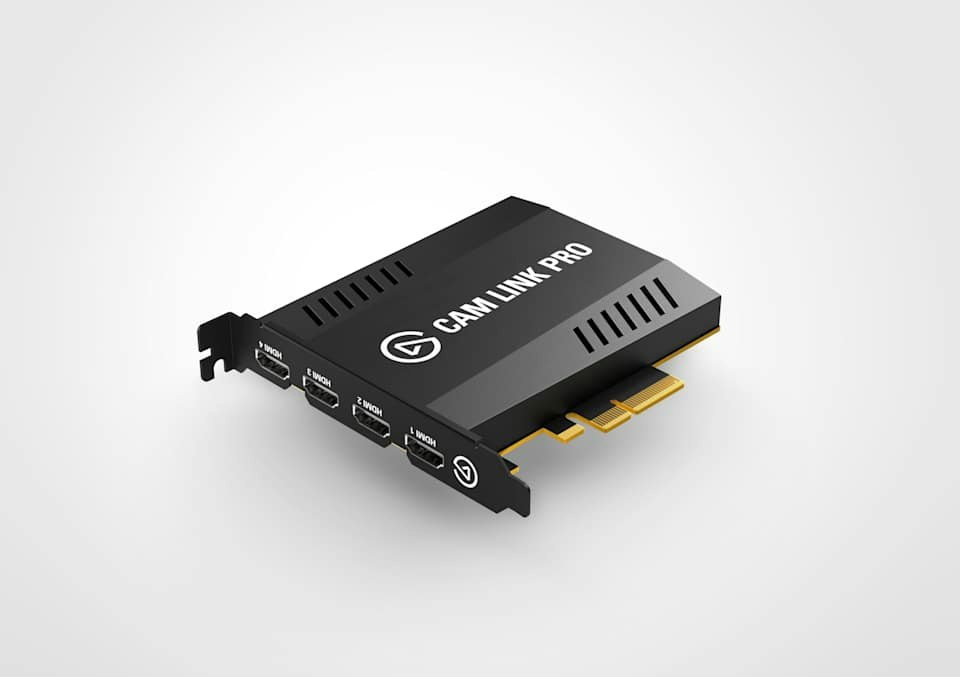
Explore this need in the finder →Elgato Cam Link Pro is an internal, four-input capture card for a Windows desktop. Its unusual strength is not a headline frame rate; it is the ability to present four clean HDMI sources as separate software devices or combine them into one Multiview feed. Elgato's current US page identifies SKU 10GAW9901, while the linked OBS support guide labels the product Legacy/EOL. This is a research-based reading of manufacturer material, not a hands-on test or a claim about current seller stock.
Four sources, with two different ways to use them
Each of the four HDMI connectors is an input. Elgato describes them as independent devices in OBS, vMix and other encoding applications. That is useful for a desk with a face camera, overhead camera, side camera and a computer feed: the software can position, scale and select each source rather than forcing the card to combine everything first. Elgato also documents embedded audio from HDMI; there is no separate 3.5 mm analog audio jack in the listed specification, so a separate microphone or analog mixer needs its own host-side route.
The second path is the card's built-in Multiview mode. Elgato lists Picture in Picture, Side by Side, Triple and Quad layouts, with the combined picture appearing as a single source for applications such as Zoom, Teams and Slack. Its 4K Capture Utility or Stream Deck integration controls the layout. This is not the same workflow as four separate OBS sources: choose between independent scene composition and a single precomposed camera view based on the application you actually use.
The card has four HDMI inputs but no listed HDMI output. The product page describes only those inputs and lists the capture card itself in the package; its technical illustration shows the input ports. Treat it as an ingest device, not as a pass-through card that keeps a console connected to a gaming display. A split display route would be an additional external design, not a feature established for this card.
Desktop installation is the first compatibility gate
Cam Link Pro uses PCIe 2.0 x4 bandwidth. Elgato's system page says it needs a physical x4, x8 or x16 slot, with x4 bandwidth; its PCIe explainer warns that a full-length slot can be electrically wired for fewer lanes. Check the motherboard manual and the slot's available bandwidth before choosing it. A compact workstation can have a long slot already occupied by a graphics card, and a laptop is explicitly unsupported. Elgato also says the product is Windows-only; it is not a Mac alternative to an external USB Cam Link.
The system-requirements page gives minimums for 4K Capture Utility, including Windows 10 64-bit, a named CPU/GPU class, 8 GB of dual-channel RAM and an x4-bandwidth PCIe path. Elgato cautions that OBS, XSplit, Streamlabs and other third-party programs have their own system needs. The product's interface uses DirectShow, and Elgato publishes an OBS setup guide; that proves a documented path, not universal app compatibility or a guarantee that every present-day driver and OS version remains supported.
Read the resolution line as a capture limit
The listed input modes include 2160p30, 1080p60, 1080p30, 1080i, 720p60 and standard-definition formats. Elgato's comparison describes the device as up to 1080p60 or 4K30. Those numbers are not evidence of 4K60 capture, 4K120 passthrough or any display output at all. A 4K source must also be configured to a supported mode, and a camera or computer may require a clean, unencrypted HDMI setting. Connectors alone do not settle compatibility: check the source's actual output, frame rate and cable type.
For a four-camera presentation, the value is the number of usable inputs and the choice of Multiview or separate sources, not recording at 4K. For a console setup where the monitor must receive a high-refresh signal, a capture card with an explicitly documented passthrough path is the more relevant comparison. Multiple single-input USB adapters can be an alternative, but each uses its own USB connection and system resources; Elgato presents Cam Link Pro as a single PCIe card for four feeds. No independent latency, thermal, image-quality or sustained-session testing was performed here.
Legacy status changes the purchase question
The technical documentation is still useful for identifying an existing Cam Link Pro or evaluating a specific offer, but Elgato's OBS setup page marks it Legacy/EOL. I therefore treat it as an earlier model in the finder rather than presenting it as a current reference. That status does not prove that no unit is available from any seller; it means the buyer should verify the exact SKU, return terms, warranty eligibility, included low-profile/full-height bracket if relevant, driver availability and compatibility with the intended Windows build before paying.
Shortlist Cam Link Pro when the desktop already has a suitable PCIe slot, four independent unencrypted HDMI sources matter, and 1080p60 or 4K30 capture is sufficient. Skip it if you need Mac or laptop operation, an HDMI monitor passthrough path, 4K60 capture, an analog or SDI input, or confidence in a currently supported model family. Before an older card enters a working system, confirm each camera's clean-HDMI output, which app will use separate feeds versus Multiview, the app/driver versions and PCIe lane availability.
Evidence note: The product, mode, system and app descriptions are drawn from Elgato's US product and support pages, including the EOL-marked OBS guide. This assessment does not claim ownership, testing, current inventory or compatibility with every source/app combination.
Key specifications
Key details at a glance
| Signal input | hdmi_unencrypted |
|---|---|
| Confirmed capture formats | 2160p30 / 1080p60 / 1080p30 / 1080i / 720p60 / 576p / 480p |
| Confirmed passthrough formats | |
| Computer connection | Pcie 2 0 x4 |
| Named compatible software | Elgato 4K Capture Utility / OBS Studio / vMix / Streamlabs OBS / XSplit |
Use the exact model’s instructions for operating limits, supplied equipment and version differences.
Sources for this review
Sources for this assessment
- Cam Link Pro — official US product page, SKU and technical specifications
- Cam Link Pro — official system requirements
- Cam Link Pro — official OBS Studio setup guide; manufacturer marks this product Legacy/EOL
- Cam Link Pro — official supported applications and DirectShow interface
- All about PCIe — Elgato slot size and lane-width explanation
Check your complete signal path
Choose the source format, desired captured signal, passthrough target, computer connection and software together. A single device must support that whole arrangement.