
Your needs, this model
Does it fit your priorities?
Can the original Game Capture 4K60 Pro capture a 4K60 source?
Yes, in the documented SDR route: Elgato specifies an unencrypted HDMI 2.0 input, 2160p60 capture and an HDMI output for passthrough, and its third-party software guidance names up to 2160p60 recording/streaming. The 4K Capture Utility path records AVC/H.264 SDR up to 140 Mbps but cannot stream; OBS-class support is documented in legacy software material, so verify the exact driver, host, app and signal chain. This original card does not record HDR.
Explore this need in the finder →Is the original Game Capture 4K60 Pro the same board as the MK.2?
No. Elgato's model-specific comparison labels them as the original and the MK.2, says their boards look significantly different, and identifies HDR recording, on-device HDR-to-SDR tone mapping and Multi App support as MK.2 additions. It says the two cards share supported resolutions, frame rates and refresh rates. Confirm the board itself: a shortened listing title or a claimed 4K60 headline is not enough to identify a used unit.
Explore this need in the finder →Can the original card preserve HDR in a recording while passing it to a display?
No. Elgato's original-card specification says HDR recording is unsupported. A later hardware revision can pass HDR10 to a display, but the exchange program ended in 2019 and the exact revision in a used offer may be unknown; the original software path also needs Stream Link for correctly tone-mapped SDR in OBS/XSplit. This must not be confused with the MK.2's documented HDR recording and on-device tone mapping.
Explore this need in the finder →The original Elgato Game Capture 4K60 Pro is an internal PCIe card for a Windows desktop, not an external USB capture device. Elgato documents unencrypted HDMI 2.0 input, capture up to 2160p60 and an HDMI output for display passthrough. Its useful lane is a fixed desktop setup that needs 4K60 SDR capture; it is a poor choice for a laptop, Mac, HDR recording, or a buyer who cannot verify a legacy driver and seller package.
Identify the original board before comparing offers
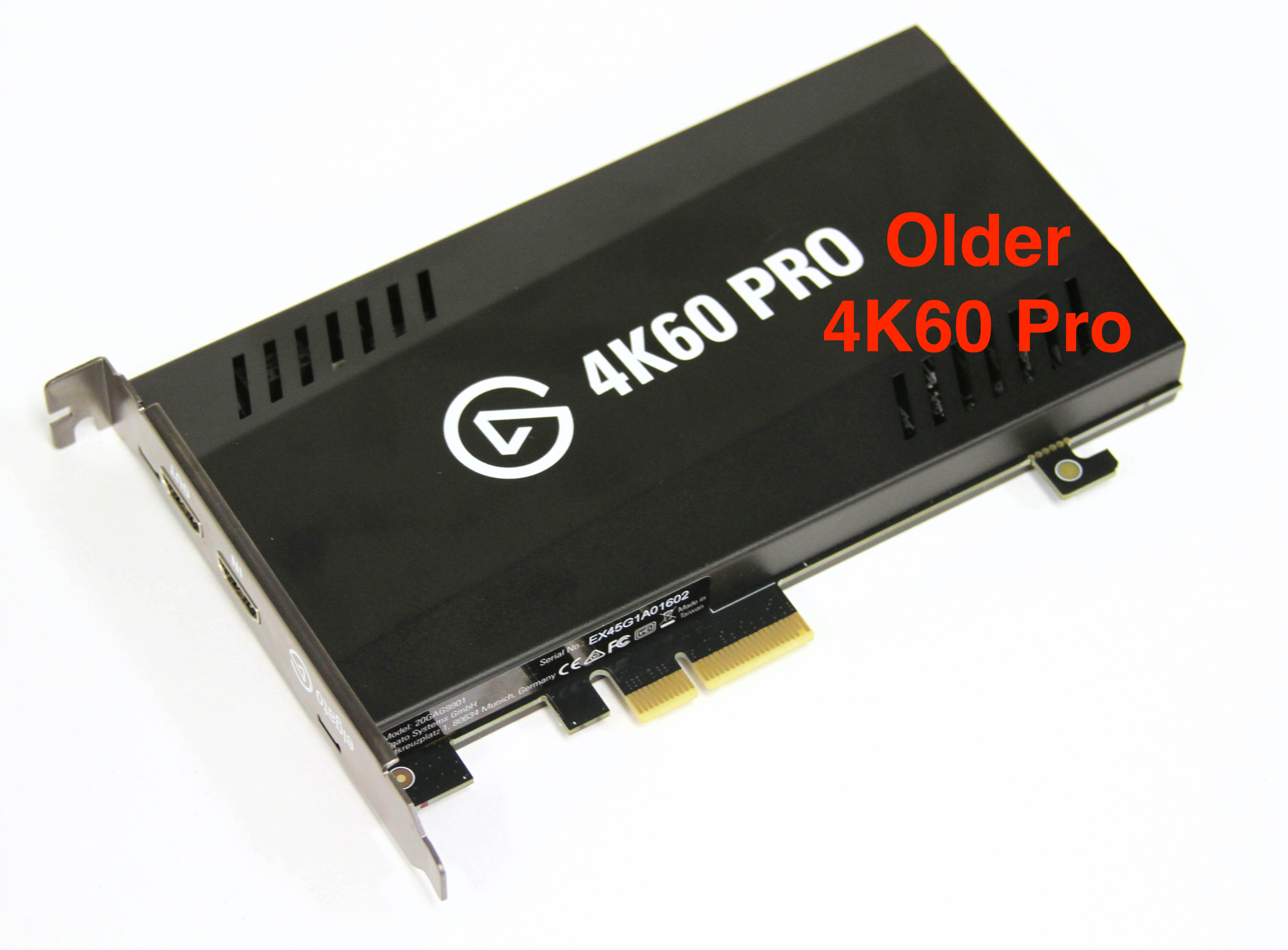
“4K60 Pro” and “4K60 Pro MK.2” are not interchangeable shorthand. Elgato's original-versus-MK.2 article explicitly describes two different boards and shows the larger original card beside the smaller MK.2. It says the two share supported resolutions and refresh rates, but the MK.2 adds HDR recording, on-device HDR-to-SDR tone mapping and Multi App access. This assessment covers the original board only. A listing that omits the suffix, an image of a box, or a generic “4K60” title is not enough to establish which card a seller will ship.
The support specifications identify the original as PCIe 2.0 x4 with an unencrypted HDMI 2.0 input and an HDMI 2.0 output. “Unencrypted” matters: this is a video-capture path, not a way around HDCP. The technical sheet lists 2160p60, 1440p60, 1080p60 and lower capture modes. Elgato's mode article separately says capture and passthrough at high-refresh timings such as 1440p144 are possible, but warns that these timings are not standardized, may behave imperfectly and can require an edited or custom EDID. A headline maximum is not a guarantee for every console, GPU, monitor, cable or timing.
Capture and display are separate decisions
For the ordinary 4K use case, Elgato documents up to 2160p60 SDR capture and provides HDMI output for passthrough. The 4K Capture Utility route is described as recording AVC/H.264 at up to 140 Mbps; that is a manufacturer software ceiling, not a bitrate measured in a test. The utility cannot stream from this card. Elgato's older Game Capture HD software works with the original card only up to 1080p60. Its model-specific recording/streaming page names third-party tools such as OBS and XSplit for capture or streaming up to 2160p60, but it also warns that the referenced software is legacy/EOL. Treat that as historical compatibility evidence, not a promise that a current PC, Windows build, driver and OBS release will work together.
HDR is the decisive boundary. Elgato's technical specification says the original 4K60 Pro does not record HDR. A separate support article explains that some later original-card hardware revisions gained HDR10 passthrough, while earlier boards did not; Elgato's exchange program ended in 2019. The exact revision of a second-hand card may be difficult to verify. Even on a capable revision, Elgato's OBS/XSplit guidance requires Stream Link for correctly tone-mapped SDR output. That is not the MK.2's on-device HDR-to-SDR processing, and it does not turn the original into an HDR recorder.
Check the desktop, not just the card label
The host requirement is narrow. Elgato specifies Windows 10 64-bit, a PCIe 2.0-or-higher x4 connection and a physical x4, x8 or x16 slot. Its system page says the card does not work with a Mac or laptop. A long slot is not proof of available x4 bandwidth: motherboard lane assignments, a graphics card, M.2 devices and the specific slot can affect one another. Elgato's own installation guidance tells users to check lane sharing and notes that NVMe/M.2 placement can change what is available. Before considering a used offer, check the motherboard manual, electrical lane allocation, case clearance and bracket height. The system page's CPU and GPU thresholds are historical baselines, not a guarantee for a present-day PC.
How it compares with nearby Elgato choices
The HD60 Pro is another internal Elgato PCIe card, but it is an HD-class 1080p60 product; it is not this 4K60 model. The original 4K60 Pro and the MK.2 share published mode ceilings but differ in HDR recording, tone mapping and multi-application access. A current 4K Pro is a separate PCIe product with newer HDMI 2.1 behavior; do not infer its 8K, 4K120 or VRR claims for the original. The original is an earlier reference, and Elgato says it is no longer made. That makes a seller's exact board photo, return terms and driver situation more important—not less.
What a used listing still needs to prove
The reviewed official sources do not establish a current US package SKU, an available offer, a price, or what any individual seller includes. The official image identifies the older board, not its condition or box contents. Ask for a clear photograph of the actual card and its printed model, confirm that the correct original board is included, and check bracket, cable, return period and warranty eligibility with the seller. Verify that the proposed host has an open PCIe x4 path and that the exact software versions still recognize the card. Elgato's old upgrade program and historic software support do not establish present support for a used example.
Assessment
The original 4K60 Pro can make sense for a technically prepared Windows desktop that needs one unencrypted HDMI source, 4K60 SDR capture and a display path through HDMI. It is not the model to choose when HDR in the recorded file, a laptop or Mac workflow, assured current software support, or predictable high-refresh operation is essential. Its documented limits are clearer than its future compatibility: check the exact board, slot and application before buying. This is a desk-based reading of Elgato's model-specific material, not a hands-on test; no ownership, performance measurement, present stock or seller experience is claimed.
Primary sources: Elgato's original 4K60 Pro technical specifications, system requirements, supported resolutions, original-versus-MK.2 comparison, HDR hardware note, recording and streaming software limits, HDR passthrough/Stream Link guidance and PCIe installation guidance.
Key specifications
Key details at a glance
| Signal input | hdmi_2_0_unencrypted |
|---|---|
| Confirmed capture formats | 2160p60 (4K60) SDR / 1440p144 (nonstandard timing; not guaranteed) / 1440p60 / 1080p60 / 1080p30 / 1080i / 720p60 / 480p |
| Confirmed passthrough formats | 2160p60 (4K60) SDR / 1440p144 when source/display timings cooperate; Elgato cautions that this nonstandard timing may need an edited/custom EDID and is not guaranteed |
| Computer connection | Pcie |
| Named compatible software | OBS Studio or XSplit: Elgato's model-specific recording/streaming page historically documents third-party capture and streaming up to 2160p60; that page warns its software information is legacy/EOL, so check the exact current driver/app/host before relying on it. / Elgato 4K Capture Utility: documents 2160p60 recording up to 140 Mbps AVC/H.264 SDR, but the utility cannot stream from this card. / Elgato Game Capture HD: supports this card only through 1080p60 capture; it does not provide the card's 4K route. |
| HDR recording | False |
Use the exact model’s instructions for operating limits, supplied equipment and version differences.
Sources for this review
Sources for this assessment
- Elgato Game Capture 4K60 Pro — Technical Specifications
- Elgato Game Capture 4K60 Pro — System Requirements
- Elgato Game Capture 4K60 Pro — Supported Resolutions and Frame Rates
- Elgato Game Capture 4K60 Pro MK.2 — differences from the older original model
- Elgato Capture Devices — Device comparison
- Elgato Game Capture 4K60 Pro — HDR video is supported with new hardware and software
- Elgato Game Capture 4K60 Pro — Recording vs. Streaming
- Using 4K60 Pro HDR passthrough with OBS Studio, Xsplit
- Elgato Game Capture 4K60 Pro — Installation Issues
Check your complete signal path
Choose the source format, desired captured signal, passthrough target, computer connection and software together. A single device must support that whole arrangement.