
Your needs, this model
Does it fit your priorities?
Can I record 4K60 and still play in 4K60?
The card lists 4K60 capture and up-to-4K60 passthrough as separate specifications. Elgato's example of a 4K60 display path while capturing instead uses a 1080p60 recording. The source material does not establish every simultaneous maximum combination, so confirm the exact 4K60-in/4K60-out recording workflow before relying on it.
Explore this need in the finder →Will 4K S pass through 4K120 from a new console or gaming PC?
No 4K120 passthrough is documented for this model. Its HDMI 2.0 passthrough ceiling is listed as 4K60; the higher refresh options are listed at 1440p or 1080p. If 4K120 must reach the display, verify an HDMI 2.1 capture path with the exact source and monitor instead.
Explore this need in the finder →Can I connect 4K S to an iPad and capture an HDMI camera or console?
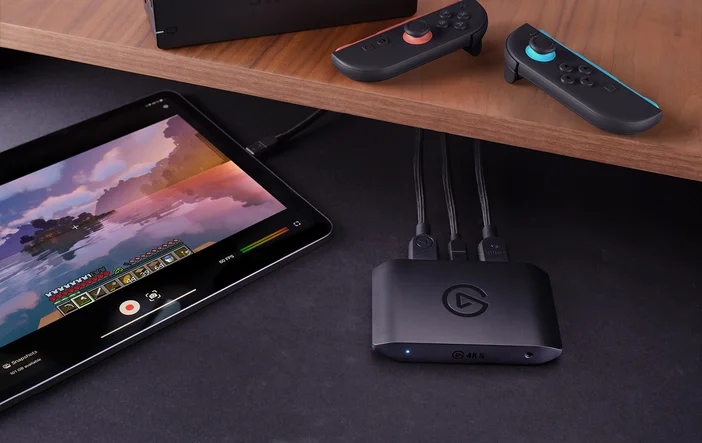
Elgato lists a USB-C iPad workflow and its Capture app for iPadOS. The input remains unencrypted HDMI; the camera or console may need its own HDMI cable, dock or adapter. Elgato's public resolutions page does not give a separate complete mode list for the iPad app, so confirm the actual app and host requirements rather than assuming every desktop capture mode transfers to iPadOS. The product page says HDR is converted to SDR for iPad capture.
Explore this need in the finder →Elgato Game Capture 4K S is an external HDMI-to-USB capture device. Its strongest documented case is an unencrypted HDMI source and a host with USB 3.0 data capability. Elgato's current mode chart lists SDR capture up to 4K60, 1440p144 or 1080p240; passthrough has its own separate limits. This assessment uses published manufacturer material, not a hands-on test.
Two video paths, with different ceilings
The source enters over unencrypted HDMI 2.0. One output continues over HDMI 2.0 passthrough to a television or monitor; the USB-C connection sends capture data to the host and app. That split is useful when a console or camera needs to stay connected to a display, but it creates two separate questions: what can the display receive, and what can the recording contain?
Elgato's supported-resolutions page lists passthrough up to 4K60, 1440p144 and 1080p240. Its capture table separately lists SDR up to 4K60, 1440p144 and 1080p240, plus 1080p120 and lower. These are format ceilings, not a promise that every pair works together. The same product page explains that passthrough is the image sent to the display and capture is what the app records; its concrete example is 4K60 play while recording at 1080p60. Do not assume that two independently stated maxima can be combined until the exact source, display, USB link, capture format and app mode are confirmed.
Where 4K S fits beside simpler and faster choices
For a portable setup, an external card avoids opening a desktop and allocating a PCIe slot. Elgato lists Windows, Mac and iPad as host families, though its supported-resolution page does not provide a complete per-OS/app mode matrix; check the specific capture app before assuming that a desktop 1440p144 or 1080p240 mode is available on an iPad. Compared with the separately listed Game Capture Neo, Elgato's product comparison gives 4K S a higher 4K60 recording ceiling and additional high-refresh modes, while Neo is listed at 1080p60 capture. Compared with Elgato's 4K X, 4K S uses HDMI 2.0 and stops at 4K60 passthrough; 4K X is the separate HDMI 2.1 choice. The internal 4K Pro is a different installation type: a PCIe card for desktop systems, not a substitute for USB portability.
Those distinctions are reasons to match the exact model to a planned chain, not to assume that a larger resolution number settles the decision. If your display must receive 4K120, 4K S is not documented for that requirement. If you record ordinary 1080p60, its larger capture ceiling may be unused. If you mainly need an HDMI camera feed for video calls, a simple camera capture dongle may be more appropriate than a console-oriented pass-through unit; input type, monitoring and audio routing still matter.
HDR is platform-specific
The important caveat is not merely “HDR supported.” Elgato lists HDR10 passthrough up to 4K60, but HDR capture only up to 1080p60 in OBS Studio on Windows. The product page says HDR is tone-mapped to SDR when capturing on Mac or iPad. That can preserve HDR for a display while the recording uses a different output. Buyers who need an HDR master should check the source, app, OS and exact mode together rather than assuming HDR passthrough means HDR recording.
Similarly, VRR is a passthrough feature for supported displays and source modes. It is useful for a high-refresh gaming route, but does not mean the capture file retains VRR as a variable-refresh recording. Elgato's format chart lists refresh ceilings but does not make every HDR/VRR/resolution pairing implicit; check the actual compatibility table and your source/display settings.
Host, software and audio checks
The host connection is USB-C with USB 3.2 Gen 1 bandwidth (5 Gbps); Elgato also specifies a USB 3.0-or-newer port and recommends connecting directly to the computer rather than through a hub. The mode table explicitly says the available resolution, frame rate and codec depend on USB-port type; the highest modes require the faster USB link, so connector shape alone is not a compatibility test. The box is listed with a 150 cm USB-C-to-C cable and a 150 cm HDMI 2.0 cable, but a camera or console may need its own compatible source cable, dock or adapter.
Elgato names its Studio software, OBS Studio and Elgato Capture for iPadOS among compatible workflows. The app list is not a guarantee that every app exposes the same formats or that system requirements stay fixed. Check the live support page before choosing a specific computer. A 3.5 mm TRS line-in is present for analog audio. It may help with console chat routing, but the card is not itself the headset adapter; accessory compatibility and the way game/chat audio is routed need to be checked separately.
Who should shortlist it—and who should not
Shortlist 4K S if you want an external HDMI capture path, need up to 4K60 recording or a documented high-frame-rate SDR mode, and can supply USB 3.0 bandwidth on a supported host. For Windows, the current support table names capture formats and Elgato documents an example of 4K60 passthrough while recording 1080p60. Mac and iPad are listed as supported host families, but exact per-app high-resolution mode availability should be checked rather than inferred. It also merits consideration when a 3.5 mm analog input or Windows-only HDR recording up to 1080p60 is relevant.
Look elsewhere if 4K120 passthrough, 4K144 capture, SDI or analog input, an internal PCIe slot, or HDR recording above 1080p60 is essential. It is also a poor fit when the host only has USB 2.0 or when the source output is protected or otherwise not an unencrypted HDMI feed. The clear buying checks are the SKU, the capture host's USB data port, the actual resolution/refresh/HDR combination, and whether your app supports that arrangement.
Evidence note: Facts come from Elgato product specifications and its 4K S/Neo comparison. No measurements, stock check or independent compatibility test is claimed.
Key specifications
Key details at a glance
| Signal input | hdmi_2_0_unencrypted |
|---|---|
| HDMI generation | HDMI 2.0 |
| Confirmed capture formats | 4K60 SDR / 1440p144 SDR / 1080p240 SDR / 1080p120 SDR / 1080p60 SDR / 1080p60 HDR (OBS on Windows only) / 720p60 / 576p / 480p |
| Confirmed passthrough formats | 4K60 (HDR10 passthrough listed to 4K60) / 1440p up to 144 Hz / 1080p up to 240 Hz |
| Computer connection | USB-C host link (USB 3.0 / 5 Gbps) |
| Named compatible software | Elgato Studio / OBS Studio / Elgato Capture for iPadOS / Meld Studio |
| HDR recording | Obs up to 1080p60 on windows only |
| VRR passthrough | Yes |
| Analog audio input | 3.5 mm TRS stereo line-in |
| Cables listed in the box | USB-C to USB-C cable, 150 cm / HDMI 2.0 cable, 150 cm |
Use the exact model’s instructions for operating limits, supplied equipment and version differences.
Sources for this review
Sources for this assessment
Check your complete signal path
Choose the source format, desired captured signal, passthrough target, computer connection and software together. A single device must support that whole arrangement.