
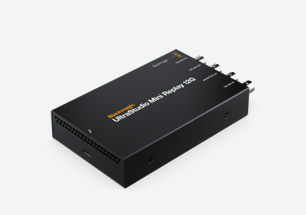
Your needs, this model
Does it fit your priorities?
Does Mini Replay 12G capture HDMI?
No. Its documented source input is 12G-SDI; Mini Recorder 12G is the separate model with HDMI 2.0 input.
Explore this need in the finder →What extra output functions does Mini Replay provide?
Two SDI outputs serve fill and key graphics, and a third distinct SDI output is for monitoring; these do not form HDMI passthrough.
Explore this need in the finder →What computer port is needed?
Thunderbolt 4. USB-C connector shape alone does not show that the host meets the device link requirement.
Explore this need in the finder →UltraStudio Mini Replay 12G combines capture and playback over a Thunderbolt connection for broadcast graphics and live-replay workflows. Its name points to a different job from Mini Recorder 12G: the Replay model can capture and play back 12G-SDI, while the Recorder model offers both SDI and HDMI capture. If HDMI input is essential, Mini Replay is not the substitute; if one compact unit must ingest and output an SDI workflow, its dedicated connections may fit better.
SDI-only capture, with several distinct outputs
The source input is 12G-SDI, with multirate support through Ultra HD 2160p60. Blackmagic says the unit provides both capture and playback and lists an SDI input alongside a separate monitoring output and fill/key outputs. Those output connectors have separate purposes: the two SDI fill/key outputs are for compositing graphics into a production switcher, and the dedicated monitor output supports confidence monitoring. They are not an HDMI loop-through or a consumer HDMI passthrough path. A source that only exposes HDMI needs a different model or a documented converter.
The distinction between capture and simultaneous operation matters. The manufacturer describes the product as supporting both capture and playback and calls out live action replay; this is not a promise that any number of streams, formats or channels can be combined under any software configuration. Confirm the exact SDI standard, channel direction, graphics/key workflow, frame-rate and application requirements with the product manual and software vendor. A 2160p60 input format on the spec sheet is not an independent test of every live replay profile.
Host and software fit
The computer link is Thunderbolt 4, and Blackmagic lists Apple Silicon Macs, Windows and Linux. This is a Thunderbolt requirement, not a generic USB-C connection. Check the host’s actual port capability, cable and operating-system/driver requirements. On a Mac, the exact supported OS and app release should be checked before a production deployment; on Windows or Linux, verify that the chosen software recognizes the capture/playback configuration. Media Express and DaVinci Resolve are among Blackmagic’s named software tools. This assessment does not assign OBS support unless that exact software/host combination is established by the product evidence.
The device is especially relevant to a small broadcast graphics or replay station where the fill/key pair and separate monitor output are useful. It is less compelling for a single-camera USB streaming setup that just wants an HDMI input, a passthrough port and simple software. A larger UltraStudio model may offer HDMI and analog connections, but those inputs solve different source problems, not the lack of an HDMI socket on Mini Replay.
It is helpful to draw the routing before ordering: the source feeds the 12G-SDI input, the replay or graphics software drives the designated outputs, and the separate monitor output feeds a confidence display. That diagram should name the intended raster and frame rate at each leg, which output performs keying, and whether the application can run the required capture and playback arrangement concurrently. The model’s general capture/playback statement does not supply this project-specific routing plan.
Check the entire SDI chain before purchase
Confirm that the source supplies SDI at a listed standard, that the host has Thunderbolt 4, and that the intended switcher or display accepts the relevant outputs. Check whether the system requires both fill and key, how the key is consumed, whether the monitor output is adequate, and which replay software and driver version the production uses. Verify cabling and routing for capture and playback directions, especially if the unit must handle a live event rather than an editing-only task. Do not infer compatibility from similar UltraStudio names or from the image of the device.
Mini Recorder 12G is the more direct pick for HDMI plus SDI capture; Mini Monitor 12G is playback-only and does not belong in a capture-card shortlist. Mini Replay sits between those roles: SDI capture with a richer output arrangement. The assessment is based on Blackmagic’s specification and family page and does not claim personal ownership, live-event use or measured performance.
Manufacturer reference: UltraStudio Mini technical specifications.
Key specifications
Key details at a glance
| Signal input | sdi |
|---|---|
| Confirmed capture formats | 12G-SDI capture and playback for SD/HD/Ultra HD standards through 2160p60. |
| Confirmed passthrough formats | |
| Computer connection | Thunderbolt4 |
| Named compatible software | DaVinci Resolve / Blackmagic Media Express |
| HDR recording | No explicit hdr capture mode is assigned by the reviewed model page. |
Use the exact model’s instructions for operating limits, supplied equipment and version differences.
Sources for this review
Sources for this assessment

Check your complete signal path
Choose the source format, desired captured signal, passthrough target, computer connection and software together. A single device must support that whole arrangement.