
Your needs, this model
Does it fit your priorities?
Does its 10G Ethernet port capture SMPTE 2110 video?
The product materials describe 10G Ethernet as a high-speed network-storage connection available to the computer over Thunderbolt. The published video capture input is 12G-SDI. The listing does not establish the Ethernet port as an SMPTE 2110 video capture input, so do not buy it for that workflow without separate model-specific confirmation.
Explore this need in the finder →Is Media Player 10G useful for capturing live SDI while sending playback out?
Blackmagic says the unit supports simultaneous capture and playback, with one 12G-SDI input, dedicated fill and key outputs, monitoring and Thunderbolt 3 connection to the computer. The manufacturer frames it around live production, replay and broadcast rather than a simple HDMI console pass-through. Confirm the exact source standard, host and software workflow.
Explore this need in the finder →Can it record 4K60 from HDMI?
There is no HDMI video input on the listed connections; HDMI connectors are outputs for extended desktop and monitoring. The capture input is 12G-SDI, which Blackmagic lists for Ultra HD standards up to 2160p60. If the source is HDMI, you need a different capture path or a properly specified signal conversion, not just an HDMI cable into this unit.
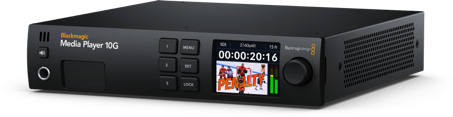
Explore this need in the finder →Blackmagic Design Media Player 10G is a broadcast playback and replay device that also has a genuine 12G-SDI capture input. It is not a small USB capture stick: the half-rack-width, 1RU chassis connects to a computer over Thunderbolt 3, has dedicated fill/key and monitoring outputs, and adds 10G Ethernet for network-storage access. This review treats its capture role as one part of a broader live-production workflow.
Capture plus playout is the point
Blackmagic says the unit can transfer video to and from the computer at the same time, so an SDI source can be captured while the host sends video back to the outputs. The connection list includes one SDI video input, separate SDI fill and key outputs, SDI loop, extended-desktop and monitor outputs, plus HDMI extended-desktop and monitoring outputs. The front panel has an LCD, controls, speaker and headphone connection. The product page specifically describes DaVinci Resolve replay and broadcast playout use, including sending graphics or fill/key video to a switcher.
This makes the Media Player 10G an in-scope capture device, but its center of gravity is different from the ordinary gaming capture card. It is designed to feed an editing or live-production computer from SDI, not to accept HDMI from a console. There is no HDMI video input in the published specification; HDMI is listed for output. If your source is HDMI, do not assume that an output socket can be reversed or that the 10G Ethernet port can replace a video input.
12G-SDI resolution range and limits
The technical specifications list SDI rates through 12G. Blackmagic's product page describes HD capture standards through 1080p60 and Ultra HD standards through 2160p60. A one-source 4K-at-60 capture plan is therefore supportable from the SDI input, subject to the exact source timing, software and host configuration. The public information does not say that every output, fill/key route and source format can all operate at their individual maximums at once, so check the actual setup rather than combining separate specifications into a single promise.
The unit's HDR-oriented output/monitoring features should not be confused with HDR capture. The reviewed source set describes HDR metadata and display behavior for HDMI output, but does not provide a clear HDR recording mode for the SDI input. This assessment therefore does not tag a capture HDR format. Likewise, no HDMI passthrough mode is assigned: the documented paths are a capture input and several production outputs.
10G Ethernet means storage access here
The 10G Ethernet port is attractive if a replay or edit station works with shared storage. Blackmagic explains that the computer receives access to network storage through the Media Player while connected by Thunderbolt, reducing the need for an additional Ethernet adapter. The product materials do not describe that RJ45 connection as an SMPTE 2110 input or as a general Ethernet video-capture interface. For IP video networking, choose hardware that explicitly documents that function; do not infer it from “10G” or the separate DeckLink IP product family.
Host, software and place in a system
The listed computer interface is Thunderbolt 3, not USB 3 and not an internal PCIe card. The specifications list current Mac, Windows and Linux support. Blackmagic names Media Express and DaVinci Resolve workflows and describes support for popular editing software such as Final Cut Pro, Premiere Pro and Media Composer. OBS is not named in the sources reviewed here, so this assessment does not treat OBS as a documented software choice for this model.
The box is half-rack wide and one rack unit tall, with internal AC power and a documented 85.2-watt maximum. The 10G Ethernet link is for storage while Thunderbolt carries the capture/playback connection. Confirm host Thunderbolt support, network cabling and the desired switcher or monitor wiring before installing it. It is a poor match for a laptop with USB-C only, a console connected only by HDMI, or a shopper seeking a single small capture interface.
How it differs from UltraStudio 4K
UltraStudio 4K Mini accepts HDMI, SDI and selected analog inputs in a smaller half-rack box and is more flexible for mixed camera or legacy-source capture. UltraStudio 4K Extreme 3 adds a much broader external I/O panel, including several SDI links and analog connections. Media Player 10G has only one listed capture input, but its fill/key outputs, simultaneous capture/playback emphasis and network-storage port make it the most specialized of these three for a broadcast replay position.
Checks before buying
Confirm the exact Media Player 10G model; a Thunderbolt 3 host; whether the source is 12G-SDI rather than HDMI; the required HD or Ultra HD timing; the capture application; fill/key or monitor destinations; and the 10G storage arrangement. If you require 2110 IP capture, an HDMI input, OBS-specific support or HDR recording, the published facts reviewed here do not establish those capabilities. This is a specification-led assessment only: no unit was installed, tested, owned or measured, and no price, stock or seller experience is claimed.
Sources: Blackmagic Design's Media Player product page, Media Player 10G technical specifications and U.S. products index.
Key specifications
Key details at a glance
| Signal input | One 12G-SDI video input |
|---|---|
| Confirmed capture formats | SD/HD through 1080p60 / Ultra HD through 2160p60 / format support depends on exact SDI timing and software workflow |
| Confirmed passthrough formats | |
| Computer connection | Thunderbolt 3 to the computer; separate 10g ethernet port is for network-storage access |
| Named compatible software | DaVinci Resolve / Media Express / Final Cut Pro / Adobe Premiere Pro / Avid Media Composer / Fusion |
| HDR recording | No capture hdr mode is assigned; the technical page's hdr material is tied to hdmi output/monitor configuration, not a stated hdr recording format. |
Use the exact model’s instructions for operating limits, supplied equipment and version differences.
Sources for this review
Sources for this assessment

Check your complete signal path
Choose the source format, desired captured signal, passthrough target, computer connection and software together. A single device must support that whole arrangement.