
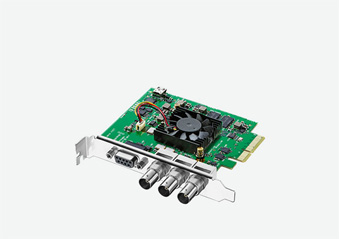
Your needs, this model
Does it fit your priorities?
Does DeckLink SDI 4K capture UHD at 60 frames per second?
No. Blackmagic's exact mode table lists UHD through 2160p30 and 4K DCI through 25p. The model name is not a 4K60 capture guarantee. The public finder has no 2160p30 option, so its 1080p60 selection is only a lower supported floor, not a UHD30 query.
Explore this need in the finder →Can I use the SDI output as a guaranteed live passthrough to a display?
The specifications list a separate SDI video output, but do not publish a consumer-style input-to-monitor passthrough matrix for this capture card. Treat output and capture modes separately, and confirm the required playback routing in Blackmagic's Desktop Video documentation and your application.
Explore this need in the finder →What host and software path is documented for an SDI source?
The card uses PCIe Gen 2 x4 and the technical page lists Windows, Mac OS and Linux with Blackmagic's driver and Media Express. OBS appears in the broad third-party application list, where Blackmagic says support may vary; this is not a tested OBS format preset.
Explore this need in the finder →The DeckLink SDI 4K is a PCIe capture and playback card for a workstation whose source chain is already SDI. Its strongest fit is not “anything with 4K in the name,” but one SDI input, a separate SDI output, and a host that can provide the card's internal x4 link. Blackmagic's current U.S. model list and exact technical section are the basis for this assessment; I have not installed or tested the board.
Read the timing table before the model name
Blackmagic specifies one 6G-SDI input and one separate 6G-SDI output. The published standards include SD and HD timings through 1080p60, UHD through 2160p30, and 4K DCI through 25p. The SDI table also identifies 2K DCI modes. These labels describe different rasters and should not be collapsed into a generic “4K” ceiling: this is not documented for UHD 2160p60 capture, and a 4K DCI 25p mode is not a substitute for UHD60.
At 1080p60, its published HD mode is a clear match for a single supported SDI source. UHD30 is useful only when the camera, converter, cabling, software and destination all agree on that specific format. The public finder has no UHD30 choice, so its 1080p60 filter represents a lower documented floor, not an exact UHD30 compatibility check.
SDI is the purchase boundary
This model is intentionally narrower than DeckLink Studio 4K. The SDI 4K specification does not list HDMI, component, composite or S-Video inputs. If the source has an HDMI socket or legacy analog outputs, this card will not solve that connection on its own; an appropriate standards converter becomes a separate part of the signal chain. The same warning applies to embedded audio and control: the card lists embedded SDI audio plus RS-422 deck control, reference input and keying features, but those are not equivalent to the Studio card's mixed analog connector and audio set.
The second SDI port is a distinct output and can be part of a professional playback workflow. That alone does not establish a direct gaming-style input-to-display passthrough path, a latency figure, or a simultaneous capture/playback format matrix. Plan capture and output routing as separate requirements, then verify the particular Desktop Video driver and production application before relying on a combined setup.
Plan for the workstation, not a cable adapter
The computer interface is PCI Express Gen 2 x4. Blackmagic lists x4, x8 and x16 slot compatibility, but the shape of a long slot does not establish its electrical lane allocation or whether a particular motherboard shares resources. Check the host manual, free slot, card clearance and airflow before choosing a package. This is not a USB device and the source does not document a Thunderbolt enclosure or laptop-dock path.
The manufacturer's technical page lists Windows, Mac OS and Linux. It identifies Media Express and the Desktop Video utility/driver, and names DaVinci Resolve and other production applications. Open Broadcaster Software Studio appears in the wide third-party app list, with a clear warning that support can vary. That is a reason to investigate a current OBS workflow, not evidence of a tested preset for every OS, frame rate or source.
What the technical detail does—and does not—settle
Blackmagic lists 10-bit color precision and several SDI sampling formats, but the page does not set out a rate-by-rate HDR capture table. A 10-bit entry should not be turned into a blanket HDR promise. The modes also distinguish UHD from DCI and give the latter lower limits; confirm the signal leaving the source instead of relying on a camera's marketing label. Similarly, the included-items section names the card, but does not list SDI leads or third-party converters. Used offers may omit items, so inspect the exact seller package.
Who should shortlist it
Consider the SDI 4K when a single SDI input, a professional PCIe workstation and the published HD/UHD30/DCI timing limits align with the job. Look elsewhere if you need HDMI or analog capture, external USB operation, UHD60 capture, or a documented live passthrough path. Before buying, identify the source raster and frame rate, confirm a supported PCIe slot and software/OS combination, and check the physical model and included accessories against the seller's actual offer. The current manufacturer listing documents a model, not its present retail stock, condition, or the contents of a used-card package.
Sources: Blackmagic Design's U.S. DeckLink model list and the DeckLink SDI 4K technical specifications.
Key specifications
Key details at a glance
| Signal input | One 6G-SDI video input; separate 6G-SDI video output |
|---|---|
| Confirmed capture formats | SD and HD standards, including 1080p60 / UHD 2160p23.98/24/25/29.97/30 / 2K DCI 23.98p/24p/25p over SDI / 4K DCI 23.98p/24p/25p |
| Confirmed passthrough formats | |
| Computer connection | Pci express gen 2 x4 card; blackmagic lists compatibility with x4, x8 and x16 slots. check the target system's actual pcie path and chassis clearance. |
| Named compatible software | Blackmagic Media Express / Blackmagic Desktop Video Utility and driver / DaVinci Resolve / Final Cut Pro X / Adobe Premiere Pro CC / Open Broadcaster Software Studio (third-party listing; support may vary) / vMix and other listed third-party applications (support may vary) |
| HDR recording | No timing-by-timing hdr capture profile is published for this model. its listed 10-bit sampling and rec.601/709 color-space data are not a rate-specific hdr recording promise. |
Use the exact model’s instructions for operating limits, supplied equipment and version differences.
Sources for this review
Sources for this assessment
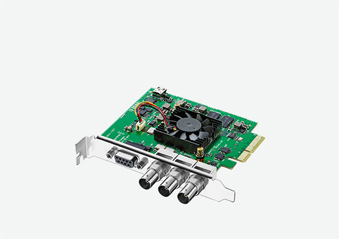
Check your complete signal path
Choose the source format, desired captured signal, passthrough target, computer connection and software together. A single device must support that whole arrangement.