
Your needs, this model
Does it fit your priorities?
Does one Quad HDMI input support 4K60 capture?
The exact video standards list both UHD 2160p60 and 4K DCI 60p, so one selected unencrypted HDMI input meets the 4K60 capture threshold in this assessment. The specification does not say that all four inputs can sustain 4K60 at once, and it does not provide a 4K60 HDR capture matrix.
Explore this need in the finder →Can it capture four HDMI sources at the same time?
Blackmagic describes four independent HDMI 2.0b inputs and says up to four different formats can be captured simultaneously. The available mode table does not establish a maximum rate for each concurrent feed, so confirm the actual mixed-format set, storage and switching software rather than assuming four 4K60 streams.
Explore this need in the finder →Will it pass the source through to a gaming display?
No display output or HDMI loop-through is listed for the Quad HDMI Recorder. It is an internal four-input ingest card, not a capture card with a console-to-monitor passthrough port. If a separate low-latency display path is essential, select hardware with an explicitly documented output and check that output's mode independently.
Explore this need in the finder →Four HDMI inputs for a workstation workflow
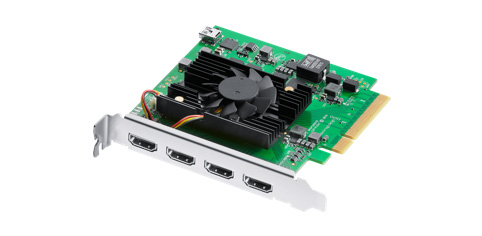
The DeckLink Quad HDMI Recorder is an internal capture card built around four independent HDMI 2.0b inputs. Blackmagic describes it as a way to capture up to four different sources at the same time, in a mix of SD, HD, Ultra HD, 4K and computer formats. That can suit a live-switching, ingest or multi-source recording system where several cameras, computers or consoles need to enter one production workstation.
It is not a USB dongle or a simple console-to-monitor adapter. The technical section specifies PCI Express Gen 3 x8, compatible with x8 and x16 PCIe slots, and lists power consumption of 23 W. A desktop or workstation therefore needs a real lane-capable slot, enough space, appropriate cooling and a system configuration that leaves the card usable. Its four full-size HDMI connectors are useful only after the host and software have been checked.
Read the mode table without multiplying its maxima
The exact video standards include SD, HD through 1080p60, UHD 2160p through 60p and 4K DCI through 60p. For a single unencrypted source, that is strong format coverage for a PCIe ingest card. The list also includes DVI computer timings on the HDMI inputs. Blackmagic’s description says different formats can be captured at once, but the specification does not publish a complete four-input matrix showing the maximum supported resolution and rate for every simultaneous combination. A four-input card with a single-input 4K60 mode is not, by itself, proof of four concurrent 4K60 streams.
That missing matrix is a practical limitation, not a reason to disregard the four channels. It means a buyer planning a mix of cameras and computers should validate the actual input combination, recording application, storage path and system bandwidth rather than assuming the highest row applies to every connector at once. The authored 4K60 finder plan is deliberately for one selected input. No multi-channel benchmark or hands-on performance result is claimed.
Capture is not display passthrough
The model page lists four video inputs, and the technical section does not list HDMI outputs or a loop-through path. The Quad HDMI Recorder is therefore a capture/ingest card, not a device that routes a console signal through to a gaming monitor. If you must preserve a separate display path, confirm that the source can feed the display directly or choose hardware with an explicitly documented output. An internal playback connector on a different DeckLink model is not automatically a consumer passthrough feature.
HDMI protection is another hard boundary: Blackmagic states that the input cannot capture from copy-protected HDMI sources. It also says HDMI 2.0b supports Deep Color and HDR, but the page does not provide a rate-by-rate HDR recording matrix. Treat input signaling and HDR capture as separate claims. The technical material does not establish a Windows 1080p60 HDR or a 4K60 HDR recording plan, so this review does not match those HDR-specific choices.
Software support is broad, but not a mode guarantee
Blackmagic lists Media Express, Disk Speed Test, Desktop Video Utility and its driver for Mac and Windows, with Media Express, Desktop Video Utility and the driver listed for Linux. Wirecast, vMix and OBS appear among the supported third-party applications; Blackmagic cautions that third-party support may vary and advises checking with the software vendor. That is useful compatibility evidence for shortlisting, but it is not an OBS-specific 4K60 profile or a four-source OBS validation.
A sensible first check is whether the application exposes each input as a separate source and can select the specific timing and audio route your production needs. Then verify that those settings are available together under the installed driver and operating system. The current spec lists Mac, Windows and Linux, but exact OS versions and third-party app behavior can change; check current support notes for the actual machine rather than treating an older project setup as a guarantee.
Four HDMI channels versus the Quad 2
The similar “Quad” name can obscure a different signal path. DeckLink Quad 2 has eight independently assignable 3G-SDI mini-DIN ports, with SD/HD modes through 1080p60 and PCIe Gen 2 x8. Quad HDMI Recorder instead has four HDMI 2.0b inputs and published UHD/4K formats through 60p on a PCIe Gen 3 x8 board. The Quad 2’s configurable capture/playback directions do not make it a four-input HDMI substitute, and Quad HDMI’s four connectors do not make it an eight-channel SDI card.
For source choice, also distinguish HDMI inputs from analog or SDI routes: the Quad HDMI model has no listed analog or SDI input. If sources are protected, use SDI where the source and rights permit it, or select another documented path. Do not plan a format conversion that is not in the card’s own specification.
Pre-purchase checks
Confirm the offer is the exact DeckLink Quad HDMI Recorder rather than Quad 2, Duo 2 or another DeckLink card. Check that the motherboard provides the required PCIe Gen 3 x8/x16 path and that shared lanes, adjacent cards and cooling do not interfere. Verify that the four sources are unencrypted, identify each source’s real output timing, and check the software vendor’s current per-input mode support. The published “What’s Included” line names the card, so compare the exact seller package for HDMI cables and any other items your installation requires.
This is a specialized choice for multi-source production, not a universal capture-card winner. Its differentiators are four independent HDMI inputs and wide single-input SD through 4K60 timing support. Its drawbacks are the internal x8 host requirement, copy-protection restriction, lack of a listed display output, and absent four-at-maximum-mode and HDR-recording matrices. A purchase decision should turn on those concrete boundaries, not the assumption that four sockets multiply every headline rate.
Key specifications
Key details at a glance
| Signal input | Four independent HDMI 2.0b video input connections; the card captures unencrypted HDMI but cannot capture copy-protected sources. / Eight channels of embedded HDMI audio are listed for SD/HD/UHD/4K inputs. |
|---|---|
| Confirmed capture formats | SD: 525i59.94 NTSC and 625i50 PAL / HD: 720p50/59.94/60; 1080p23.98/24/25/29.97/30/50/59.94/60; 1080i50/59.94/60 / UHD: 2160p23.98/24/25/29.97/30/50/59.94/60 / 4K DCI: 4Kp23.98/24/25/29.97/30/50/59.94/60 / DVI computer-format timings are also listed on the HDMI inputs; this does not establish passthrough. / HDMI 2.0b supports Deep Color and HDR signaling, but the technical section gives no per-mode HDR capture matrix. |
| Confirmed passthrough formats | |
| Computer connection | Pci express gen 3 x8 card, documented as compatible with x8 and x16 pcie slots. the exact section lists 23 w power consumption; check the motherboard's electrical lanes, slot sharing, chassis space and current system requirements. |
| Named compatible software | Media Express, Disk Speed Test, Blackmagic Desktop Video Utility and Blackmagic driver are included for Mac OS and Windows; Media Express, Desktop Video Utility and driver are listed for Linux. / Wirecast, vMix and OBS plus other third-party applications are named; Blackmagic says third-party software support may vary and directs buyers to the software vendor. / The exact model section does not tie OBS support to a particular resolution or simultaneous input count. |
| HDR recording | Hdmi 2.0b deep color and hdr signaling are listed, but no rate-by-rate hdr recording matrix is supplied. no windows 1080p60 hdr or 4k60 hdr capture mode is assigned. |
Use the exact model’s instructions for operating limits, supplied equipment and version differences.
Sources for this review
Sources for this assessment

Check your complete signal path
Choose the source format, desired captured signal, passthrough target, computer connection and software together. A single device must support that whole arrangement.