
Your needs, this model
Does it fit your priorities?
Can one Quad 2 channel capture 1080p60 SDI?
Yes as a documented one-source assessment: its SD/HD timing list reaches 1080p60 and the product has eight configurable 3G-SDI ports. This does not promise that all channels can sustain their maximum mode simultaneously.
Explore this need in the finder →Do its eight ports mean eight independent SDI feeds?
Each of the eight 3G-SDI mini-DIN ports is independently configured as input or output, and Blackmagic describes up to eight capture or up to eight playback channels. The published page does not give an aggregate maximum-rate matrix, so confirm the exact simultaneous format mix, driver, application and storage path.
Explore this need in the finder →Will it install in any Mac?
The exact physical-installation note says Mac systems require a Mac Pro with PCIe slots, and the card itself needs an x8 or x16 PCIe slot. A generic Mac, USB connection or M.2 socket is not the documented host path.
Explore this need in the finder →Eight configurable SDI channels are the reason to consider it
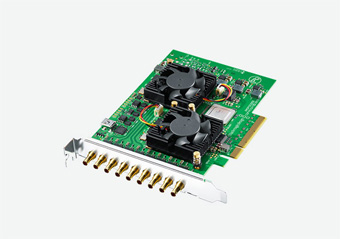
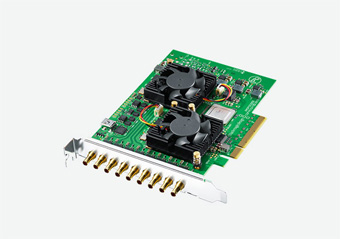
DeckLink Quad 2 is an internal PCIe capture-and-playback card for a workstation or production server that needs several SDI paths in one board. Its technical page specifies eight independent 3G-SDI mini-DIN connections; each can be configured as an input or output. Blackmagic describes configurations of up to eight capture or up to eight playback channels. That is a substantially different job from a USB HDMI game-capture device or a single-input card. The current [DeckLink model list](https://www.blackmagicdesign.com/products/decklink/models/) and the exact [Quad 2 specification](https://www.blackmagicdesign.com/products/decklink/techspecs/W-DLK-30) identify this eight-connection model separately from the four-channel Duo 2 and compact M.2 SDI Micro.
The number of sockets should not be mistaken for a consumer passthrough feature or an eight-source guarantee at every maximum data rate. Input and output are direction choices for each physical port, not eight inputs plus eight additional outputs. The page gives an independent channel description and individual modes through 1080p60, but not an aggregate, all-channels-at-peak-rate bandwidth matrix. If the plan is simultaneous ingest, playout, or a mixture, check the exact signal assignment and storage/host workload with the intended software rather than assuming a benchmark that the source has not published.
Read the video modes as SD and HD
The documented standard is 3G-SDI. Its SD/HD table includes NTSC/PAL, 720p, and 1080i, PsF and progressive modes up to 1080p60. It is not a 4K card: the name “Quad 2” describes its multi-channel design, not UHD capacity. This model should be compared with a higher-rate 6G- or 12G-SDI board if the source is UHD, 4K DCI or a modern high-refresh display path. There is no HDMI or analog-video input listed.
Blackmagic lists 4:2:2 and 4:4:4 sampling, 8/10/12-bit RGB through 1080p30, and 8/10-bit YUV in all listed modes; 12-bit RGB 4:4:4 is playback-only. The distinction prevents a common overread: an output-side color capability is not automatically a capture format. The page also lists HDR static metadata packing and HLG/PQ transfer characteristics, but that is not a mode-by-mode HDR recording table. This assessment does not add a 1080p60 HDR capture claim or convert metadata support into a guarantee for any chosen application.
Host and software requirements are substantial
The card uses PCI Express Gen 2 x8 and is specified as compatible with x8 and x16 slots. The physical-installation section says Mac systems require a Mac Pro with PCIe slots; that should not be generalized to every Mac or to an external USB connection. Check the motherboard's available lanes, slot spacing, chassis clearance, cooling and the rest of the workstation configuration before choosing an eight-lane internal card. Its reference input accepts Tri-Sync or Black Burst, which may matter in a synchronized production environment but is not a substitute for the SDI signal connections.
Blackmagic lists Media Express, Disk Speed Test, LiveKey, Desktop Video Utility and drivers for Mac/Windows, and Media Express, Desktop Video Utility and drivers for Linux. OBS Studio appears among the named third-party applications, with an explicit warning that third-party application support may vary. That is useful compatibility evidence, not a test of every OBS version, operating system, resolution or concurrent-channel plan. The plans here therefore treat a Windows one-source OBS workflow as a supported assessment scenario, while leaving the throughput of a multi-channel production unclaimed.
Audio, reference and workflow fit
The specification lists 16 channels of embedded SD/HD audio on SDI input and output, and a Tri-Sync/Black Burst reference input. These are broadcast-oriented features: they may help integrate the board into an existing signal chain, but they do not replace the correct BNC-format source cables, reference distribution, audio routing or application setup. The board does not provide a simple consumer HDMI loop-through for keeping a gaming display connected. If live monitoring is essential, plan a separate SDI output path and display conversion or monitoring equipment, and verify the intended routing in the software documentation.
When it is a better fit than a smaller card
Choose the Quad 2 as a candidate when the actual work calls for a PCIe x8 card, several independently assignable SDI inputs/outputs and SD/HD capture or playback. A single-source 1080p60 user may find the four-channel Duo 2 or a more compact single-input card easier to integrate, depending on the required connectors and signal. Conversely, an HDMI-only source, a laptop without an internal compatible slot, or a 4K capture requirement points away from this board. Keep those distinctions in view rather than comparing product names or channel counts alone.
Verify the exact installation and package
The technical page lists the card as included; it does not turn the exact cable, bracket condition, or seller bundle into a known fact. Before buying, check the product identity and card condition, confirm that the host has a usable x8/x16 PCIe path, compare every SDI source's mode to the table, and validate the current driver and intended production app. For multiple feeds, ask the vendor/software provider about the precise concurrency and storage requirements. These recommendations are based on published documentation and source comparison, not hands-on installation or a measured stream. No price, stock position, rating or customer experience is inferred.
Key specifications
Key details at a glance
| Signal input | Eight independent 3G-SDI mini-DIN connectors, each configurable as input or output / Tri-Sync or Black Burst reference input |
|---|---|
| Confirmed capture formats | SD: 525i59.94 NTSC and 625i50 PAL / HD: 720p50/59.94/60 / HD: 1080p23.98/24/25/29.97/30/50/59.94/60 / HD: 1080PsF23.98/24/25/29.97/30 and 1080i50/59.94/60 |
| Confirmed passthrough formats | |
| Computer connection | Pci express gen 2 x8; specified as compatible with x8 and x16 pcie slots. blackmagic’s installation section requires a mac pro with pcie slots for mac systems. verify lane allocation, spacing and chassis clearance. |
| Named compatible software | Blackmagic Media Express, Disk Speed Test, LiveKey, Desktop Video Utility and driver (Mac/Windows); Media Express, Desktop Video Utility and driver (Linux) / DaVinci Resolve, Final Cut Pro X, Adobe Premiere Pro CC, Avid Media Composer and other listed third-party applications / OBS Studio appears in the third-party list; manufacturer says third-party support may vary by application/vendor. |
| HDR recording | Hdr static metadata packing and hlg/pq transfer characteristics are listed, but no rate-by-rate hdr capture/recording matrix is supplied. no specific hdr capture mode is assigned. |
Use the exact model’s instructions for operating limits, supplied equipment and version differences.
Sources for this review
Sources for this assessment
Check your complete signal path
Choose the source format, desired captured signal, passthrough target, computer connection and software together. A single device must support that whole arrangement.