
Your needs, this model
Does it fit your priorities?
Does this board capture an HDMI console or an SDI cable directly?
No. The DeckLink IP HD captures SMPTE 2110 IP video through 10GBASE-T; it has no HDMI or SDI video input.
Explore this need in the finder →Is its 10G network port plug-and-play video capture?
No. The documented use is SMPTE ST 2110 broadcast video over an engineered managed network. Validate streams, switching, PTP clocking, multicast and application routing; a generic 10GbE port does not establish a working source chain.
Explore this need in the finder →Is 4K or OBS capture supported?
The selected HD models are specified to 1080p60, not 4K. OBS is not identified in the exact model evidence used here. Do not assume that a general Windows driver proves OBS support.
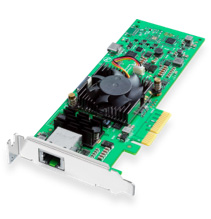
Explore this need in the finder →Blackmagic Design DeckLink IP HD is a PCIe card for capturing and playing broadcast video over a SMPTE ST 2110 network. The defining connection is a single 10GBASE-T RJ45 network port, not an HDMI socket or an SDI BNC. Blackmagic lists two IP video input channels and two output channels, each up to 1080p60. That makes this a specialized HD network interface for a broadcast workflow, not a substitute for the USB capture cards usually connected to a game console.
What “IP” means on this card
The 10G Ethernet port transports the video stream on a compatible SMPTE 2110 network. It is not the connection to the computer: the computer interface is a four-lane PCI Express Gen 2 card. It is also not a general-purpose network video receiver that automatically finds any source plugged into a router. The source, switch fabric, network addresses, multicast behavior, timing and software route all have to be configured as one broadcast system.
Blackmagic describes the DeckLink IP family as supporting SMPTE 2110-20 uncompressed video, traffic shaping, audio, ancillary data and precision time protocol. The family page explains the use of a common PTP clock and multicast. Those details matter in practice: an ordinary 10GbE link by itself does not prove that a camera or production switcher is sending a compatible stream, that its switch is configured for the traffic, or that the clock domains agree. A network engineer should confirm the particular topology and flow plan before a card is selected.
Two HD channels, not an assumed four-feed system
The model-specific specifications describe the single network port as supporting two input channels and two output channels, each up to 1080p60 with embedded audio. Blackmagic says the IP cards can capture and play back at the same time. These statements support a strong two-channel HD use case, but they do not specify every possible combination of input, output, codec, frame rate and application as one guaranteed maximum-throughput configuration. A plan that needs two simultaneous records plus several playout streams should be checked against the exact SDK, software, host and storage requirements rather than inferred from the channel count alone.
There is no HDMI or SDI video input on the DeckLink IP HD specification. If a source device outputs only HDMI, an HDMI-to-Ethernet cable cannot turn that signal into SMPTE 2110. If the source is SDI, the card does not provide a direct SDI connector; a suitable gateway or a model with SDI capture must be considered. This distinction also explains why a shopper choosing “SDI” in our finder will not see this IP-only model.
Host fit and software
The host requires a PCI Express Gen 2 x4 slot; Blackmagic lists compatibility with x4, x8 and x16 PCIe slots. This is an internal desktop/server installation rather than a laptop accessory. Mac, Windows and Linux are listed for the family and technical specifications. A Mac therefore needs a machine with a suitable PCIe expansion route; a USB-C or Thunderbolt port by itself is not the listed host interface.
Blackmagic names DaVinci Resolve, Media Express and professional editing and production tools in the DeckLink IP product materials. The company also lists a Windows WDM driver. That evidence does not establish OBS Studio support for this particular board, and a generic WDM listing is not treated as a substitute for a model-specific OBS mode. If the app is a hard requirement, confirm the current driver and capture path with its developer before purchasing.
How it compares with the fiber and SDI variants
DeckLink IP HD Optical has an SFP+ 10GBASE-LR fiber connection instead of this model’s RJ45 copper port. DeckLink IP/SDI HD adds two direction-configurable 3G-SDI connectors and reference output alongside its own 10GBASE-T network interface. Those alternatives solve different physical plant problems: copper Ethernet, optical fiber and direct SDI should not be treated as interchangeable because the product names share “IP HD.” The IP HD’s card image shows the copper RJ45 configuration; it is a model identification, not proof of interoperability.
All three HD IP cards are constrained to SD/HD standards through 1080p60 in their published descriptions. The “HD” in the name is important. This is not an 8K or 4K network card and does not match a 4K capture requirement. Its role is to put a PCIe workstation on a compatible 2110 production network while preserving the familiar DeckLink software/API approach.
Checks before purchase
Before ordering, verify the host’s open PCIe lane and chassis clearance; the exact network source, destination and flow count; switch capacity and multicast settings; PTP grandmaster and synchronization; the intended codec and storage throughput; and current software/driver compatibility. Ask the network team to confirm 10GBASE-T, cabling and network policy at the card location. If you simply need to capture a console, webcam or single SDI camera on a personal computer, this model’s infrastructure requirements are likely disproportionate to that task.
This assessment is based on Blackmagic’s published product and technical material. No card was installed, owned or tested, no stream was measured, and no customer or seller experience or price claim is made. The card may be a capable component in the documented broadcast design, but its match depends on the rest of the IP-video system.
Sources: Blackmagic Design’s DeckLink IP family page, DeckLink IP technical specifications and U.S. products index.
Key specifications
Key details at a glance
| Signal input | 10GBASE-T SMPTE 2110 network input |
|---|---|
| Confirmed capture formats | Two SMPTE 2110 input channels up to 1080p60 each |
| Confirmed passthrough formats | |
| Computer connection | Pci express gen 2 x4; compatible with x4, x8 and x16 slots |
| Named compatible software | DaVinci Resolve / Media Express / Final Cut Pro / Adobe Premiere Pro / Avid Media Composer |
| HDR recording | No hdr recording mode is assigned. smpte 2110-40 ancillary transport in the ip family spec is not a named hdr capture mode. |
Use the exact model’s instructions for operating limits, supplied equipment and version differences.
Sources for this review
Sources for this assessment

Check your complete signal path
Choose the source format, desired captured signal, passthrough target, computer connection and software together. A single device must support that whole arrangement.