
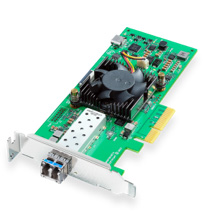
Your needs, this model
Does it fit your priorities?
Does this board capture an HDMI console or an SDI cable directly?
No. The DeckLink IP HD Optical captures SMPTE 2110 IP video through 10GBASE-LR fiber Ethernet; it has no HDMI or SDI input.
Explore this need in the finder →Is its 10G network port plug-and-play video capture?
No. The documented use is SMPTE ST 2110 broadcast video over an engineered managed network. Validate streams, switching, PTP clocking, multicast and application routing; a generic 10GbE port does not establish a working source chain.
Explore this need in the finder →Is 4K or OBS capture supported?
The selected HD models are specified to 1080p60, not 4K. OBS is not identified in the exact model evidence used here. Do not assume that a general Windows driver proves OBS support.
Explore this need in the finder →DeckLink IP HD Optical is Blackmagic Design’s optical-fiber version of its two-channel HD SMPTE 2110 PCIe interface. It connects a computer through PCI Express Gen 2 x4 and sends or receives network video through a 10GBASE-LR SFP+ port. Blackmagic lists two input channels and two output channels, each up to 1080p60. The useful distinction is the physical network handoff: this is fiber Ethernet for a managed broadcast IP system, not SDI-over-fiber and not a consumer HDMI capture adapter.
Optical transport is the deciding difference
The model’s SFP+ port is specified as 10GBASE-LR. Blackmagic’s package list includes an optical module and cage, which is a meaningful detail for a system integrator comparing the Optical model with DeckLink IP HD’s copper 10GBASE-T connection. It does not remove the need to check the actual network: fiber type, wavelength, link budget, patching, connector cleanliness, compatible switch port and any site-specific transceiver policy all matter. “Optical” does not mean any fiber cable or SFP will work at any distance.
This card carries SMPTE ST 2110 video over Ethernet. The fiber connector is not an SDI optical input. The published connections do not include a direct SDI BNC or HDMI port. A source with SDI or HDMI output therefore needs a compatible network gateway or a different capture device. The card should not be chosen simply because a camera system happens to have a fiber connector; confirm that the endpoint and network are using the expected 2110 transport and timing.
HD channel capacity and limits
Blackmagic describes two capture and two playback channels on this IP port, each up to 1080p60, with multi-rate support for SD, 720p and 1080-line standards. Its family description says the cards support simultaneous capture and playback. This gives the Optical a clear place in a HD production environment where multiple feeds must travel over fiber into a workstation. It is not a 4K card: the published model is an HD product with a 1080p60 maximum.
Separate channel counts do not guarantee every combination can be routed, recorded and played at full rate in every software package. Confirm whether the intended workflow requires two concurrent sources, output streams, redundant paths or a specific codec, then check the current Desktop Video driver, application version, host resources and storage. The published information supports an operating arrangement; it is not a test of a named server build or a promise of a particular number of simultaneous records in every third-party tool.
Blackmagic lists IP compliance including SMPTE 2110-20 video, 2110-21 traffic shaping, 2110-30 audio and 2110-40 ancillary data, with PTP support and NMOS information. These details are useful when the card is being added to a properly engineered broadcast network. They are also a warning that the work is not plug-and-play in the consumer sense. The stream needs source and destination configuration, multicast and clock alignment, which may involve a network administrator rather than just selecting a capture input in a simple application.
PCIe, operating systems and software
The computer interface is a four-lane PCI Express Gen 2 card, compatible with x4, x8 and x16 slots. Installation therefore requires an internal computer with an appropriate expansion slot and chassis clearance for the low-profile card. Blackmagic lists Mac, Windows and Linux support for this family. For a Mac workflow, confirm the actual model has an expansion route; a MacBook’s Thunderbolt port is not itself the PCIe interface described for this board.
Blackmagic names Media Express and lists DaVinci Resolve, Final Cut Pro, Adobe Premiere Pro and Avid Media Composer among the software context. OBS is not identified in the source pages reviewed for this exact optical model. A Windows driver or generic application list should not be treated as proof that an OBS build can discover and route ST 2110 input from this board. Verify application-specific support with the current driver and technical documentation before making it a purchase condition.
Comparing the three HD IP choices
The standard DeckLink IP HD uses a 10GBASE-T RJ45 network port. The IP HD Optical substitutes an SFP+ 10GBASE-LR fiber link and includes a matching optical module and cage. DeckLink IP/SDI HD keeps copper Ethernet and also adds two configurable 3G-SDI ports plus reference output. If the installation is already wired for fiber, Optical is the relevant model to examine; if the source is a direct SDI feed, the IP/SDI version has the more relevant connector. These differences change what can physically connect and should be settled before choosing based on the shared 1080p60 headline.
Checks before purchase
Confirm the workstation’s PCIe Gen 2 x4 slot, card clearance, fiber type, 10GBASE-LR compatibility, link budget and switch policy. Have a broadcast engineer check the SMPTE 2110 stream, PTP grandmaster, multicast/IGMP behavior, NMOS discovery and the actual channel plan. Then confirm the required capture app, codec, audio routing and storage capacity. This product is for a network that is already being designed or operated to carry IP video; it is not a shortcut for converting a single HDMI or SDI source.
This is a source-based review of published specifications. No hardware was tested, installed, owned or measured, and no price, seller stock or customer experience is claimed.
Sources: Blackmagic Design’s DeckLink IP family page, DeckLink IP technical specifications and U.S. products index.
Key specifications
Key details at a glance
| Signal input | 10GBASE-LR SFP+ SMPTE 2110 fiber network input |
|---|---|
| Confirmed capture formats | Two SMPTE 2110 input channels up to 1080p60 each |
| Confirmed passthrough formats | |
| Computer connection | Pci express gen 2 x4; compatible with x4, x8 and x16 slots |
| Named compatible software | DaVinci Resolve / Media Express / Final Cut Pro / Adobe Premiere Pro / Avid Media Composer |
| HDR recording | No hdr recording mode is assigned. smpte 2110-40 ancillary transport in the ip family spec is not a named hdr capture mode. |
Use the exact model’s instructions for operating limits, supplied equipment and version differences.
Sources for this review
Sources for this assessment

Check your complete signal path
Choose the source format, desired captured signal, passthrough target, computer connection and software together. A single device must support that whole arrangement.